With double opt-in, every visitor gets a mail with a confirmation link after submitting. Only when they click it do the mails to them and the connections to your tools run. This way you make sure the address is real and belongs to the sender.
Requirements
- Funnelforms Pro. This feature is not included in Funnelforms Free. In the settings of a form, Free shows under More settings, with the Pro badge, that Confirm e-mail address comes with Funnelforms Pro. If a form already uses double opt-in, for example after switching from Pro to Free, Free shows the Confirm e-mail address card so you can switch it off.
- The form has an e-mail field in a contact step. Without an e-mail field, double opt-in cannot be switched on; the editor says "Needs an e-mail field in a contact step."
- You can edit the form in the editor.
- Your website can send mails.
Where to find it
Open the form in the editor, click the Settings workspace at the top and then the section Confirm e-mail address.
Features at a glance
- The Double opt-in switch.
- Address from: the e-mail field the link goes to.
- Subject and Message of the confirmation mail, with the placeholder
{{confirm_url}}for the link. - Shown after confirming: the text of the page that appears after the click, also with the placeholders of mails.
- In the entry: the status "Waiting for confirmation" or "E-mail address confirmed", and the option to send the link again.
Step by step
- Open the form in the editor and click Settings at the top.
- Click the section Confirm e-mail address.
- Switch on Double opt-in. Funnelforms picks the first e-mail field and enters default texts.

- Check under Address from that the right e-mail field is chosen. The choice is always shown, also with only one e-mail field.
- Adjust Subject. The default is "Please confirm your e-mail address".
- Adjust the Message. Put
{{confirm_url}}where the link should be. Without the placeholder, Funnelforms adds the link at the end.
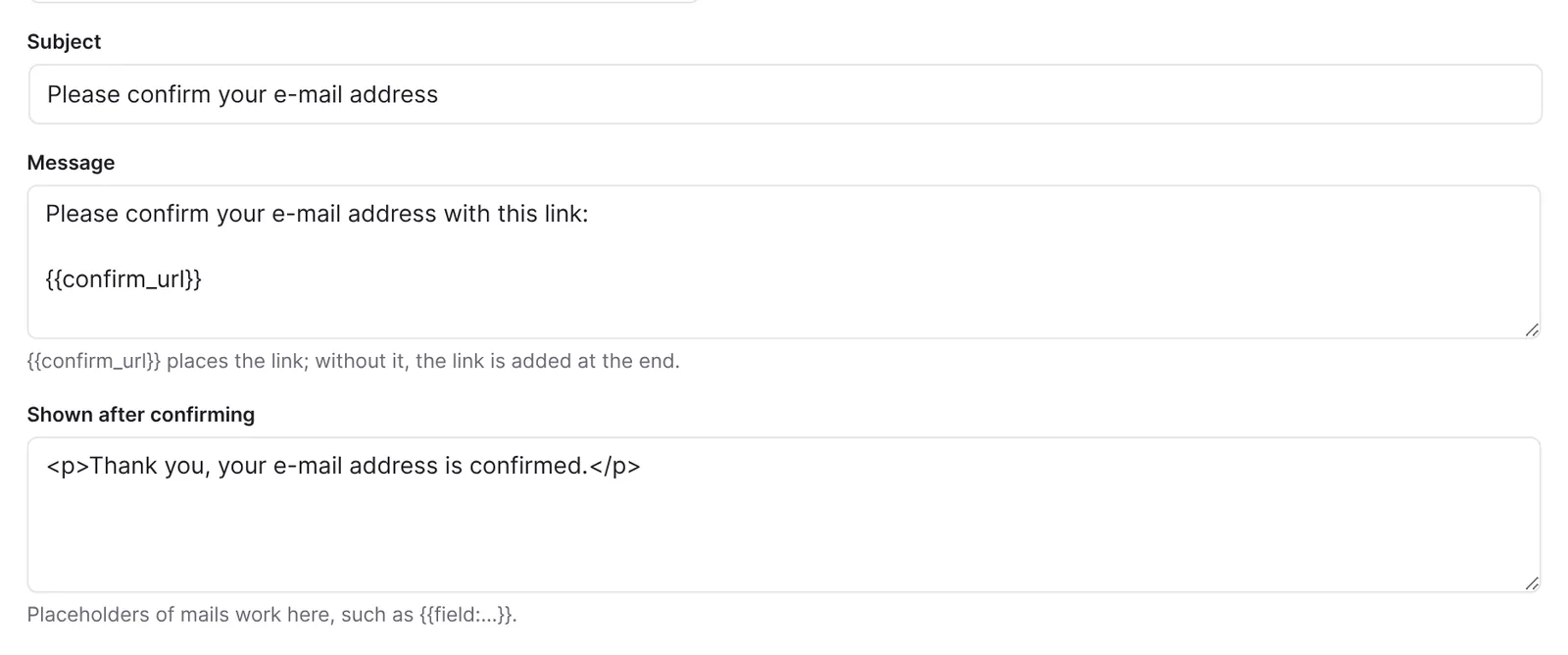
- Adjust Shown after confirming. The default is "Thank you, your e-mail address is confirmed." With
{{field:variable name}}you can, for example, address the visitor by name. - Publish the form with Publish.
- Send a test entry with your own address, open the mail, click the link and then Confirm.
How it works
What happens as long as the visitor has not confirmed?
The entry is stored right away and gets the status "Waiting for confirmation". Only the action E-mail to you runs right away. Everything else waits:
- Confirmation to the visitor
- Webhooks, CRM transfers, Slack and Teams messages, SMS and WhatsApp
- Conversions to Meta, GA4 and TikTok
- Appointment invitations
- the lead list of Funnelforms 3, and with it the Funnelforms 3 app, Zapier and Make, which read from it
- the interface for automation
After the confirmation, Funnelforms puts these actions in the queue. A Google Ads conversion does not wait: the visitor's browser sends it right after sending, through the Google tag of your website.
What does the visitor see?
They get the confirmation mail at the address from the chosen field. The link opens a page with the Confirm button. Only the click on it confirms, because mail programs often open links on their own. After that they see the text from Shown after confirming, with their answers in place of the placeholders. A second click changes nothing. An invalid link shows "This confirmation link is not valid." The page appears in the language of the entry.
How long is the link valid?
The link stays valid until it is used. It does not expire after a fixed time. The entry shows whether the address is confirmed.
How is the link protected?
The link contains a token derived from the entry. Only its hash is stored in the database. Funnelforms stores the time of the confirmation as proof, but no IP address.
How do I send the link again?
Open the entry under Funnelforms → Entries, choose the item "Confirmation link (double opt-in)" under Send again … in Sent to, and click Send. This works as long as the visitor has not confirmed.
Who sends the confirmation mail?
It goes through WordPress like the other mails, with the sender address of the website. You do not set a sender of your own for this mail.
What happens to the form in Funnelforms Free?
Double opt-in is one of the Pro features a form cannot work without. If a website switches from Pro to Free, Funnelforms Free no longer shows a form with double opt-in and cannot publish it.
Best Practices
- Write in the message why the confirmation is needed and what happens afterwards.
- Tell visitors on the thank-you page to check their mails now.
- Test the whole way, including the spam folder.
Troubleshooting
| Problem | Cause | Solution |
|---|---|---|
| The Double opt-in switch cannot be switched on | The form has no e-mail field in a contact step. | Add an e-mail field. |
| "The e-mail field of the double opt-in no longer exists. Choose another one." | The chosen field was deleted. | Choose another field under Address from. |
| Visitors get no confirmation mail | Mail sending of the website. | See Mails do not arrive. The delivery is called "Double opt-in mail" there. |
| The entry stays on "Waiting for confirmation" | The visitor did not click Confirm. | Send the link again or contact the visitor. |
| A webhook or confirmation does not arrive | They wait for the confirmation. | Check the status of the entry. |
| A placeholder on the confirmation page stays empty | The variable name does not match the field, or the field was empty. | Check the variable name of the field. |
Tips
- The mail to you arrives right away, even if the address is not confirmed yet. You see the status of the entry.
- An unconfirmed entry does not appear in public entry lists either.
- Developers can hook into
funnelforms_entry_confirmed.
FAQ
Is the entry deleted without confirmation? Not because of the missing confirmation. The entry stays stored with the status "Waiting for confirmation" until you delete it or the automatic deletion of old entries removes it.
Can I adjust the text of the confirmation mail per language? Yes. You maintain subject, message and the text shown after confirming per language.
Does double opt-in apply to all forms? No, you switch it on per form.
Is there double opt-in in Funnelforms Free? No. Double opt-in is only in Funnelforms Pro.