This article answers the questions that come up most often when moving from Funnelforms 3 to Funnelforms 5. For details it points to the full articles.
Requirements
- You are an administrator of the website.
- The website holds data from Funnelforms 3.
- The way back to Funnelforms 3, appointments and CRM connections exist only in Funnelforms Pro.
Where to find it
- Migration assistant: opens on its own after the update. Until it is finished, every Funnelforms page leads to it.
- Migration page: Funnelforms → Migration.
- Way back and restore points: Funnelforms → Migration → Way back or Funnelforms → Settings → Backup and way back (Pro only).
Features at a glance
- Your data from Funnelforms 3 is copied, not moved. Funnelforms 3 stays unchanged.
- Every form is checked against its behaviour in Funnelforms 3.
- Checked forms move to Funnelforms 5 on their own. In Funnelforms Pro the others keep running on Funnelforms 3; in Funnelforms Free they are not shown until the reason is fixed.
- In Funnelforms Pro you can go back to Funnelforms 3 with one click at any time.
Step by step
The recommended order for the move:
- Update the plugin to Funnelforms 5. The copy starts on its own: Funnelforms writes a restore point first and then copies your data in the background.
- Go through the migration assistant.
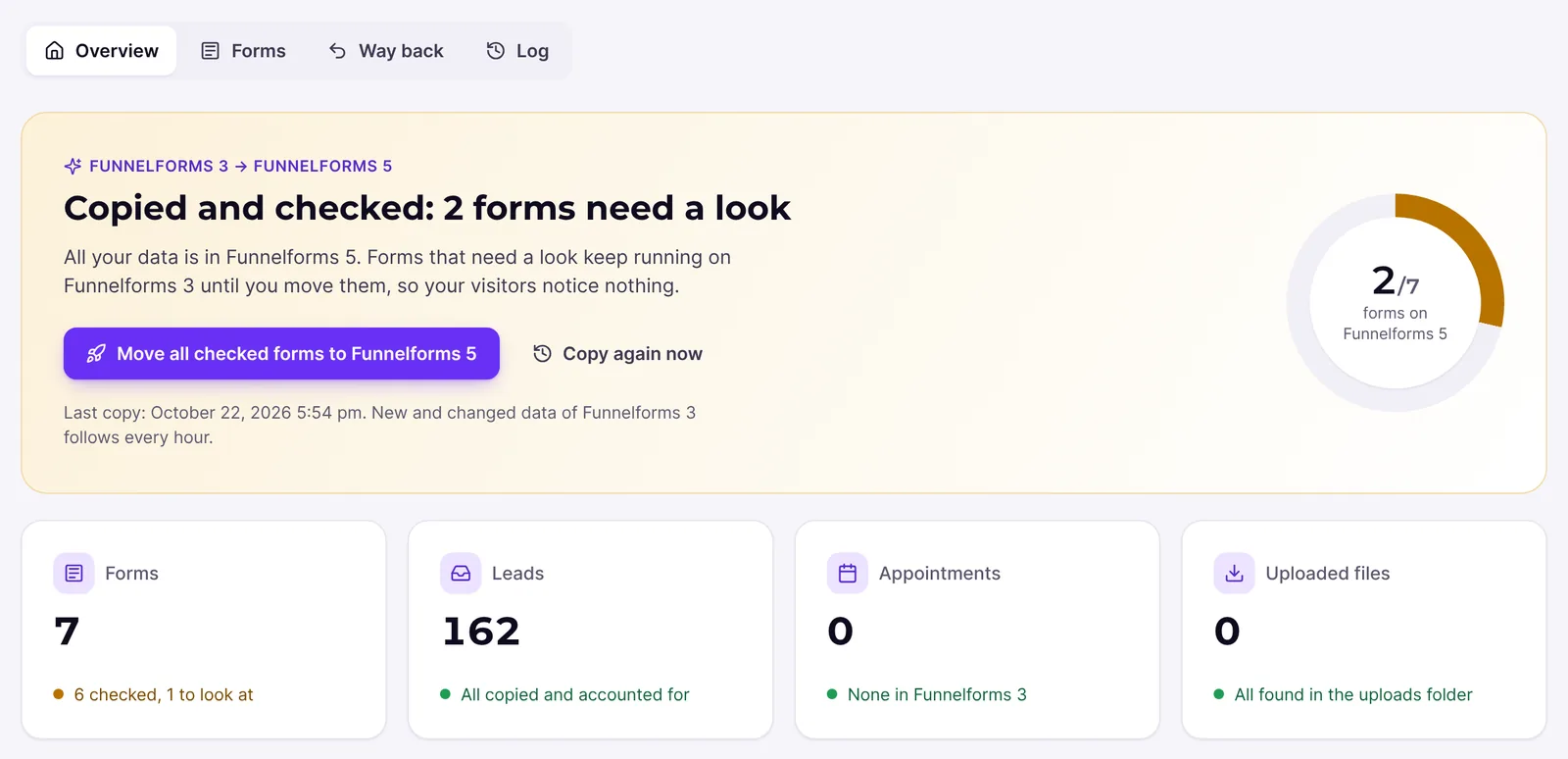
- See in the assistant which forms are checked and ready and which need a look.
- Choose which forms move and compare the most important ones.
- Click Go live now.
- Afterwards open Funnelforms → Migration and take care of the forms that have not moved yet.
- In Funnelforms Pro, download a restore point and keep it safe.
Explanations
Do I have to go through the migration assistant?
Yes. Funnelforms is ready to use only after the setup. Continue later pauses it; the copy goes on meanwhile. Skipping the assistant or postponing the decision is no longer possible.
What happens to my appointments and calendars? (Pro only)
Appointments are taken over with start and end in UTC and linked to the entry. Appointment types come along too. If you connected an appointment type to a calendar through Cronofy in Funnelforms 3, forms with this appointment type stay on Funnelforms 3. They move as soon as you save the appointment type again in the form builder or connect the calendar there again. The form builder says: "This appointment type still uses the calendar connected in Funnelforms 3. Save it again here, so the new form can book it."
What happens to my connections to CRM, e-mail and other services?
Connections and e-mails come along; their keys are stored encrypted.
- In the form builder, imported connections carry the label "From Funnelforms 3" and keep working as they are. Editing their settings there: This feature is currently in progress.
- CRM connections from Funnelforms 3 are under Funnelforms → Integrations (Pro only). There you test them with Test and change their access data with Change. They cannot be deleted: "This connection came from Funnelforms 3 and is still used there. Change its access data instead."
- Funnelforms Free has no CRM connections and no webhooks. An imported form still moves, but the connection then stays unused.
Where do I see my old leads?
Under Funnelforms → Entries. The imported leads are listed there together with the new entries, marked "From Funnelforms 3". In Funnelforms Pro the Funnelforms 3 lead list stays available as long as the old interface is shown.
What happens to uploaded files?
The files stay where they are in the folder uploads/af2/ and keep their download links. Moving them into the private storage of Funnelforms 5: This feature is currently in progress.
What happens to the automatic deletion of leads?
The migration assistant asks how long entries are kept: 6, 12 or 24 months or never. Your current setting is preselected. Later you change the period under Settings → Entries and spam in the part Deleting entries. Until you save a value there, the setting "Automatically delete leads" of Funnelforms 3 applies.
What happens on a privacy request?
When you erase a person's data through the WordPress privacy tools, Funnelforms deletes their entries in Funnelforms 5 and also their leads in Funnelforms 3, with their files. The sync does not bring them back. In Funnelforms Pro, restore points still hold the erased leads until you delete the restore points or they expire after the move is complete. A restore leaves the erased leads out. In Funnelforms Free the erasure request reports: "Restore points of Funnelforms 3 still hold the erased leads until they are deleted on their own, 30 days after the move to Funnelforms 5. They are never restored."
What happens to the Funnelforms 3 license check? (Pro only)
Funnelforms Pro 5.0 ships the Funnelforms 3 code but switches its license check off. It no longer asks the old license servers. So the forms, menu and interfaces of Funnelforms 3 stay reachable even without an answer from the old servers. You manage your license in Funnelforms 5.
What happens to the Funnelforms 3 menu?
The menu "Funnelforms" takes over the pages. In Funnelforms Pro the old menu becomes one entry Funnelforms 3 in the Funnelforms menu. You show or hide it under Settings → General with Show the old interface (Funnelforms 3) in the menu. The data stays when you hide it. The migration assistant hides the old interface only when no form needs it any more. Funnelforms Free no longer has a Funnelforms 3 interface.
What happens to shortcodes and pages?
Both stay valid. See the article on shortcodes, IDs and embeds.
Best practices
- Plan the move so that you try the forms on your pages after going live.
- Fix missing keys and permissions soon, so the forms concerned can move.
- Test booking forms after the move with a test booking.
Troubleshooting
| Problem | Cause | Solution |
|---|---|---|
| Every Funnelforms page leads to the assistant | The setup is still open | Go through the assistant until Done. |
| I cannot find Migration in the menu | The menu item appears only once the first copy has begun | Wait until the assistant shows the copy and reload the page. |
| A booking form does not move (Pro) | The appointment type is still connected through Cronofy, or the appointment type is missing | Save the appointment type again in the form builder or connect the calendar again. |
| A form with address suggestions does not move (Pro) | The Google Maps key is missing | Enter it under Settings → General in the part Address fields. |
| A form with tracking code does not move | Tracking code is not allowed on the site | Allow it under Settings → General in the part Tracking code. |
| A CRM connection from Funnelforms 3 cannot be deleted (Pro) | Funnelforms 3 still uses it | Change its access data instead. |
Tips
- The reason why a form has not moved yet is always shown under Funnelforms → Migration → Forms at Details.
- The hourly sync takes along changes to imported forms in Funnelforms 3 as long as you have not published them in the form builder.
- Funnelforms only reads Funnelforms 3. The only exception is a privacy request.
FAQ
Do I have to do anything for the copy to start? No. It starts on its own after the update as soon as data from Funnelforms 3 exists. You still go through the migration assistant.
Are my forms on Funnelforms 5 right after the update? Checked forms move as soon as you go live in the assistant. The others follow once their reason is fixed.
Can I keep some forms on Funnelforms 3? In Funnelforms Pro yes: leave them out in the assistant or send them back later. In Funnelforms Free no, because Free no longer contains the Funnelforms 3 code.
What if something goes wrong? In Funnelforms Pro one click puts all forms back on Funnelforms 3, and your data is unchanged. In Funnelforms Free you fix the reason the migration page names.
Are entries lost when I switch between the versions? No. Entries are kept in both directions.