If something does not work as before after the move, you put forms from Funnelforms 3 back on Funnelforms 3: all at once or one by one. The data of Funnelforms 3 was never changed, so everything is where it was. One more click brings you forward to Funnelforms 5 again. In addition, Funnelforms keeps restore points of all Funnelforms 3 data, so you can bring back damaged data.
Requirements
- Funnelforms Pro. This feature is not included in Funnelforms Free.
- You are an administrator (the way back requires the WordPress capability "manage_options"). Other roles do not see the tab, because restore points hold every lead from Funnelforms 3.
- For the way back, forms from Funnelforms 3 run on Funnelforms 5. If there are none, the tab says "No form from Funnelforms 3 runs on Funnelforms 5 at the moment, so there is nothing to take back."
Where to find it
- Funnelforms → Migration → Way back. The tab has three parts: Back to Funnelforms 3 with one click, Your restore point and All restore points.
- The same parts are under Funnelforms → Settings → Backup and way back.
- You put a single form back under Funnelforms → Migration → Forms with Back to Funnelforms 3 in its row or on its detail page.
- While you are back on Funnelforms 3, the pages of Funnelforms 3 and Funnelforms show the notice "Your forms run on Funnelforms 3 again. The data of Funnelforms 3 is unchanged." with the link Back to Funnelforms 5. The old menu has the same entry Back to Funnelforms 5.
Features at a glance
- All forms back to Funnelforms 3: puts every imported form that runs on Funnelforms 5 back and shows the old menu.
- Back to Funnelforms 3 for a single form: only this form switches, all others stay where they are.
- Back to Funnelforms 5: switches exactly the forms back that the way back put on Funnelforms 3.
- Create a restore point: saves all data of Funnelforms 3 exactly as it is stored.
- Check Funnelforms 3 against it: compares the data of Funnelforms 3 with the restore point. This only reads.
- Restore: puts back what is missing and changes back what was changed, without deleting anything newer.
- Download: saves a restore point as a file.
- Delete restore points: deletes every restore point. The way back keeps working.
- The badge Funnelforms 5 active or Funnelforms 3 active shows where you are.
Step by step
All forms back to Funnelforms 3
- Open Funnelforms → Migration → Way back.
- Click All forms back to Funnelforms 3.
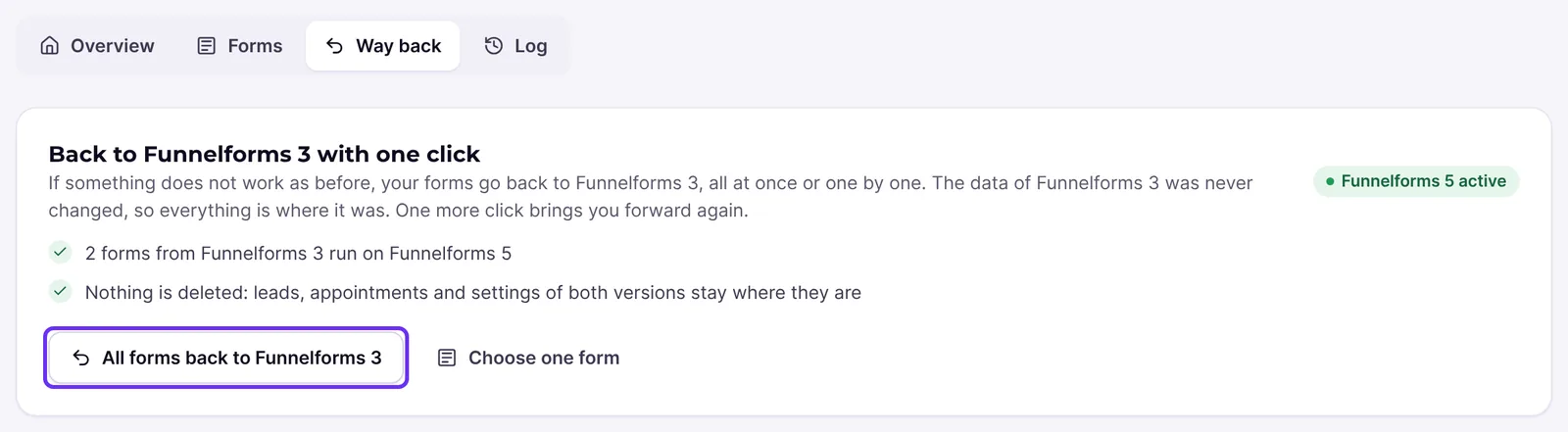
- On the page "All forms back to Funnelforms 3?" read the parts What happens and Your data.
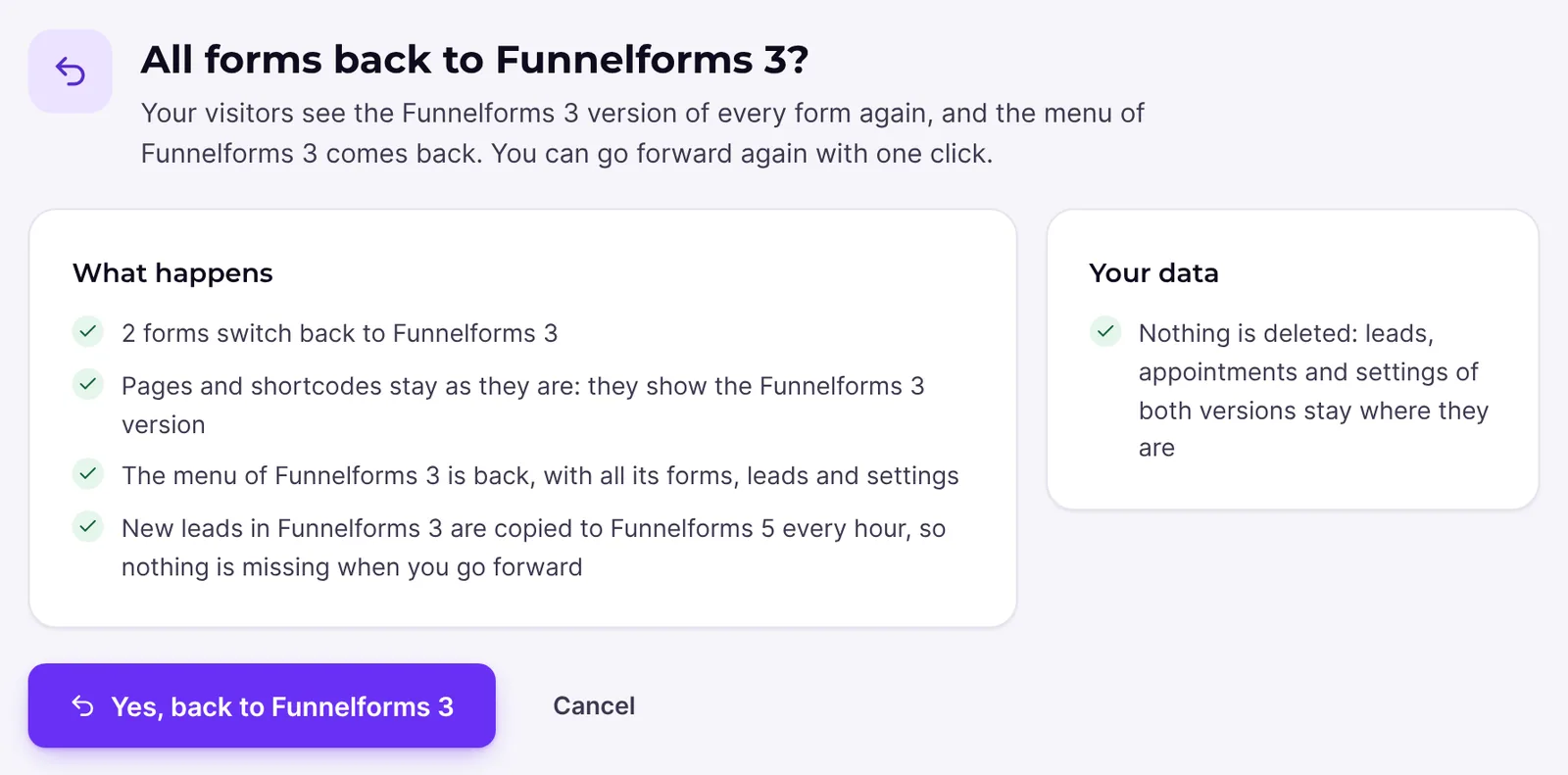
- Click Yes, back to Funnelforms 3. Cancel changes nothing.
- You see "You are on Funnelforms 3 again" with the number of forms. Open Funnelforms 3 takes you to the old menu.
Put a single form back
- Open Funnelforms → Migration → Forms. Or click Choose one form in the tab Way back; then you see only the forms on Funnelforms 5.
- In the row of the form click Back to Funnelforms 3.

- On the page "Put "Name" back on Funnelforms 3?" read what happens to the data of the form.
- Click Yes, put this form back.
- You see ""Name" runs on Funnelforms 3 again". To the form opens its detail page.
Back to Funnelforms 5
- Open Funnelforms → Migration → Way back, or click Back to Funnelforms 5 in the notice or in the old menu.
- Click Back to Funnelforms 5.
- You see "Welcome back on Funnelforms 5" with the number of forms that run on Funnelforms 5 again.
- If forms stay on Funnelforms 3 for now, open the tab Forms with See all forms. There every form shows its reason.
You bring a single form that you put back forward again in the tab Forms with Move to Funnelforms 5 once it is ready.
Create and download a restore point
- Open Funnelforms → Migration → Way back.
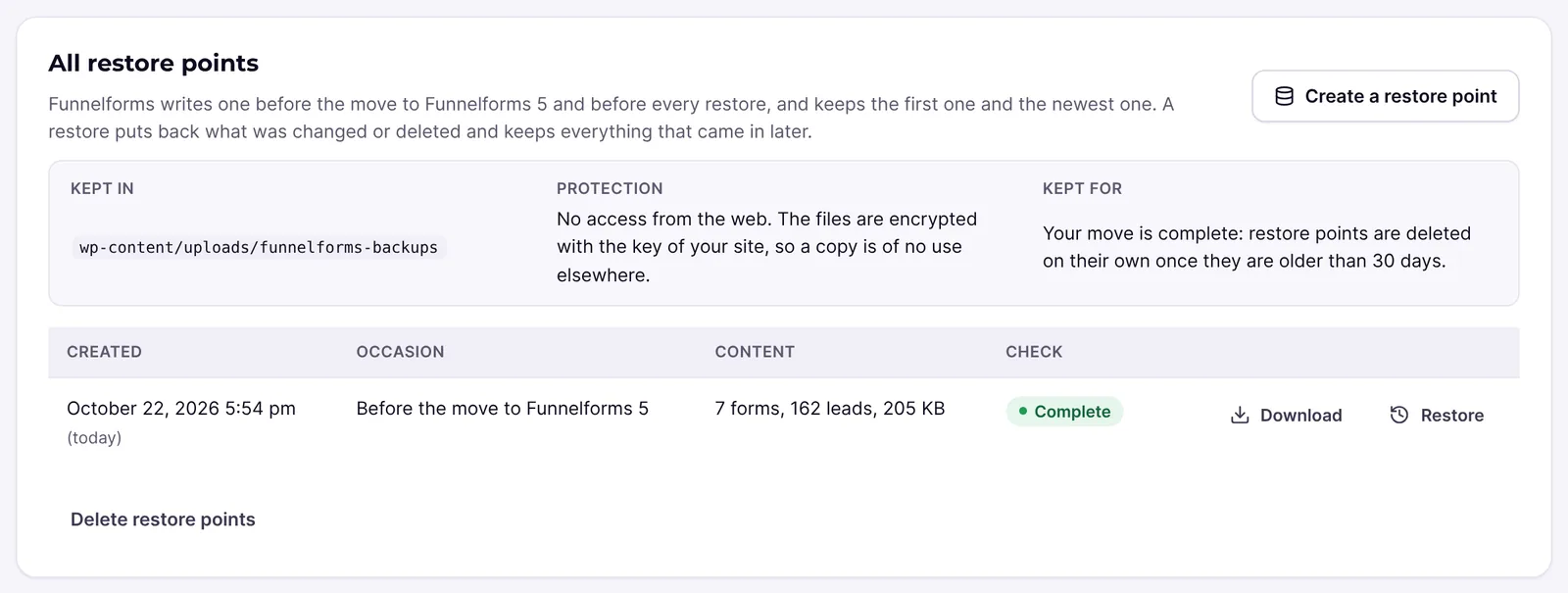
- In the part All restore points click Create a restore point.
- You see "The restore point is being written. This page shows when it is done." Wait until the progress is done.
- The table now has a row with Created, Occasion, Content and Check.
- Download saves the file on your computer.
Check Funnelforms 3 against the restore point
- In the part Your restore point click Check Funnelforms 3 against it.
- Wait until the check is done. It changes nothing.
- Read the result, for example "Your Funnelforms 3 data is complete" or "Some Funnelforms 3 data is missing". The table shows Unchanged, Changed and Missing per kind of data.
- If something is missing, click Restore what is missing.
Restore data from a restore point
- Click Restore in the part Your restore point or in the table. This works only for restore points in the state Complete.
- On the page "Restore the state of …?" the part What the restore changes shows how many rows are put back and changed back.
- Tick Yes, restore this state.
- Click Restore now. You can leave the page; the restore goes on in the background.
- At the end you see "Your Funnelforms 3 data is restored" with the numbers rows put back, rows changed back, rows were fine and rows left alone. Check the result checks again right away.
Delete all restore points
- In the part All restore points click Delete restore points.
- On the page "Delete all restore points?" read the parts What is deleted and What stays.
- Tick Yes, delete all restore points and click Delete now.
Explanations
What happens when I go back to Funnelforms 3?
- Every imported form that ran on Funnelforms 5 shows its Funnelforms 3 version again. Funnelforms remembers which ones these were.
- Pages and shortcodes stay as they are. They show the Funnelforms 3 version.
- The old menu comes back with all its forms, leads and settings. In this time the menu of Funnelforms 5 is called Funnelforms 5, so you can tell the two apart.
- Forms you built in Funnelforms 5 have no Funnelforms 3 version and keep running.
- Changes in the form builder are kept and come back when you go forward.
- Nothing is deleted. Entries that came in on Funnelforms 5 stay in Funnelforms 5 → Entries.
- New leads in Funnelforms 3 are copied to Funnelforms 5 every hour.
- While you are on Funnelforms 3, no imported form moves to Funnelforms 5, not even on its own.
What happens when I put a single form back?
Only this form switches. Visitors see its Funnelforms 3 version again, on the same pages. The menu does not change. Funnelforms no longer moves this form on its own; the list says "kept on Funnelforms 3 by you". You bring it back yourself with Move to Funnelforms 5.
What happens when I go forward to Funnelforms 5 again?
Funnelforms switches exactly the forms back that the way back put on Funnelforms 3 and checks each one again. A form that cannot move yet stays on Funnelforms 3 for now. The result then says, for example, "1 form stays on Funnelforms 3 for now; the migration report says why." You see the reason in the tab Forms and on its detail page. After that, Funnelforms also moves the other checked forms on its own if the automatic move is on. The menu entry Funnelforms 3 is shown as it was before the way back. Under Settings → General you show or hide it with Show the old interface (Funnelforms 3) in the menu.
What happens to leads that come in meanwhile?
By default, entries from forms on Funnelforms 5 are also saved as Funnelforms 3 leads. So the Funnelforms 3 lead list, Zapier, Make and the old app see them too. Leads that come in on Funnelforms 3 are copied to Funnelforms 5 by the hourly sync.
What is a restore point?
A copy of all data of Funnelforms 3, exactly as it is stored: forms, questions, contact forms, calculations, leads, appointments, appointment types and settings.
- Kept in: the uploads folder under
funnelforms-backups, with a random file name. - Protection: no access from the web. The files are encrypted with the key of your site, so a copy is of no use elsewhere. Older restore points from an earlier version are not encrypted yet; new ones are.
- Occasion: "Before the move to Funnelforms 5", "Before a restore" or "Created by hand".
- State: Complete, Damaged or missing or Cannot be read: the key of the site changed. Only complete restore points can be downloaded and restored.
- Funnelforms keeps the very first and the newest restore point. One that is needed right now, for example for a running restore or the active way back, is kept as well.
- Without a restore point no form from Funnelforms 3 goes live on Funnelforms 5.
- The downloaded file is readable and not encrypted, so you can use it elsewhere too.
How long are restore points kept?
Until your move is complete. Complete means here: the copy is done, every form, lead and appointment has arrived in Funnelforms 5, you are not back on Funnelforms 3, and no restore point is being written, checked or restored. After that, Funnelforms deletes restore points on its own once they are older than 30 days. The line Kept for shows what applies to your site.
Once all are deleted, you see for example "Your move is complete, so the restore points were deleted on …, as planned. The data of Funnelforms 3 is still there, and the way back keeps working." Funnelforms then no longer writes new ones on its own, and forms no longer need a restore point to move. You can still create one with Create a restore point.
When you uninstall Funnelforms, the restore points stay, so a new installation finds them.
What does "Check Funnelforms 3 against it" do?
Funnelforms looks up every form, question, lead and setting of the restore point as it is now. This only reads. Changed rows are normal while Funnelforms 3 is in use, for example a lead status or counters. Missing rows point to deleted data.
What does "Restore" do?
- First Funnelforms writes a new restore point of the state now, so the restore can be undone too.
- Then it puts back missing rows and changes changed rows back to the state of the restore point.
- Nothing is deleted. Leads and forms that came in after the restore point stay.
- If the place of a row in the database now holds other data, Funnelforms leaves it alone and overwrites nothing.
- Leads erased on a privacy request are not brought back.
- Funnelforms 5 is not touched. It takes over the restored data with its next copy, within the hour.
What is the difference between the way back and a restore?
The way back only changes which version your visitors see and which menu you see. The data stays as it is. A restore sets data of Funnelforms 3 back to the state of a restore point.
Can I reset the plugin files to Funnelforms 3.8?
The way back uses the Funnelforms 3 code that is part of Funnelforms Pro 5.0. A real reset of the plugin files to 3.8 for single sites: This feature is currently in progress.
Best practices
- Create a restore point of your own before larger changes.
- Keep downloaded restore points safe. They hold every lead and API key from Funnelforms 3 and are not encrypted.
- If only one form does not work as before, put only this form back instead of all.
- Check Funnelforms 3 first and use Restore only if data is really missing or was changed by mistake.
- Do not change the key of your site (
FFX_SECRET_KEYor the salts inwp-config.php) while you need restore points.
Troubleshooting
| Problem | Cause | Solution |
|---|---|---|
| The tab Way back is missing | You are not an administrator | Ask an administrator of the site. |
| "No form from Funnelforms 3 runs on Funnelforms 5 at the moment, so there is nothing to take back." | All imported forms already run on Funnelforms 3 | There is nothing to do. |
| "The restore point could not be written: the uploads folder is not writable. …" | The uploads folder is not writable | Fix the write permissions and click Create a restore point again. |
| "A restore point is being written, checked or restored right now. Try again in a moment." | Another job is running | Wait until it is done and try again. |
| "This restore point is damaged; it was not used." | The file is damaged or was removed | Create a new restore point. |
| Cannot be read: the key of the site changed | FFX_SECRET_KEY or the salts in wp-config.php were changed | Put the old key back to use the restore point. |
| "Please confirm the restore." | The tick is missing | Tick Yes, restore this state. |
| "The restore did not start: the restore point of the current state could not be written first. …" | The uploads folder is not writable | Make the uploads folder writable and start the restore again. |
| Download is missing | You are signed in through the support access | Restore points hold the leads of the site and stay on it. An administrator of the site downloads them. |
| After Back to Funnelforms 5 forms stay on Funnelforms 3 | They cannot move yet | You see the reason in the tab Forms. The message always names a change in Funnelforms 3; the reason at the form is what counts. |
| The entry Funnelforms 3 is missing in the menu | The old interface is hidden | Show it again under Settings → General. |
Tips
- Switching in either direction changes no data of Funnelforms 3.
- The way back works even when all restore points are deleted.
- Administrators with access to the command line have the same steps as WP-CLI commands, for example
wp funnelforms backup listandwp funnelforms backup mode 3.
FAQ
Is data lost on the way back? No. The data of Funnelforms 3 was never changed, and entries of both versions stay where they are.
Can I go back to Funnelforms 5 afterwards? Yes, with one click on Back to Funnelforms 5.
What about forms I built new in Funnelforms 5? They have no Funnelforms 3 version and keep running after the way back.
Who sees restore points and who may download them? Only administrators. The support access may check and restore, but not download.
Why are my restore points gone? Your move is complete and they were older than 30 days. The part Your restore point says when they were deleted.