Funnelforms copies every form from Funnelforms 3 and then plays every path and calculation in both versions. The result is on the migration page. There you see which forms behave exactly as before, where Funnelforms found differences and what still keeps a form on Funnelforms 3. Every reason comes with how to fix it.
Requirements
- The copy of the Funnelforms 3 data has run at least once. Before that the menu item is missing.
- You have the capability "Change settings" (administrators have it). Without it the page is not visible.
- The comparison "Old and new side by side" and the tab Way back exist only in Funnelforms Pro. In Funnelforms Free, "Stays on Funnelforms 3" means that the form is not shown on your website.
Where to find it
Funnelforms → Migration. The page has the tabs Overview, Forms, Way back (Pro only) and Log.
Features at a glance
- Overview: the state of the move at a glance, with the ring "forms on Funnelforms 5", the tiles Forms, Leads, Appointments and Uploaded files, and the parts What was copied and checked, Where your forms run, What needs your attention and Latest activity.
- Forms: every form from Funnelforms 3 with the columns Form, Check, Leads and Runs on, filtered by All, On Funnelforms 5, Ready to move, Please have a look and Stays on Funnelforms 3.
- Details of a form: what keeps it on Funnelforms 3, the five checks with their findings, its leads and, in Funnelforms Pro, both versions side by side.
- Import again: copies and checks a single form once more.
- Log: every copy, check, restore point and switch between Funnelforms 3 and 5, newest first.
Step by step
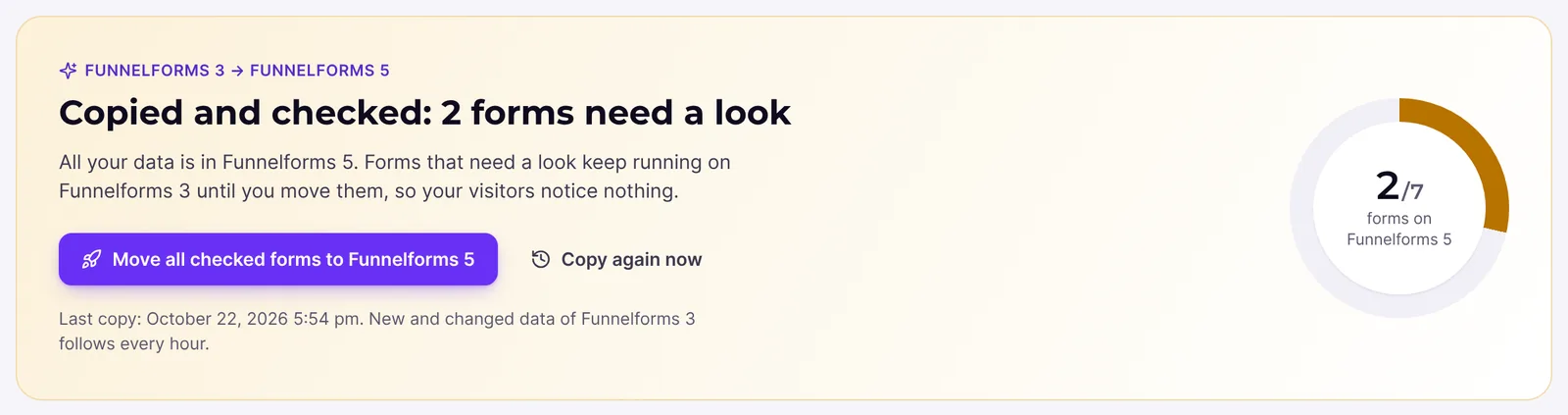
- Open Funnelforms → Migration. At the top you see the state, for example "Copied and checked: 2 forms need a look".
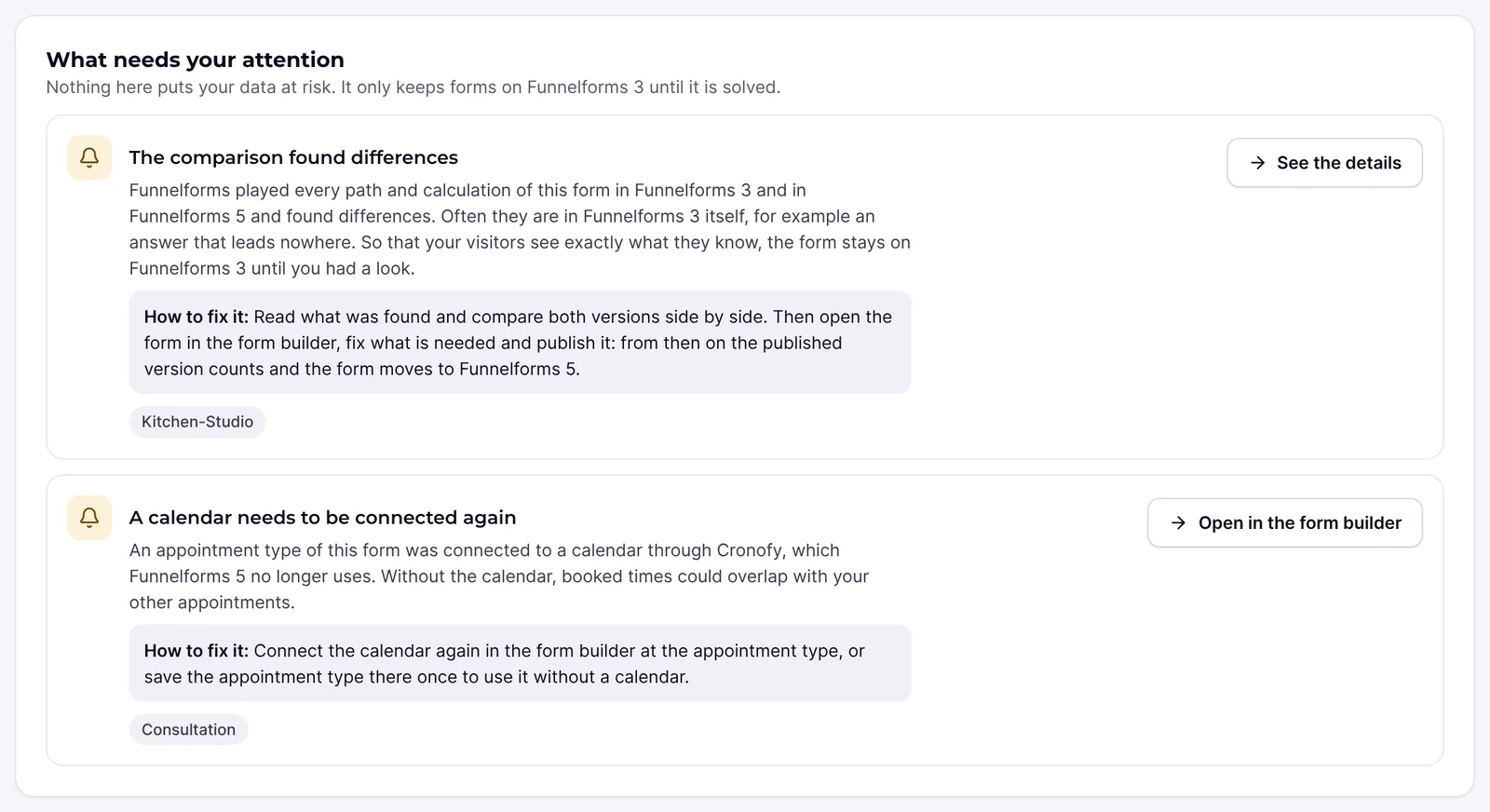
- Read the part What needs your attention. It groups the reasons, each with How to fix it: and the forms concerned.
- Switch to the tab Forms and choose the filter Please have a look or Stays on Funnelforms 3 at the top.
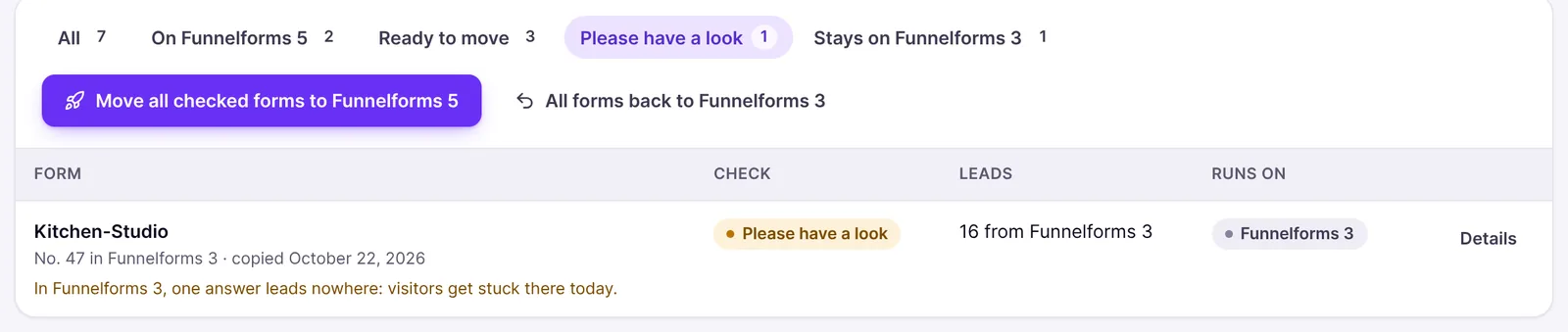
- Click Details at a form.
- Read Please have a look before it moves or Why it stays on Funnelforms 3 for now.
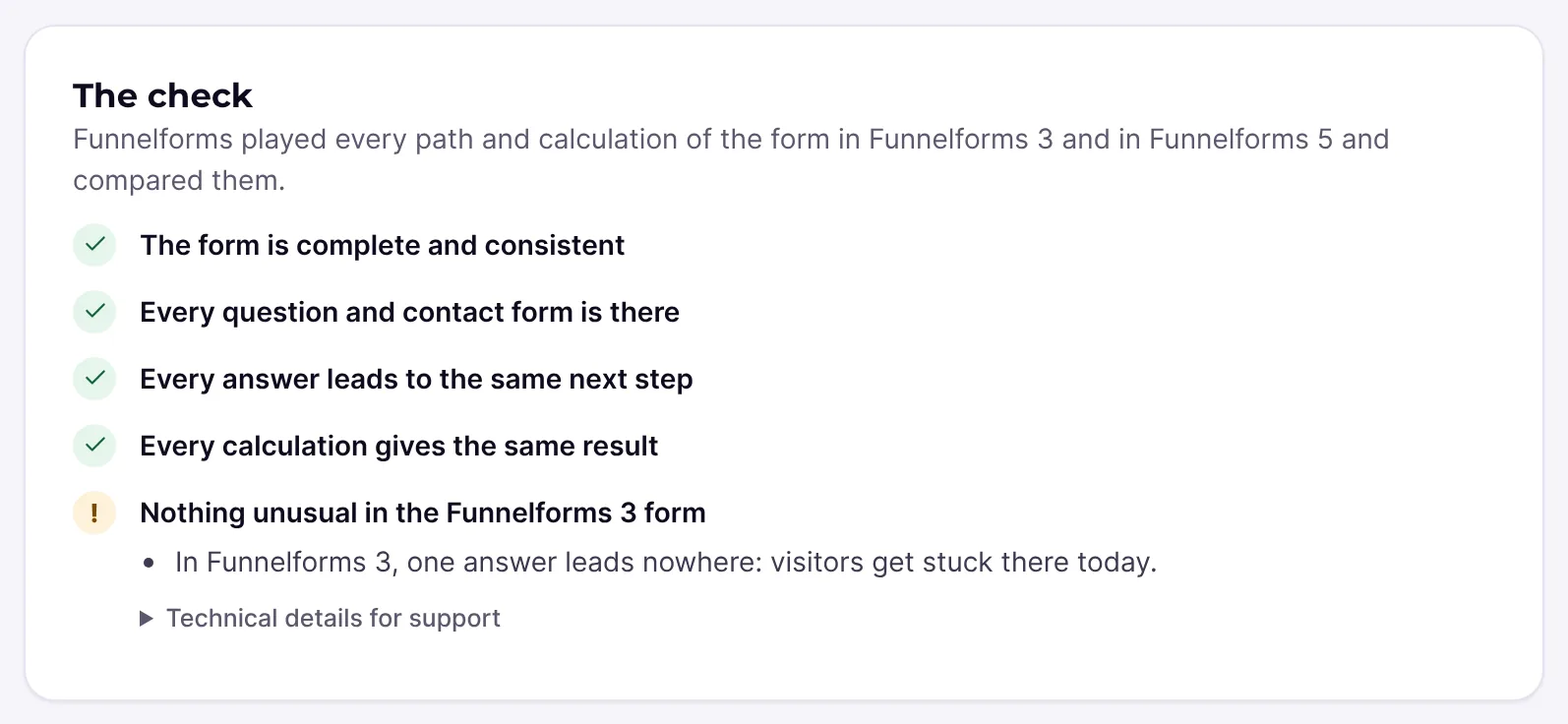
- Under The check read which of the five checks found something.
- In Funnelforms Pro try both versions under Old and new side by side, with Desktop and Phone.

- Fix the cause, for example with Open in the form builder or in Funnelforms 3, and then click Import again.
Explanations
Where does a form stand?
| State | Meaning |
|---|---|
| On Funnelforms 5 | Your visitors see the new version of the form. |
| Ready to move | Checked identical and nothing holds it back; it still runs on Funnelforms 3. |
| Please have a look | The comparison found differences; it still runs on Funnelforms 3. |
| Stays on Funnelforms 3 | Something is missing for Funnelforms 5, for example a key or a feature. |
Forms that need a look are at the top of the list.
What do the badges in the column "Check" mean?
| Badge | Meaning |
|---|---|
| Checked | Every path played and every calculation led to the same result as in Funnelforms 3. |
| Edited in Funnelforms 5 | The form was changed and published in the form builder. From then on the published version counts, not the comparison with Funnelforms 3. |
| Please have a look | The comparison found differences. |
| Stays on Funnelforms 3 | The check could not finish, for example because the form could not be read. The details show the reason. |
| Could not be copied | The check failed. The details say what is missing. |
Below the title you see for example "No. 12 in Funnelforms 3", "copied …" and, where it applies, "moved on its own after the check" or "kept on Funnelforms 3 by you" (Pro only).
Which five checks are there?
| Check | What is checked |
|---|---|
| The form is complete and consistent | Everything the form points to is there. |
| Every question and contact form is there | Every question and contact form is taken over with all fields and required flags, and every contact form sends an e-mail. |
| Every answer leads to the same next step | For every answer the path is played in Funnelforms 3 and in Funnelforms 5. |
| Every calculation gives the same result | Every calculation is computed with several values in both versions. |
| Nothing unusual in the Funnelforms 3 form | Signs that the form did not fully work in Funnelforms 3 already. |
What do the findings mean?
Every check with a finding shows what was found, in readable sentences. The most important:
| Finding | What you can do |
|---|---|
| "The form uses a question or contact form that was deleted in Funnelforms 3." | Remove the reference in the form builder or in Funnelforms 3. |
| "An answer leads to a step that does not exist." | Set a valid target in the form builder. |
| "In Funnelforms 3, one answer leads nowhere: visitors get stuck there today." | Give the answer a next step in the form builder. |
| "A calculation already fails in Funnelforms 3." | Correct the formula. |
| "An answer leads to a different step than in Funnelforms 3." | Compare both versions and check the path in the form builder. |
| "A calculation gives a different result than in Funnelforms 3." | Compare the result with sample values in both versions. |
| "A contact form sends no e-mail." | Add an e-mail in the form builder. |
| "A booking question has no appointment type." | Choose an appointment type in the form builder. |
| "The Funnelforms 3 editor had moved steps of this form; the order was taken as Funnelforms 3 shows it." | Check the order of the steps. |
Technical details for support lists up to 20 technical messages per check. Include them in a support request.
Which reasons keep a form on Funnelforms 3?
Every reason comes with an explanation and How to fix it:. The most common:
- The comparison found differences: read the findings, compare both versions, fix what is needed in the form builder and publish it.
- The form has not been checked yet: click Import again.
- The form could not be read: open the form in Funnelforms 3, save it once and import it again.
- No restore point yet: forms move only once a restore point of the Funnelforms 3 data exists.
- The spam protection has no keys: the form asks for a captcha (such as reCAPTCHA), but Funnelforms 5 has no keys for it.
- The form contains tracking code or scripts: allow tracking code under Settings → General or remove it.
- A field with an input mask Funnelforms 5 does not know: Funnelforms 5 knows the common masks of digits, letters and fixed characters, but not this one.
- A kind of field Funnelforms 5 cannot show yet and A connection Funnelforms 5 does not offer yet.
- In Funnelforms Pro: The Google Maps key is missing, An appointment type is missing, A calendar needs to be connected again.
- In Funnelforms Free: the name of a Funnelforms Pro feature, for example Calculations and price calculators, with "The form uses “Calculations and price calculators”, which is part of Funnelforms Pro, so Funnelforms Free cannot publish it."
How to fix each reason is described in the article on switching forms.
What does "What was copied and checked" show?
Per kind of data (forms, leads, appointments, appointment types, uploaded files) you see how many are in Funnelforms 3 and how many were copied, for forms also "checked identical". The badge says for example Checked, Complete, Follows soon or Not all copied. "deleted on purpose in Funnelforms 5" counts leads that Funnelforms 5 deleted, for example after the retention period. Uploaded files stay in the uploads folder of Funnelforms 3; Funnelforms 5 links to them.
What does "Import again" do?
Funnelforms copies the form from Funnelforms 3 once more and checks it again. Afterwards you see for example "Imported again and checked: the form behaves exactly as in Funnelforms 3." If you edited the form in the form builder, your version is kept. If the form already runs on Funnelforms 5 and can no longer move afterwards, for example because it is no longer checked identical, it runs on Funnelforms 3 again.
The same happens in the hourly sync when you change a form in Funnelforms 3.
Why does a form with "Please have a look" stay on Funnelforms 3?
So that your visitors see exactly what they know. Often the difference is in Funnelforms 3 itself, for example an answer that leads nowhere. As soon as you publish the form in the form builder, the published version counts and the form can move.
Which quirks of Funnelforms 3 does Funnelforms reproduce?
Imported forms behave the way your visitors know them, quirks included. If several rules of a slider match, the last matching one wins, as in Funnelforms 3. The only deliberate difference is how calculations treat text answers: Funnelforms 5 reads numbers from text answers, otherwise 0. Funnelforms 3 put the text into the formula as it was, which led to errors with text.
What does the log show?
Log shows by day what happened when: copies, checks, restore points, moves of single forms and switches between Funnelforms 3 and 5. Every entry shows the time and who started it. The overview shows the last five entries under Latest activity.
Best practices
- Start with the forms at the top of the list.
- Test forms with calculations and several paths after the move with real sample values.
- Fix dead ends and broken formulas even if they already existed in Funnelforms 3.
Troubleshooting
| Problem | Cause | Solution |
|---|---|---|
| The menu item Migration is missing | The copy has not run yet, or you lack the capability "Change settings" | Finish the migration assistant or ask an administrator. |
| "Your data is being copied" | The copy is still running | Wait. You can leave the page; the copy goes on in the background. |
| "A copy is running right now. Try again in a moment." | A copy was running when you clicked Import again | Try again after the copy. |
| "This form no longer exists in Funnelforms 3, so it cannot be imported again. …" | The form was deleted in Funnelforms 3 | The copy in Funnelforms 5 stays. Edit it in the form builder. |
| "Imported again, but the form could not be copied. …" | The form is stored unreadably in Funnelforms 3 | Open it in Funnelforms 3, save it once and import it again. |
| "Some leads or appointments could not be copied" | Funnelforms 3 stored them unreadably | They stay in Funnelforms 3. Send a support request; the diagnosis names the entries concerned without their content. |
| "Copies kept to be safe" | Very many leads vanished from Funnelforms 3 at once | If they were deleted on purpose, delete them in Funnelforms 5 too. In Funnelforms Pro, check Funnelforms 3 against the restore point first. |
| "Files are missing in the uploads folder" | Leads point to files that are no longer in wp-content/uploads/af2 | Put the files back from a backup of the uploads folder. |
| In Funnelforms Free the reason is a feature such as Calculations and price calculators | The form uses a feature of Funnelforms Pro | Open the form with Open in the form builder; it shows what is missing. Remove the feature or use Funnelforms Pro. |
Tips
- Copy again now on the overview starts a new copy of all data. Unchanged records are skipped.
- The data in Funnelforms 3 stays untouched by every check.
- A click on a state under Where your forms run opens the tab Forms with this filter.
FAQ
Does "Please have a look" mean something is broken? No. An administrator should have a look first. The form keeps running on Funnelforms 3 as before.
What does "Checked" mean exactly? Every path played and every sample calculated led to the same result as in Funnelforms 3.
Do I see lead contents on the page? No. The page shows only form titles, numbers and findings, no lead contents.