The renderer is the technology that shows a form on your website. A form from Funnelforms 3 runs on Funnelforms 5 as soon as it is checked identical and nothing else holds it back. By default this happens on its own, because Funnelforms 5 works with keyboard and screen readers. You can also move forms yourself, one by one or all at once. In Funnelforms Pro you send them back to Funnelforms 3 at any time.
Requirements
- The copy of the Funnelforms 3 data has run.
- Users with the capability "Change settings" see the page Migration. The buttons to move forms appear only with the capability "Edit forms". Only administrators may send forms back (Pro only). Administrators have all capabilities.
- A form moves only when it is checked identical, a restore point of the Funnelforms 3 data exists and Funnelforms 5 can do everything in the form. The single reasons are listed below.
Where to find it
- Funnelforms → Migration → Forms. The column Runs on shows Funnelforms 5 or Funnelforms 3 per form.
- Funnelforms → Migration → Overview, part Where your forms run.
- The migration assistant moves forms the first time. See the article on the migration assistant.
Features at a glance
- Moving on their own: checked forms run on Funnelforms 5 on their own. In Funnelforms Pro you switch this on or off with Use the new renderer for all checked forms (Pro only).
- Move to Funnelforms 5: moves a single form that is Ready to move.
- Move all checked forms to Funnelforms 5: moves every ready form at once.
- Back to Funnelforms 3 per form and All forms back to Funnelforms 3 (Pro only).
- Every form that cannot move yet shows the reason and How to fix it:.
- Entries are kept in every case.
Step by step
Move a single form
- Open Funnelforms → Migration → Forms.
- Choose the filter Ready to move at the top.

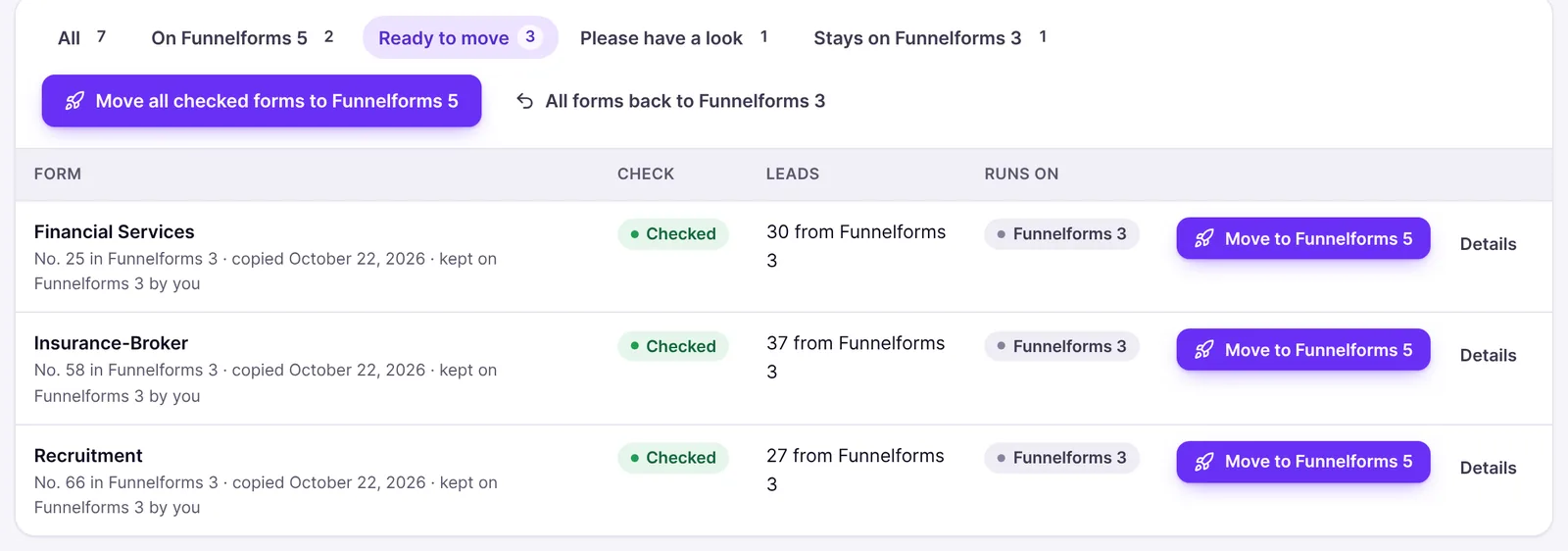
- Click Move to Funnelforms 5 at the form.
- You see "The form runs on Funnelforms 5 now. Your pages and shortcodes stay as they are." If it cannot move after all, you see "The form cannot move yet. Below you see why and how to fix it."

Move all ready forms at once
- Open Funnelforms → Migration → Forms or the Overview.
- Click Move all checked forms to Funnelforms 5.

- Read the message, for example "2 forms run on Funnelforms 5 now." If forms stay behind, it also says "1 form stays on Funnelforms 3 for now; the table shows why."
Switch the automatic move on or off (Pro only)
- Open Funnelforms → Migration → Forms.
- At the top, tick or untick Use the new renderer for all checked forms.
- Click Save.
- When you switch it on, you see for example "Saved. 3 checked forms moved to Funnelforms 5." When you switch it off, "Saved. 3 forms that had moved on their own run on Funnelforms 3 again."
Send a form back to Funnelforms 3 (Pro only)
- Open Funnelforms → Migration → Forms.
- Click Back to Funnelforms 3 at the form.
- Confirm with Yes, put this form back.
How the way back works for all forms is described in the article on the way back.
Explanations
What happens when a form moves?
From now on Funnelforms 5 shows the form. Its shortcodes stay the same; you do not have to change your pages. The data in Funnelforms 3 stays untouched, and existing entries are kept.
When does a form move on its own?
After every copy and after going forward to Funnelforms 5 again, Funnelforms moves every form that is checked identical, that nothing holds back and that you did not keep on Funnelforms 3 yourself. Forms you edited in the form builder are not moved on their own.
The automatic move waits:
- while the migration assistant is open, because you choose the forms there yourself ("Waits while the setup assistant is open: there you choose the forms yourself.");
- while your forms run on Funnelforms 3 again (Pro only, "Paused while your forms run on Funnelforms 3 again.").
If you switch it off in Funnelforms Pro, exactly the forms it moved run on Funnelforms 3 again. Forms you moved yourself or edited in the form builder stay on Funnelforms 5.
Which forms stay on Funnelforms 3?
In Funnelforms Pro a form stays on Funnelforms 3 if you leave it out in the migration assistant or send it back on its own. The list then says "kept on Funnelforms 3 by you". If you move it yourself later, this no longer applies.
Funnelforms Free has no way back to Funnelforms 3. A form that cannot move, or that you left out in the migration assistant, is not shown on your website. A form you left out moves only once you move it yourself. See the article on moving from Funnelforms Free 3 to Funnelforms Free 5.
What holds a form back?
If a condition is missing, the page names the reason with How to fix it:.
| Reason | How to fix it |
|---|---|
| The comparison found differences | Read the findings, fix what is needed in the form builder and publish the form. |
| The form has not been checked yet | Click Import again on the page of the form. |
| The form could not be read | Open the form in Funnelforms 3, save it once and import it again. |
| No restore point yet | In Funnelforms Pro create a restore point under Migration → Way back. In Funnelforms Free ask in the support forum. In both cases check that the uploads folder is writable. |
| You went back to Funnelforms 3 (Pro only) | Go forward to Funnelforms 5 with one click. |
| The spam protection has no keys | The form asks for a captcha (such as reCAPTCHA), but Funnelforms 5 has no keys for it. Choose Cloudflare Turnstile or hCaptcha with its keys under Settings → Entries and spam, then remove the old captcha field in the form builder. Every form also keeps its hidden spam checks. |
| The form contains tracking code or scripts | If you trust the code, allow tracking code under Settings → General. Only administrators with the capability to use unfiltered HTML may do this. Otherwise remove it in the form builder. |
| A field with an input mask Funnelforms 5 does not know | Funnelforms 5 knows the common masks of digits, letters and fixed characters. Keep the form on Funnelforms 3 for now, or change or remove the input mask in the form builder and check the field there. |
| A kind of field Funnelforms 5 cannot show yet | Keep the form on Funnelforms 3 for now. Funnelforms moves it as soon as an update supports the field. |
| A connection Funnelforms 5 does not offer yet | Keep the form on Funnelforms 3 for now or replace the connection in the form builder, for example with a webhook. |
| The Google Maps key is missing (Pro only) | Enter the key under Settings → General in the part Address fields. |
| An appointment type is missing (Pro only) | Choose the appointment type of the booking question in the form builder. |
| A calendar needs to be connected again (Pro only) | Connect the calendar again at the appointment type in the form builder, or save the appointment type there once. |
| The new form display is missing | Install the plugin again. In Funnelforms Free you get it from wordpress.org; if that does not help, ask in the support forum. |
Forms with the contact field phone verification stay on Funnelforms 3 for now; the reason shown is a kind of field Funnelforms 5 cannot show yet. Phone verification on Funnelforms 5: This feature is currently in progress.
In Funnelforms Free, every Funnelforms Pro feature that changes what visitors go through also holds a form back. The reason then shows the name of the feature, for example Calculations and price calculators, with the hint "Open the form in the form builder; it shows what is missing." See the article on moving from Funnelforms Free 3 to Funnelforms Free 5.
What happens when I publish a form in the form builder?
Imported forms can be edited in the form builder like any other. The forms list shows Live on Funnelforms 3 for them while they still run on Funnelforms 3. When you publish, the form moves to Funnelforms 5, because Funnelforms 3 does not know the version from the form builder. If something still holds it back, it stays on Funnelforms 3 and the form builder shows the reason under Please check. From then on your published version counts: the hourly sync does not overwrite it, and the comparison with Funnelforms 3 no longer counts for this form.
What happens when a form changes in Funnelforms 3?
The hourly sync copies and checks it again. If a form that already runs on Funnelforms 5 can no longer move afterwards, for example because it is no longer checked identical, it runs on Funnelforms 3 again on its own. The same applies after Import again.
Best practices
- Move a single, less important form first and test it on the page.
- Fix the reasons shown (keys, permission for tracking code, appointment type) and let Funnelforms move the form afterwards.
- In Funnelforms Pro, send back only the form that does not work as before instead of all.
Troubleshooting
| Problem | Cause | Solution |
|---|---|---|
| There is no button Move to Funnelforms 5 | The form is not Ready to move, or you lack the capability "Edit forms" | Open Details and read the reason. |
| A checked form does not move on its own | You kept it on Funnelforms 3, it was edited in the form builder, the migration assistant is open or the automatic move is off (Pro only) | Move it yourself with Move to Funnelforms 5. |
| After Move all checked forms to Funnelforms 5 forms stay behind | Something holds them back | The table names the reason per form. |
| The switch Use the new renderer for all checked forms is missing | You use Funnelforms Free, or you lack the capability "Change settings" | In Funnelforms Free checked forms always move on their own. |
| Back to Funnelforms 3 is missing | You use Funnelforms Free or you are not an administrator | Funnelforms Free has no way back. In Pro, ask an administrator. |
| A form suddenly runs on Funnelforms 3 again | It was changed in Funnelforms 3 and is no longer checked identical | Open Details and read the findings. |
Tips
- An imported form in the trash cannot be deleted permanently in the form builder (Delete permanently is locked) as long as it comes from Funnelforms 3.
- Moving only changes what shows the form. It changes no data of Funnelforms 3.
- Under Where your forms run, a click on Ready to move leads straight to the matching forms.
FAQ
Do I lose entries when a form moves or goes back? No. Entries are kept in every case, in both directions.
Do I have to change my pages or shortcodes? No. The shortcodes stay. Funnelforms shows the new version for moved forms.
Why does a checked form still not move? The check only confirms the behaviour compared with Funnelforms 3. Keys, permissions and kinds of fields must fit as well. The reasons are shown at every form.
Can I keep single forms on Funnelforms 3 for good? In Funnelforms Pro, yes: send them back or leave them out in the migration assistant. In Funnelforms Free, no, because Free no longer contains the Funnelforms 3 code.