You do not have to change any pages after the move. The shortcodes from Funnelforms 3 stay valid. If a form runs on Funnelforms 5, Funnelforms 5 answers the same shortcode with the same ID. The article shows what stays the same, what is new and where there are differences.
Requirements
- Shortcodes and form IDs need nothing special.
- Popups, embeds on other websites, webhooks, published entries, Zapier and Make exist only in Funnelforms Pro.
Where to find it
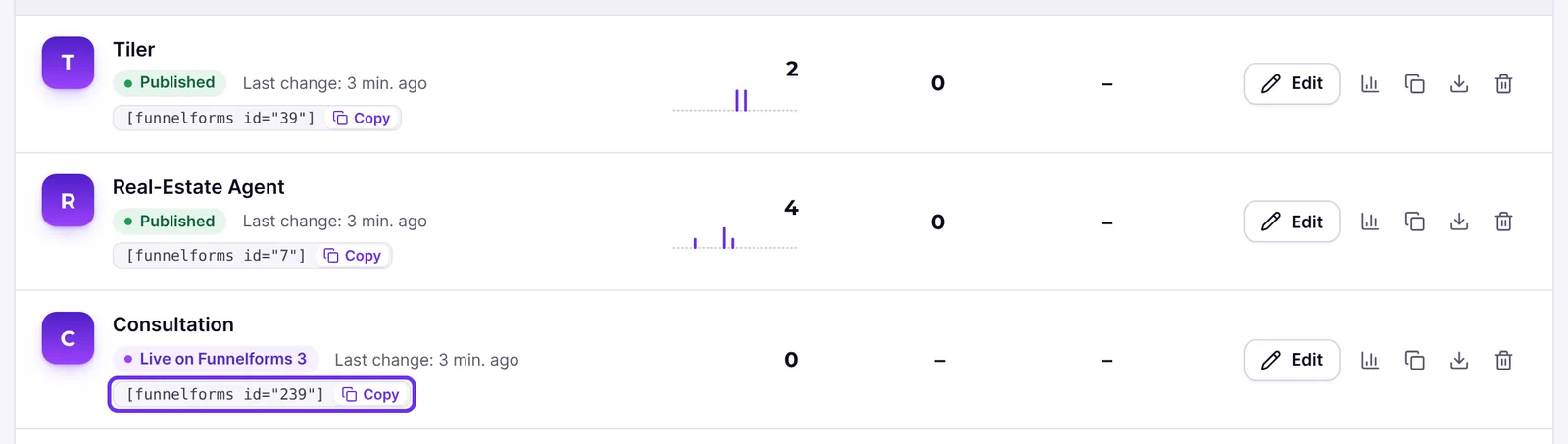
- The forms list under Funnelforms → Forms shows the shortcode of every form to copy.
- The ID of an imported form is shown under Funnelforms → Migration → Forms as "No. … in Funnelforms 3".
- Embeds on other websites and webhooks: Funnelforms → Settings → Interfaces (Pro only).
Features at a glance
[funnelforms id="…"]and[anfrageformular2 id="…"]stay valid, with the ID from Funnelforms 3.- Forms you build new in Funnelforms 5 use
[funnelforms uid="…"]. - The block "Funnelforms" and the Elementor widget show both kinds of forms.
- Popups from Funnelforms 3 by time or click keep working; new display types are added (Pro only).
- Existing embed codes for other websites and direct form links keep working (Pro only).
- Webhooks keep sending their content in the Funnelforms 3 format (Pro only).
- Zapier, Make and the old app also see entries of forms on Funnelforms 5 (Pro only).
Step by step
After a form has moved, check that everything is in place:
- Open the page with the form in the browser and look at the form.
- Open Funnelforms → Forms and compare the shortcode of the form with the one on your page. For imported forms it contains the ID from Funnelforms 3.
- If the form opens in a popup on your page, check that it opens as usual. In Funnelforms Free it is shown in the page.
- If you use an embed on another website, open the page there and check the form (Pro only).
- If a webhook receiver checks the signature, enter the secret from Settings → Interfaces there (Pro only).
Explanations
What happens to my shortcodes?
The shortcodes [funnelforms id="…"] and [anfrageformular2 id="…"] stay registered. Before WordPress runs one, Funnelforms checks whether the form runs on Funnelforms 5. If so, Funnelforms 5 shows the form. If not, Funnelforms Pro shows it as in Funnelforms 3. Only the preview in the Funnelforms 3 editor (attribute preview) still uses Funnelforms 3.
What does a shortcode show in Funnelforms Free?
Funnelforms Free no longer contains any Funnelforms 3 code. If a form does not run on Funnelforms 5 yet, visitors see nothing in its place. People who may edit forms see a note instead:
- while the move is running: "Funnelforms is moving this form to version 5. It appears here once that is done. Only people who edit forms see this note."
- afterwards: "This Funnelforms form is not shown: it is not published on version 5 yet. Open Funnelforms in the admin to see why. Only people who edit forms see this note."
You find the reason under Funnelforms → Migration → Forms.
Which ID applies to an imported form?
The ID from Funnelforms 3 stays valid in the shortcode. The migration page shows it as "No. … in Funnelforms 3". [funnelforms_entries id="…"] (published entries on the website, Pro only) also expects this ID for imported forms.
How do I embed a form I built new in Funnelforms 5?
Such forms have no ID from Funnelforms 3. You embed them with [funnelforms uid="…"]. The forms list shows the matching shortcode. If the form is not published, the uid is wrong or the form uses a feature your edition does not have, visitors see nothing in its place. People who may edit forms see the note "This Funnelforms form is not shown here. Open it in Funnelforms to see why. Only people who edit forms see this note." This applies to Funnelforms Free and Pro.
What happens to popups? (Pro only)
The attributes from Funnelforms 3 keep working: popup_by_delay with popup_delay (in milliseconds) and popup_by_click with popup_click_class. Funnelforms 5 also knows popup="delay|click|scroll|exit" and widget="bottom-right" (a button in a corner). Scrolling, leaving the page and the corner button need Funnelforms 5. If the form still runs on Funnelforms 3, it is shown in the page.
Funnelforms Free has no popups and no corner button. A form with popup attributes is shown in the page there.
What about the block and the Elementor widget?
The block "Funnelforms" shows a form like the shortcode. In the editor, forms on Funnelforms 5 appear as a preview and forms on Funnelforms 3 as a placeholder. On the page itself both work.
What happens to embeds on other websites? (Pro only)
The existing embed code keeps working without changes on the other website. This also applies once Funnelforms no longer loads the Funnelforms 3 code: Funnelforms 5 then answers the requests of the embed code itself. Under Settings → Interfaces, in the part Forms on other websites, you list the websites that may use it. If the field stays empty, every website may embed forms, as in Funnelforms 3.
What happens to direct form links?
Forms from Funnelforms 3 keep their links under /funnelforms/…. If Funnelforms Pro loads the Funnelforms 3 code, that code answers the old link. If the code is not loaded, and in Funnelforms Free it never is, the old link shows the imported form once it is published on Funnelforms 5. This applies as long as you have not saved another address for the form under Own page. For forms from Funnelforms 5 you set the link in the form settings under Own page. A link is never given out twice.
What happens to webhooks, Zapier, Make and the app? (Pro only)
- The content of webhooks stays as in Funnelforms 3; existing receivers keep working.
- Forms on Funnelforms 5 also sign every webhook (headers
X-Funnelforms-Timestamp,X-Funnelforms-SignatureandX-Funnelforms-Delivery). Only receivers that check the signature need the secret. - Zapier, Make and the old app read leads from Funnelforms 3. That is why Funnelforms also saves every entry of an imported form on Funnelforms 5 as a Funnelforms 3 lead. Existing Zaps and scenarios keep working.
- The Funnelforms 3 interfaces for Zapier, Make and the app answer only when the request brings exactly the stored access data: for Zapier and Make the license key and the password from Funnelforms 3, for the app its code. If a value is missing or differs, Funnelforms refuses the request. Without a password set, the connection does not work.
When does Funnelforms Pro load the Funnelforms 3 code?
Only when your site needs it: when you went back to Funnelforms 3, when a form still runs on Funnelforms 3, when forms of the old AI generator exist, or when the app, Zapier or Make are connected. Otherwise the Funnelforms 3 code stays off. Your shortcodes and the existing embed code on other websites still work, because Funnelforms 5 answers them.
Whether the code is loaded and why is shown under Tools → Site Health → Info in the Funnelforms section at "Code of Funnelforms 3 loaded": "No", "Yes, the site went back to Funnelforms 3", "Yes, a connection of Funnelforms 3 (app, Zapier or Make) is set up" or "Yes, forms still run on Funnelforms 3". Forms of the old AI generator count as forms on Funnelforms 3.
What happens to custom hooks and scripts?
For forms on Funnelforms 3 nothing changes. For forms on Funnelforms 5 one difference is confirmed: the JavaScript hook af2_doOwnExternalRedirectFunction from Funnelforms 3 is no longer called. Funnelforms 5 runs tracking code and scripts in content only when an administrator allows it under Settings → General in the part Tracking code; until then such forms stay on Funnelforms 3. A complete list of how custom changes behave: This feature is currently in progress.
Best practices
- Leave existing shortcodes unchanged. There is no reason to replace them after the move.
- After the move, pay special attention to pages with popups, forms on other websites and custom JavaScript.
- Enter the secret at webhook receivers that check the signature before forms move.
Troubleshooting
| Problem | Cause | Solution |
|---|---|---|
| Visitors do not see the form, editors see "This Funnelforms form is not shown …" | Funnelforms Free: the form does not run on Funnelforms 5 yet | Open Funnelforms → Migration → Forms and fix the reason. |
A shortcode with uid shows visitors nothing, editors see "This Funnelforms form is not shown here. …" | The form is not published, or the uid is wrong | Copy the shortcode from the forms list and publish the form. |
| An old direct link from Funnelforms 3 shows no form | The form is not published on Funnelforms 5 yet, or another address is saved under Own page | Fix the reason under Funnelforms → Migration → Forms or use the address under Own page. |
| A popup does not open, the form is shown in the page | Funnelforms Free has no popups; in Pro, scrolling, leaving and the corner button need Funnelforms 5 | In Pro let the form move to Funnelforms 5 or use a popup by time or click. |
| The form does not appear on another website | The website is not in the list Forms on other websites | Add it under Settings → Interfaces or leave the list empty. |
| A webhook receiver refuses calls | It checks the signature but does not know the secret | Enter the secret from Settings → Interfaces. |
| Zapier or Make reports an access error | License key or password are missing or do not match exactly | Check the license key and password in Zapier or Make. |
A custom redirect through af2_doOwnExternalRedirectFunction no longer works | Funnelforms 5 does not call this hook | Use the redirect of the form, or keep the form on Funnelforms 3 in Pro. |
Tips
- The shortcode of a form does not change when it switches between Funnelforms 3 and Funnelforms 5.
- The shortcode
[funnelforms_entries]shows published entries of a form; forms without this setting show nothing (Pro only).
FAQ
Do I have to change my pages after the move? No. The shortcodes and IDs stay valid.
Does the form ID change? In the shortcode the ID from Funnelforms 3 still applies. Newly built forms use uid.
Do my Zaps and Make scenarios keep working? In Funnelforms Pro yes, as long as license key and password match. Funnelforms also saves entries of forms on Funnelforms 5 as Funnelforms 3 leads.
Do my custom hooks keep working? For forms on Funnelforms 3 yes. For forms on Funnelforms 5 only the JavaScript hook named above is confirmed as no longer called.