Skip to content
Funnelforms 3

Optimizepress 2

Updated 2026-10-211 min read

This short guide serves to explain the compatibility with the page builder Optimizepress and Funnelforms:

In order for the Funnelforms shortcode to work with Optimizepress, the following steps must be carried out.

The shortcode cannot be entered directly in the element. You must go to the settings of an element and then insert the shortcode under “Insert code after element” or “Insert code before element”:
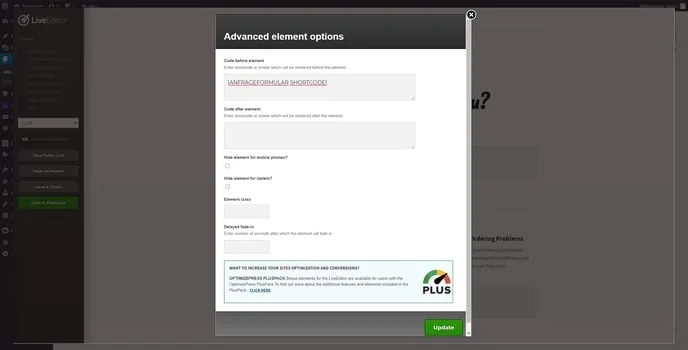
OptimizePress LiveEditor: “Advanced element options” with the shortcode in “Code before element”

Funnelforms is then loaded correctly.

Related articles

Support

Still have questions?

Our support team is happy to help, in English and German.

  • In the plugin

    In Funnelforms Pro, send a ticket from Funnelforms → Support in the WordPress menu. The system details we need are sent along.

  • By email

    Write to us, ideally with the address of your website.

    support@funnelforms.io