If there are problems with the display of funnel forms on the website, the cause is often incorrect or undefined caching settings.
In rare cases, the form is not loaded after correct integration of the shortcode and the error message: “An error has occurred” or “Please contact support” appears. This article gives you information on the possible sources of errors.
Caching plugins
Frequently used caching plugins such as WP Fastest Cache, WP Rocket, WP Super Cache, W3 Total Cache and others have the task of compressing your website and improving the loading time. They change the output HTML / CSS / or JavaScript code of your website when it is called up by any browser.
This compression can lead to some plugins, including Funnelforms, not loading correctly. If the caching plugin is set too “strict” or incorrectly, the JavaScript required for Funnelforms cannot be loaded on the website and the error message appears.
Make sure NOT to make the following settings:
- JavaScript reduction
- JavaScript / JS compression
- Minify JavaScript
- Summarize JavaScript
- Delayed loading of JavaScript
If you still want or need to minify or compress JavaScript, you can add an exception:
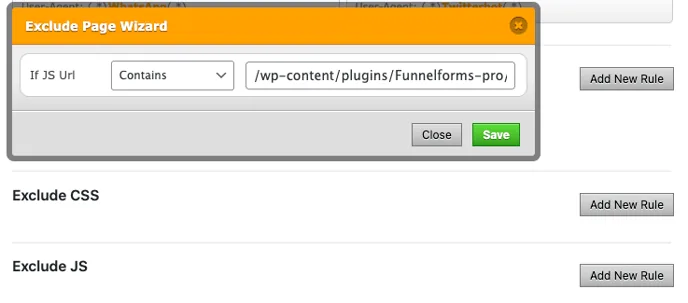
Add the following JavaScript file as an exception:
/wp-content/plugins/Funnelforms-pro/res/frontend/scripts/frontend.js
Add the following CSS file as an exception:
/wp-content/plugins/Funnelforms-pro/res/frontend/styles/frontend.css
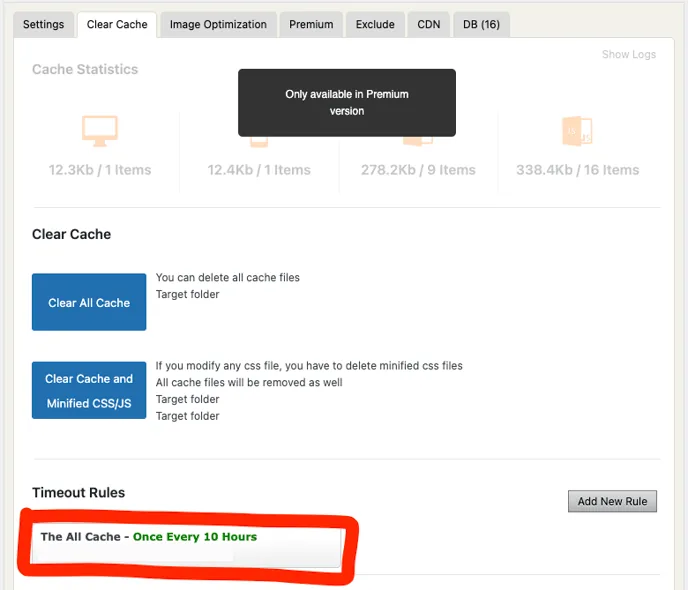
It is also necessary to set the maximum caching time to no longer than 10 hours, here is an example from WP Fastest Cache:
Server-side caching
If your website is hosted by Raidboxes, Kinsta, etc., there may be problems with the display of funnel forms despite the settings made above. This is usually due to the server-side caching provided automatically by your hoster.
Accordingly, the above-mentioned exceptions must also be defined in the hoster settings and Funnelforms must be excluded from caching.
Individual notes and instructions can be found directly from the hosters:
Raidboxes: <https://helpcenter.raidboxes.de/en/articles/1157295-cache-general-overview>
Kinsta: [https://kinsta.com/blog/wordpress-cache/
](https://kinsta.com/blog/wordpress-cache/)If these settings do not affect the display of the form, check it for completeness and duplicate or missing connections or integration configurations. If no error is apparent, please contact our support.