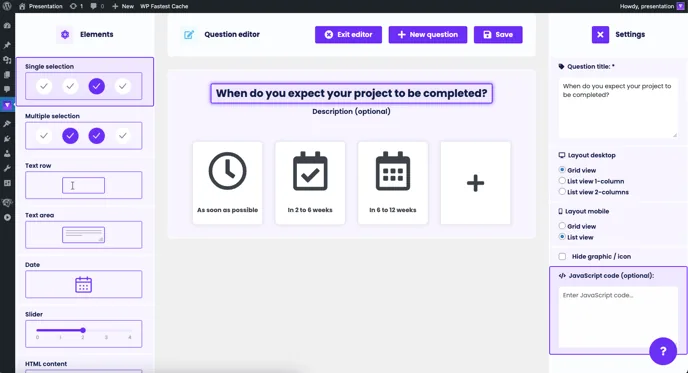
Funnelforms has features for collecting/tracking user data for online marketing. With a precisely set tracking function, you can measure either the successful sending of a form (conversion) or individual steps within the form.
Thank you page
If you want to track that a visitor has successfully completed the form, you will need to use a redirect or thank you page. To do this, simply use the redirect function in your form (at the bottom of the left sidebar) to add a URL to a page that you have previously created after the contact form or after the last question. The redirect can optionally be opened in a new tab:
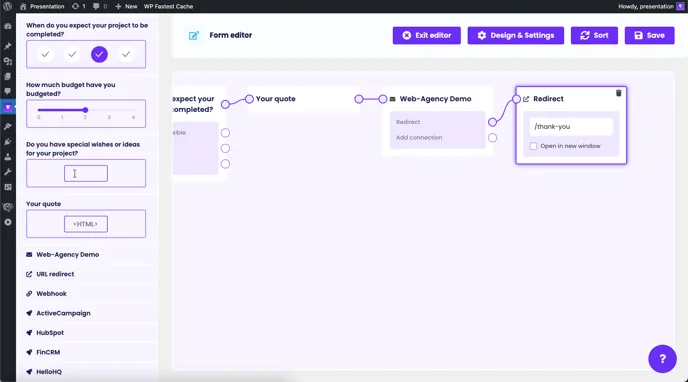
Insert the corresponding tracking codes on the thank you page.
You can find out how to set up conversion tracking with Google Ads and receive a conversion tracking tag here: Google Ads guide
You can find out how to create a Facebook Pixel for Facebook Ads and then track an event here: Facebook Ads guide
Conditional thank you page
When using conditional logic, it may sometimes be necessary to use several thank you pages and track them accordingly. For example, you can use this function to filter out particularly hot leads or set up tracking based on the visitor's responses. To do this, simply create several thank you pages and then link them behind the response options or according to different contact forms:
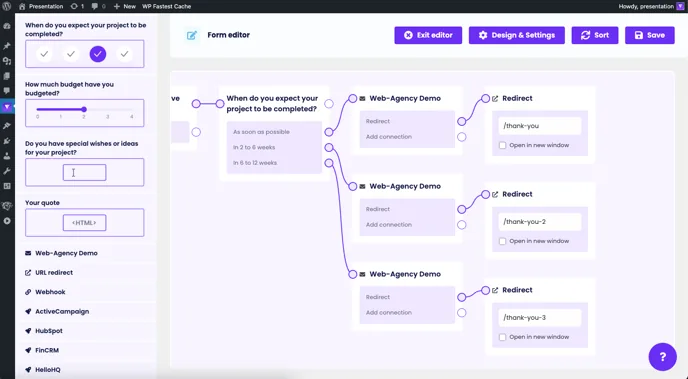
Different tracking codes should then be integrated on the thank you pages to ensure differentiation.
JavaScript code (event tracking)
As an option to the existing tracking via the thank you page, a JavaScript code can also be inserted in the contact form and in each individual question. This code is executed when the question or the contact form becomes visible to the visitor, i.e. when they have reached this point in the form. This makes it possible, for example, to create razor-sharp target groups within advertising networks in order to deliberately address visitors who have reached a certain point in the form but have then abandoned it.
You can find more information, especially about Facebook's event tracking and which possible codes can be added within the fields here: Specifications for standard events of the Facebook pixel