In the member area you can upgrade your Funnelforms Pro license to a larger plan or downgrade to a smaller plan.
Funnelforms Pro offers you maximum flexibility in the various license plans. Basically, the licenses only difference is the number of websites that can be linked. The functions are the same in every Funnelforms Pro version.
You can upgrade/downgrade your current license at any time during the active contract period.
Please note, that you can only upgrade/downgrade once you have exited the trial phase and when the license status is “Active”.
You will find all your booked licenses in the member area under the menu item “License management Paddle”.
Open License management Paddle
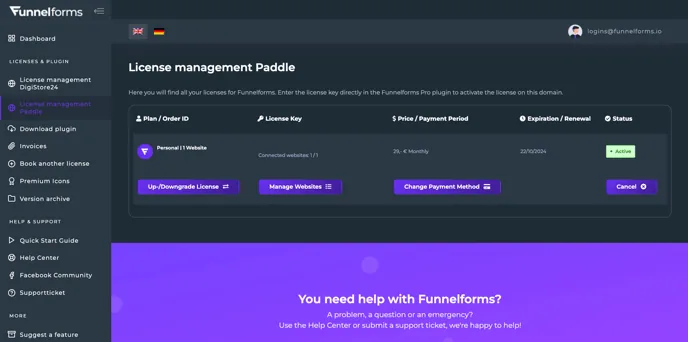
You can see your current plan in the first column of the table with the heading “Plan / Order ID”. In this example, the current plan is “Personal | 1 Website”.
Click on the “Up-/Downgrade License” button to open the page for changing license plans.
This will open a page with the different plans and payment options.
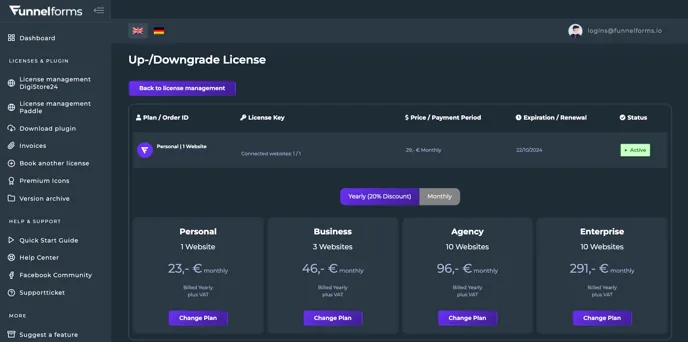
Select your new desired plan, the payment option (monthly or annually) and click on the “Change Plan” button. The change will take effect immediately.
Please note: If you click on “Change Plan”, the plan change will take effect immediately and your payment method will be charged directly.
You will receive an e-mail confirmation of the successful plan change. You can use the new number of websites immediately.
You have now upgraded or downgraded your Funnelforms Pro license.