License keys are linked to websites which you can manage and disconnect in the member area.
Each license key has a maximum number of websites on which Funnelforms Pro can be activated with this license key. Depending on the package you have booked, you can connect different numbers of websites:
- Personal = 1 website
- Business = 3 websites
- Agency = 10 websites
- Enterprise = 50 websites
An individual number of websites is on request also possible.
1. Connect websites
To link a website to your license key, simply insert the license key in the Funnelforms Pro plugin. The license is then automatically linked to this domain.
Click on “Funnelforms” in the WordPress side menu.
You will automatically be taken to the “License & App” menu item. Paste the license key into the correct field and click on the “Check license” button.
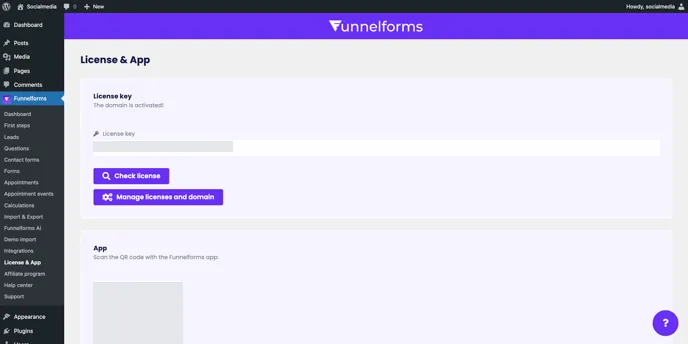
You have now linked this website to your Funnelforms Pro license key.
2. Disconnect websites
To disconnect a website from the license key, go to the Funnelforms member area.
You will find all your booked licenses in the member area under the menu item “License management paddle”.
Open License management Paddle
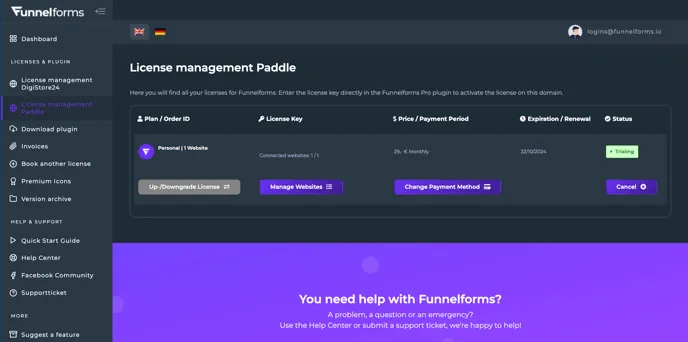
Click on the “Manage websites” button to open the website disconnection page for this license key.
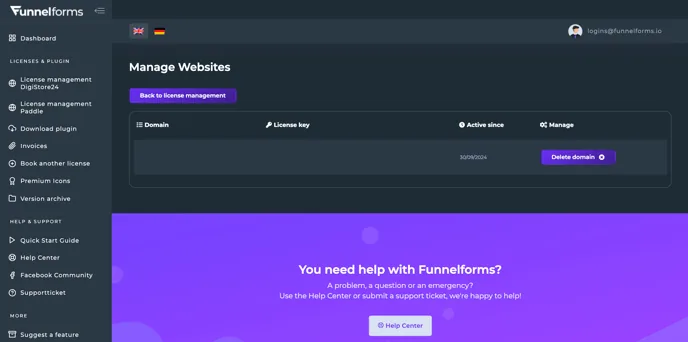
To disconnect a website again from the license key, click the “Delete domain” button on the right-hand side.
You have now disconnected the website from the license key and made space for a new one.