The version archive helps you to go back to an older Funnelforms Pro version if you have problems with the newer version.
WordPress systems can be complex with a variety of plugins and different themes. Sometimes errors or unexpected problems occur after updating Funnelforms Pro.
Downgrading Funnelforms Pro to an older, most recently functioning version can help here.
You can find all published Funnelforms Pro versions in the member area under the menu item “Version archive”.
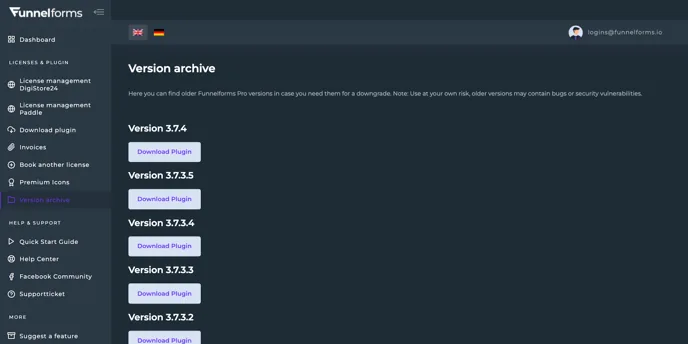
To downgrade, download the .zip archive by clicking on the “Download Plugin” button for the desired version.
Next, go to the WordPress website where you want to downgrade Funnelforms Pro and log in as administrator. Click on “Add New Plugin” under the Plugins menu item and then on the “Upload Plugin” button.
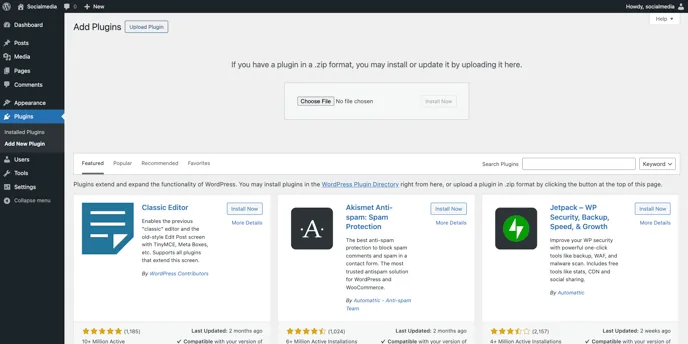
Click on “Select file” and select the previously downloaded .zip archive of Funnelforms Pro on your computer. Then click on “Install now”.
You will then be taken to this screen, click on the “Replace current with uploaded” button.
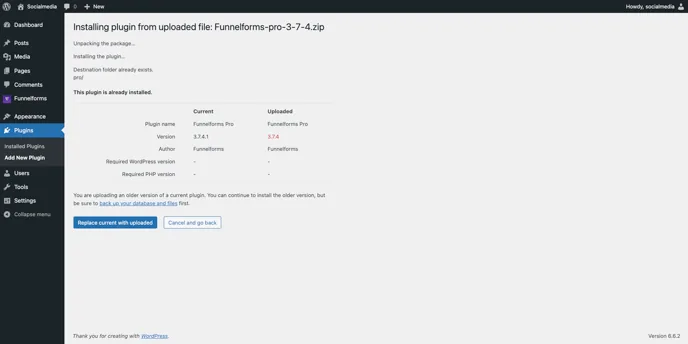
You have now downgraded Funnelforms Pro to an older, functioning version.