Connect Funnelforms: Use Apps, Webhooks, Tracking and Automations the Right Way
Funnelforms connects your forms with the tools you use every day — CRM, email marketing, calendars, messaging, tracking and automation. This article gives you the map: which connection types exist, what is live today and when to pick which path.
Requirements
- An active Funnelforms account with at least one form.
- For plan-gated apps: a matching plan. On the Free tier you remain limited to 1 form and 1 domain.
- For native OAuth apps: an account with the respective provider (Google, Microsoft, Meta, Slack, Apple).
Where to find it
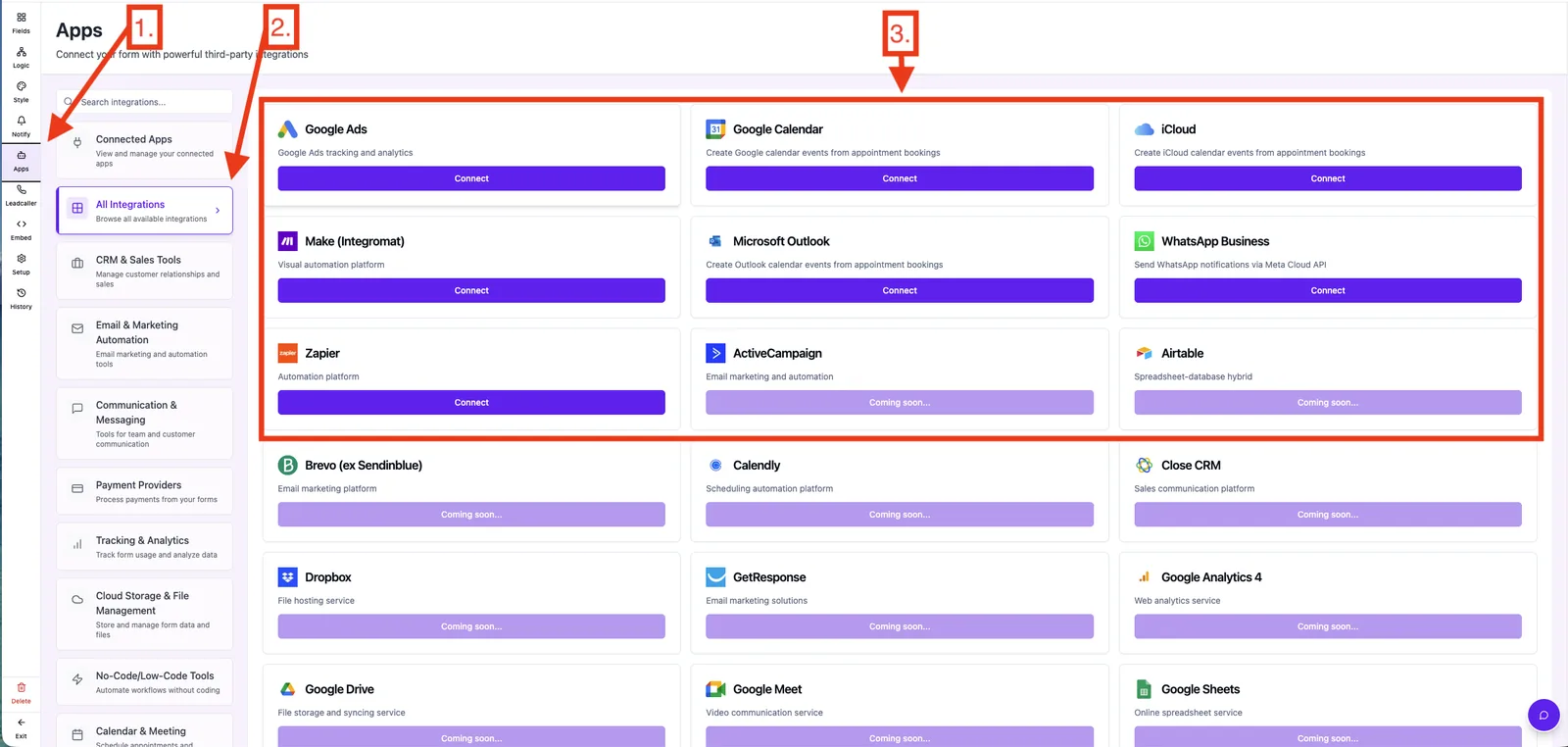
Main menu → Apps. The catalog shows each app with its status (Connected or Not connected). Webhook targets, Zapier and Make.com are also configured directly on a form under Editor → Notifications.
Connection types at a glance
- Native OAuth apps — click Connect, authorize Funnelforms in a popup, done. Used for Google Calendar, Microsoft Outlook, iCloud Calendar, WhatsApp Business (Meta) and Slack.
- Automation platforms — Funnelforms is a trigger app inside Zapier (REST Hooks) and Make.com (Instant Trigger). The actual connection is created inside Zapier or Make, not inside Funnelforms.
- Webhooks — you configure an HTTPS URL on the form. On every submission Funnelforms POSTs a JSON payload to your endpoint.
- Tracking codes — Google Ads, Google Analytics 4, Meta Pixel and Google Tag Manager are added as tracking snippets, not via OAuth.
Currently active integrations
- Webhooks — POST to any URL on submit.
- Zapier — trigger app with REST Hooks and OAuth handled inside Zapier.
- Make.com — instant trigger for new leads.
- WhatsApp Business — native Meta integration for admin and user notifications.
- Google Calendar, Microsoft Outlook, iCloud Calendar — automatic appointment sync for the booking field.
- Google Ads — conversion tracking for trials and form submissions.
Which option for which case?
- Plug and play, no code — native OAuth app when available, otherwise Zapier.
- Complex workflows with filters and data transformation — Make.com.
- Custom backend or in-house tool — direct webhook. No third-party fees, lowest latency.
- Just an appointment or a Slack ping — the matching native integration.
Best practices
- Send one test lead through every integration before going live.
- Disconnect unused connections to keep your data flows clean.
- Combine tracking (for performance) and lead delivery (for sales) deliberately — they serve different purposes.
- For critical workflows: add a webhook as a second receiver for safety.
Common pitfalls
- Trying to connect Zapier or Make from inside Funnelforms. The connection lives inside Zapier or Make — Funnelforms is the trigger app there.
- Webhook without HTTPS. Funnelforms only delivers to HTTPS endpoints.
- Confusing tracking with lead delivery. A Meta Pixel reports the conversion but does not push lead data into your CRM. For that you need a webhook, Zapier, Make or a native integration.
- Missing plan limits. Some integrations are plan-gated; a lock icon in the catalog marks restricted apps.
Tips & notes
- Catalog logos without a Connect button are placeholders for upcoming native connectors. Until then you can already reach those tools via Zapier, Make or a webhook.
- Native integrations need no maintenance from your side — token refresh runs automatically.
- Webhooks and Zapier deliver independently; if one path fails the other keeps working.
FAQ
Can I use several integrations at the same time? Yes. Webhooks, native apps and tracking codes run in parallel and independently.
Do I need coding skills? No. Native apps and Zapier work fully without code. Webhooks require a tool that can accept HTTP POST.
Is data buffered when sent to an integration? Funnelforms stores the lead in its own system and additionally pushes it to the connected integration. The third party stores it on its own side.
What happens if the target server is briefly unreachable? Webhook deliveries are protected by retries and logging. Details are covered in the webhook logs article.