With a conversion action, Funnelforms reports every new entry to your advertising and analytics accounts. Meta, Google Analytics 4 and TikTok receive the report directly from the server of your website, so ad blockers and lost redirects cannot swallow it. Google Ads receives it through the Google tag in the visitor's browser. Whether anything is sent depends on the visitor's consent and on the privacy mode of your website.
Requirements
- Funnelforms Pro. This feature is not included in Funnelforms Free. Free does not offer the conversion actions under Add an action and names conversion tracking in the note with the Pro badge.
- You have the right to see entries. Without this right you can prepare actions; someone with the right publishes them.
- For Add connection you need the right to change the settings.
- Credentials of the platform: for Meta Pixel ID and Access token, for Google Analytics 4 Measurement ID and API secret, for TikTok Pixel code and Access token.
- For Google Ads: a Google tag on the page with the form. Funnelforms does not load one itself.
- A cookie banner that supports the WP Consent API (for example Complianz, Borlabs, Real Cookie Banner or CookieYes), so Funnelforms knows the consent.
Where to find it
Open the form in the editor in the Structure workspace, click the contact step and then the After sending tab on the right. Under Actions, choose Conversion (Meta, GA4, TikTok) or Google Ads conversion in Add an action.
You find the privacy mode under Funnelforms → Settings → General in the Privacy mode card.
Features at a glance
- Platform: Meta (Conversions API), Google Analytics 4, TikTok (Events API).
- Event: your own name or the Standard event of the platform.
- Value from the calculation and Currency, if the form has calculations.
- A note below the action tells you when it is sent: for Meta, GA4 and TikTok only with consent in the cookie banner.
- Test event code for Meta and TikTok, for tests in the test view of the platform.
- For Google Ads: Conversion ID and label, Only with the visitor's consent and Enhanced conversions.
- Privacy mode of the website: EU (GDPR), recommended or Global (opt-out).
Step by step
Check the privacy mode
- Open Funnelforms → Settings and stay on General.
- Check in the Privacy mode card which mode is chosen. For websites with visitors from the EU, keep EU (GDPR), recommended.
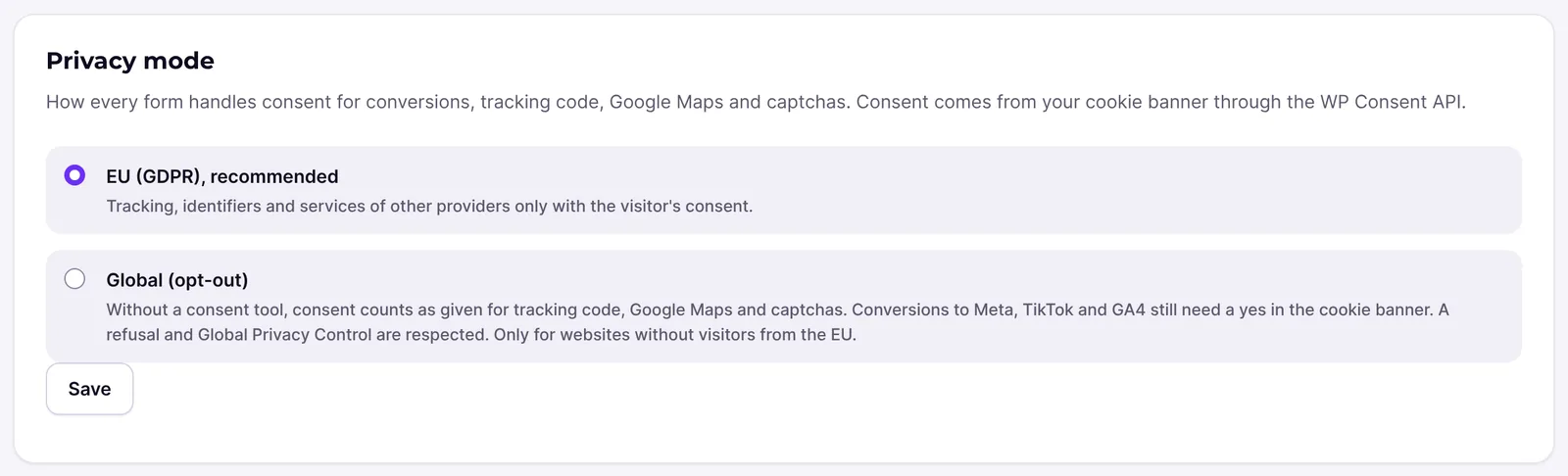
- Click Save if you changed something.
Meta, GA4 or TikTok
- Open the form in the editor, click the contact step and then the After sending tab.
- Under Add an action, choose Conversion (Meta, GA4, TikTok).
- Choose the platform under Platform.
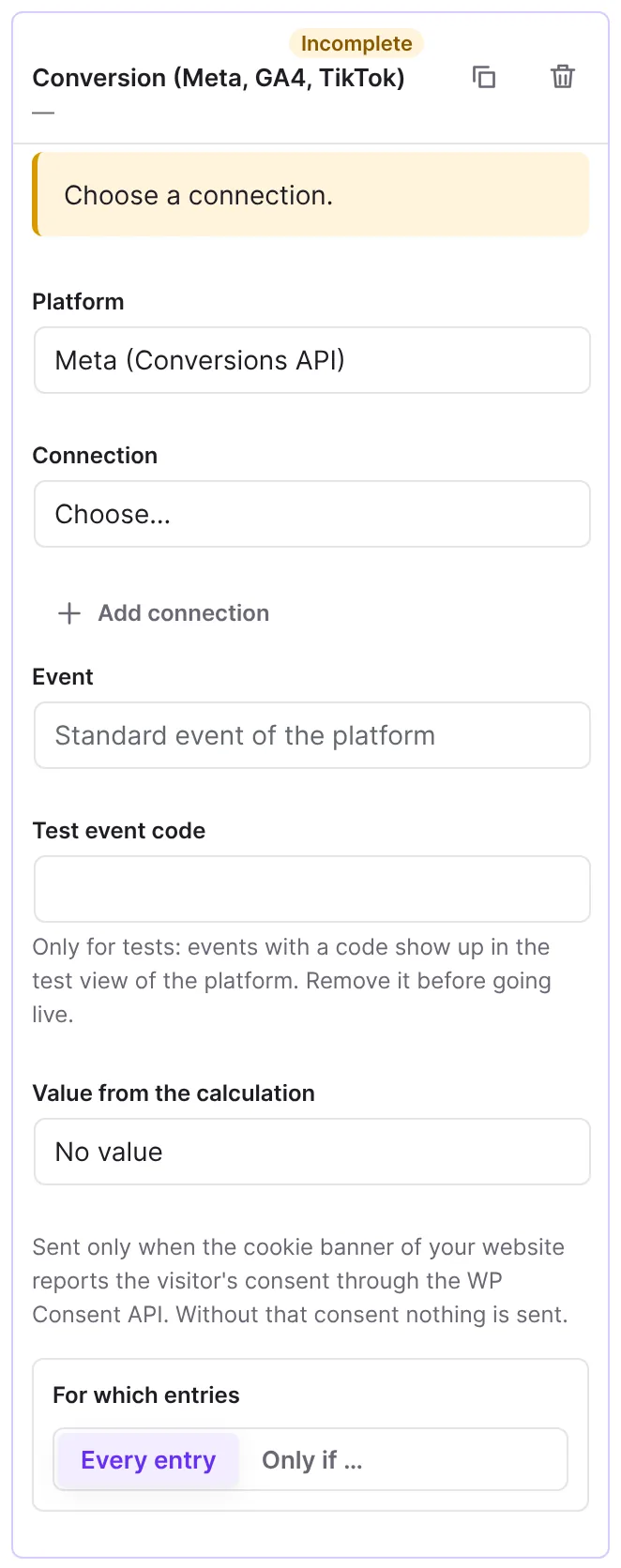
- Under Connection, click Add connection, give it a Name, enter the credentials and click Save connection.
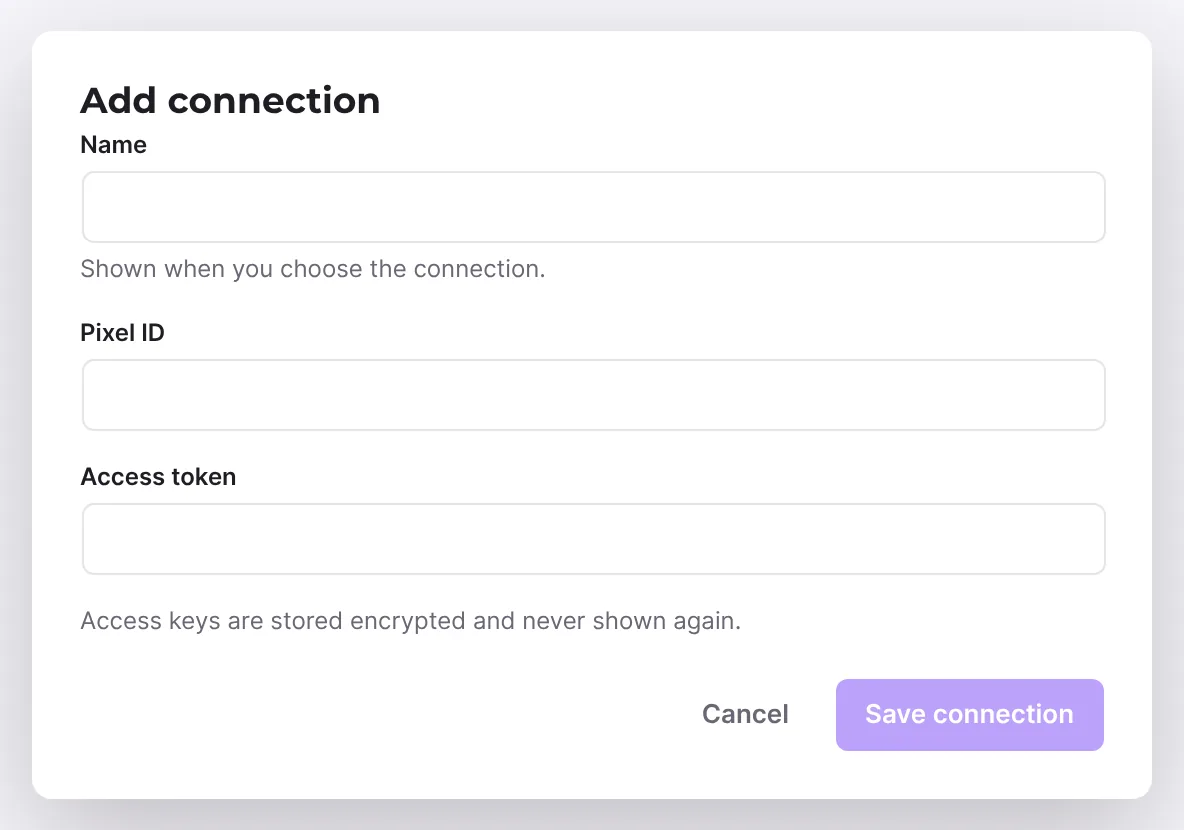
- Leave Event empty to send the standard event, or enter a name.
- If the form has calculations, choose a result under Value from the calculation and enter the Currency, for example
EUR. - For a test with Meta or TikTok, enter the code from the test view of the platform under Test event code. Remove it before going live.
- Read the note below the fields: "Sent only when the cookie banner of your website reports the visitor's consent through the WP Consent API. Without that consent nothing is sent." This applies in both privacy modes.
- Publish the form with Publish.
Google Ads
- Under Add an action, choose Google Ads conversion.
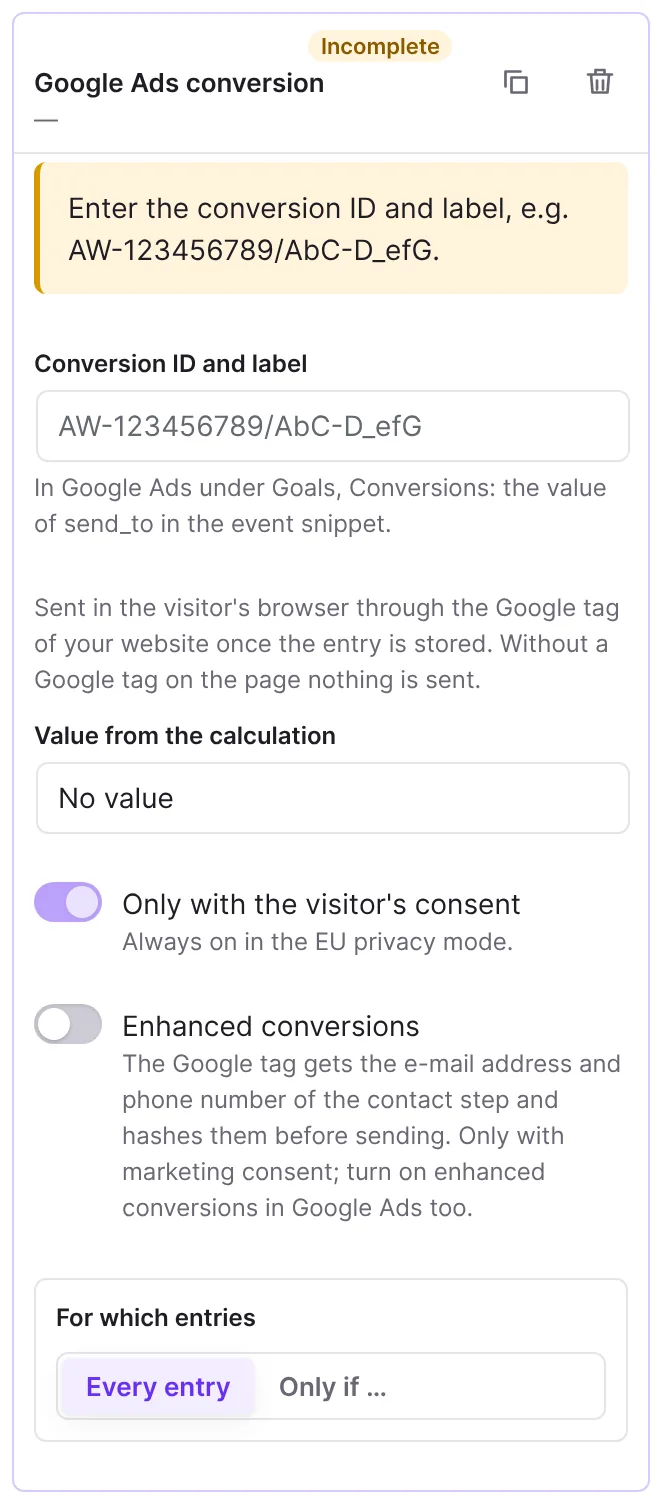
- Under Conversion ID and label, enter the
send_tovalue from the event snippet, for exampleAW-123456789/AbC-D_efG. You find it in Google Ads under Goals, Conversions. - Choose Value from the calculation and Currency if needed.
- Leave Only with the visitor's consent on. It can be switched off only in the Global (opt-out) mode; Funnelforms then sends unless the visitor refused.
- Switch on Enhanced conversions if needed.
- Publish the form.
How it works
What does the privacy mode do?
The privacy mode applies to all forms of the website. It sets how Funnelforms handles consent for conversions, tracking code, Google Maps and captchas. Consent comes from your cookie banner through the WP Consent API.
- EU (GDPR), recommended (default): tracking, identifiers and services of other providers only with the visitor's consent. If no cookie banner reports consent, nothing is sent.
- Global (opt-out): without a consent tool, consent counts as given for tracking code, Google Maps and captchas. Conversions to Meta, TikTok and GA4 still need a yes in the cookie banner. A refusal and Global Privacy Control are respected. Only for websites without visitors from the EU. For Google Ads the switch Only with the visitor's consent decides, see below.
When is it sent?
Each platform belongs to a category of the WP Consent API: Meta, TikTok and Google Ads to "marketing", Google Analytics 4 to "statistics". Funnelforms reads the consent when the form is sent and stores it with the entry.
| Visitor | EU (GDPR) | Global (opt-out) |
|---|---|---|
| agreed to the category | sent | sent |
| refused it | never | never |
| no consent tool on the website, or no answer | never | Meta, GA4, TikTok: never. Google Ads: only with Only with the visitor's consent turned off |
| browser sends Global Privacy Control | only after agreeing in the cookie banner | never |
Meta, GA4 and TikTok always require consent; these actions have no switch for it. So Funnelforms sends them in the Global (opt-out) mode too only when your cookie banner reports the visitor's agreement. The note at the action says the same, in both modes.
If nothing is sent, the entry shows the delivery as "Skipped" with no_consent.
Which data does the entry store?
Funnelforms reads the identifiers of a platform only when its category is allowed. The entry stores IP address, user agent and the cookies of Meta and TikTok only when "marketing" is allowed, and the Google Analytics client ID only when "statistics" is allowed. If neither category is allowed, the entry stores no tracking data at all. The data is deleted with the entry. More in Privacy and personal data.
What does the platform receive?
- Meta and TikTok: event name, time, page address, event ID, value, e-mail address and phone number from the contact step as SHA-256 hashes, IP address, user agent and the cookies of the platform.
- Google Analytics 4: no personal data, only client ID, event name, event ID and value. Without the
_gacookie, GA4 cannot assign the event to a visitor; the delivery is then "Skipped" withno_client_id.
Adapt your privacy policy to this transfer.
Which standard events are there?
If Event stays empty, Funnelforms sends Lead to Meta, generate_lead to Google Analytics 4 and SubmitForm to TikTok.
How do I avoid double counting with the browser pixel?
Funnelforms sends an event ID and writes it to the dataLayer with { event: 'ffxLead', eventId }. If your browser pixel fires from this event with the same ID, the platform counts the browser and the server event only once.
How does Google Ads work?
Google Ads offers no server interface a website can use without an app of its own. That is why Funnelforms sends the conversion in the visitor's browser through the Google tag of your website once the entry is stored. Without a Google tag on the page nothing is sent. The category "marketing" applies as in the table above. In the EU (GDPR) mode, Only with the visitor's consent is always on and cannot be switched off ("Always on in the EU privacy mode."). In the Global (opt-out) mode the switch decides: with Only with the visitor's consent on (the default), Funnelforms sends only after the visitor agreed in the cookie banner. With it off, Funnelforms sends unless the visitor refused or the browser sends Global Privacy Control ("Off: sent unless the visitor refused, for cookie banners that do not report consent.").
With Enhanced conversions and marketing consent, the Google tag gets the e-mail address and phone number of the contact step and hashes them before sending; turn on enhanced conversions in Google Ads too. A Google Ads conversion does not go through the queue, does not wait for a double opt-in and cannot be sent again from the entry.
What happens on errors?
Meta, GA4 and TikTok run in the background like mails. If the platform refuses the request (wrong token, unknown pixel ID), Funnelforms does not retry. With rate limits and server errors it tries up to three times.
What happens with double opt-in?
With double opt-in, the report to Meta, GA4 and TikTok waits until the visitor has confirmed their address.
How do I test a conversion?
There is no Test button for these connections. Below the connection it says: "Try it with a test entry: payments with the test keys of the provider, conversions with the test event code of the platform." For Meta and TikTok you enter a Test event code at the action. Its hint says "Only for tests: events with a code show up in the test view of the platform. Remove it before going live." Then send an entry of your own and check in the test view whether the event arrives. GA4 has no such field; there the DebugView helps.
Best Practices
- Keep the privacy mode on EU (GDPR), recommended as soon as visitors from the EU come to your website.
- Check that your cookie banner reports consent through the WP Consent API. Without this report, the EU mode sends nothing.
- Use the same event ID in the browser pixel and in the server report.
Troubleshooting
| Problem | Cause | Solution |
|---|---|---|
Delivery "Skipped", code no_consent | The visitor did not agree, or no consent tool reports consent. This applies in the EU mode and, for Meta, GA4 and TikTok, in the global mode too. | Check that your cookie banner supports the WP Consent API and reports the category. |
Delivery "Skipped", code no_client_id | GA4: there is no _ga cookie, or "statistics" is not allowed. | Check that GA4 runs on the page and the visitor agreed. |
| "Choose a connection." | No connection chosen. | Choose or add a connection. |
| "Enter the conversion ID and label, e.g. AW-123456789/AbC-D_efG." | The value does not have the format AW-…/…. | Copy send_to from the event snippet. |
| Google Ads shows nothing | No Google tag on the page, or no marketing consent. In the global mode consent is needed while Only with the visitor's consent is on. | Add the Google tag to the page with the form and check the cookie banner. |
Code permanent:connection_missing | The connection was deleted or does not match the platform. | Choose a valid connection. |
| Only with the visitor's consent cannot be switched off | The privacy mode is EU (GDPR). | This is intended; in the EU mode every conversion needs consent. |
Tips
- The value options only appear if the form has calculations.
- Delete a Test event code after the test, otherwise real entries end up in the test view of the platform.
- The click IDs
gclid,gbraidandwbraidstay with the UTM values of the entry and in the CSV export, for the offline import in Google Ads. - With several contact steps, set under For entries from which one the conversion counts for.
FAQ
Does this replace my browser pixel? No, it adds to it. With the same event ID, the platform counts both only once.
Is data sent without consent? If the visitor refused, never. In the EU (GDPR) mode also not when no consent tool answers. Only in the Global (opt-out) mode, for a Google Ads conversion with Only with the visitor's consent turned off, does a missing answer count as consent.
Where is the "Only with the visitor's consent" switch for Meta, GA4 and TikTok? It doesn't exist there. These actions always require consent: in both privacy modes Funnelforms sends them only after the visitor agreed in the cookie banner, and a refusal always stops them.
Can I send a conversion again? Meta, GA4 and TikTok yes, under Send again … in the entry. Google Ads no.