After submission, Funnelforms can send an SMS or a WhatsApp message, for example to your sales phone or as a confirmation to the number the visitor entered. You send through your own account with the provider; the costs run there.
Requirements
- Funnelforms Pro. This feature is not included in Funnelforms Free. Free does not offer Text message (SMS) and WhatsApp message under Add an action and names them in the note with the Pro badge.
- You have the right to see entries. Without this right you can prepare actions; someone with the right publishes them.
- For Add connection, Test, Edit, Delete and New template you need the right to change the settings.
- For SMS: an account with Twilio or Bird.
- For WhatsApp: a WhatsApp Business account with a sending number and a permanent access token. You send messages with templates that Meta approved.
Where to find it
Open the form in the editor in the Structure workspace, click the contact step and then the After sending tab on the right. Under Actions, choose Text message (SMS) or WhatsApp message in Add an action.
Features at a glance
- Text message (SMS): connection, recipient, sender, message, country code.
- WhatsApp message: connection, recipient, template from the account with preview, placeholder texts.
- Recipients are fixed numbers, numbers from a phone field, or both.
- Test sends a test message to your own number.
- You submit new WhatsApp templates to Meta for review from the editor.
- When and For entries from.
Step by step
SMS
- Open the form in the editor, click the contact step and then the After sending tab on the right.
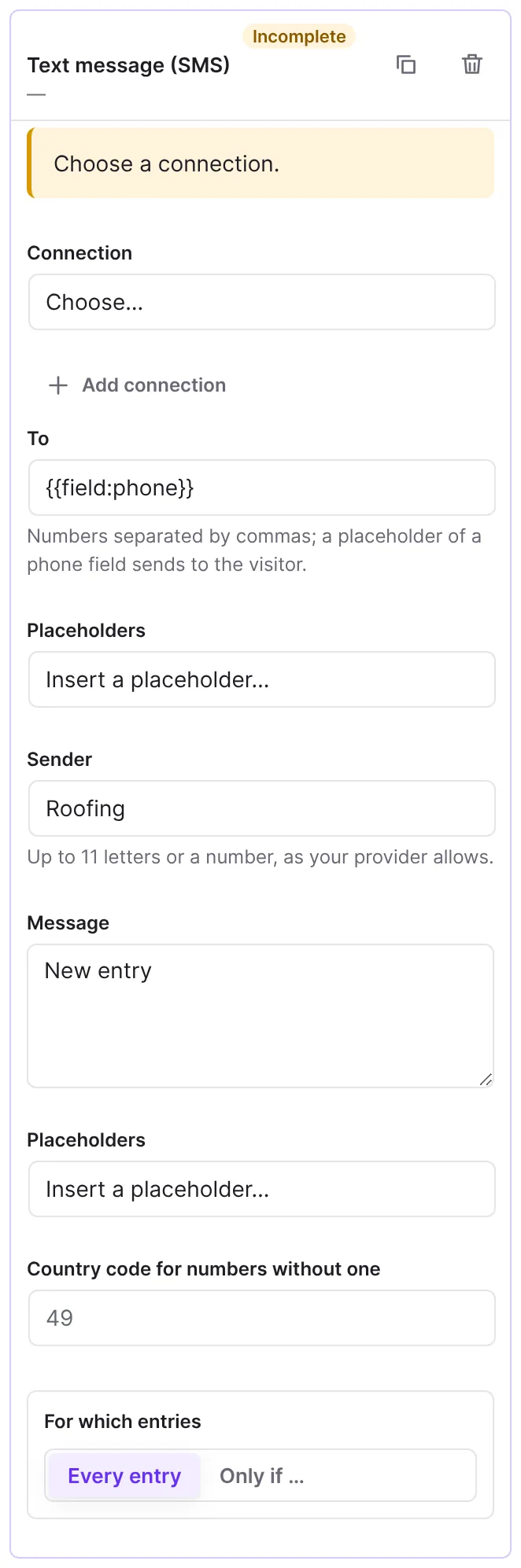
- Under Add an action, choose Text message (SMS).
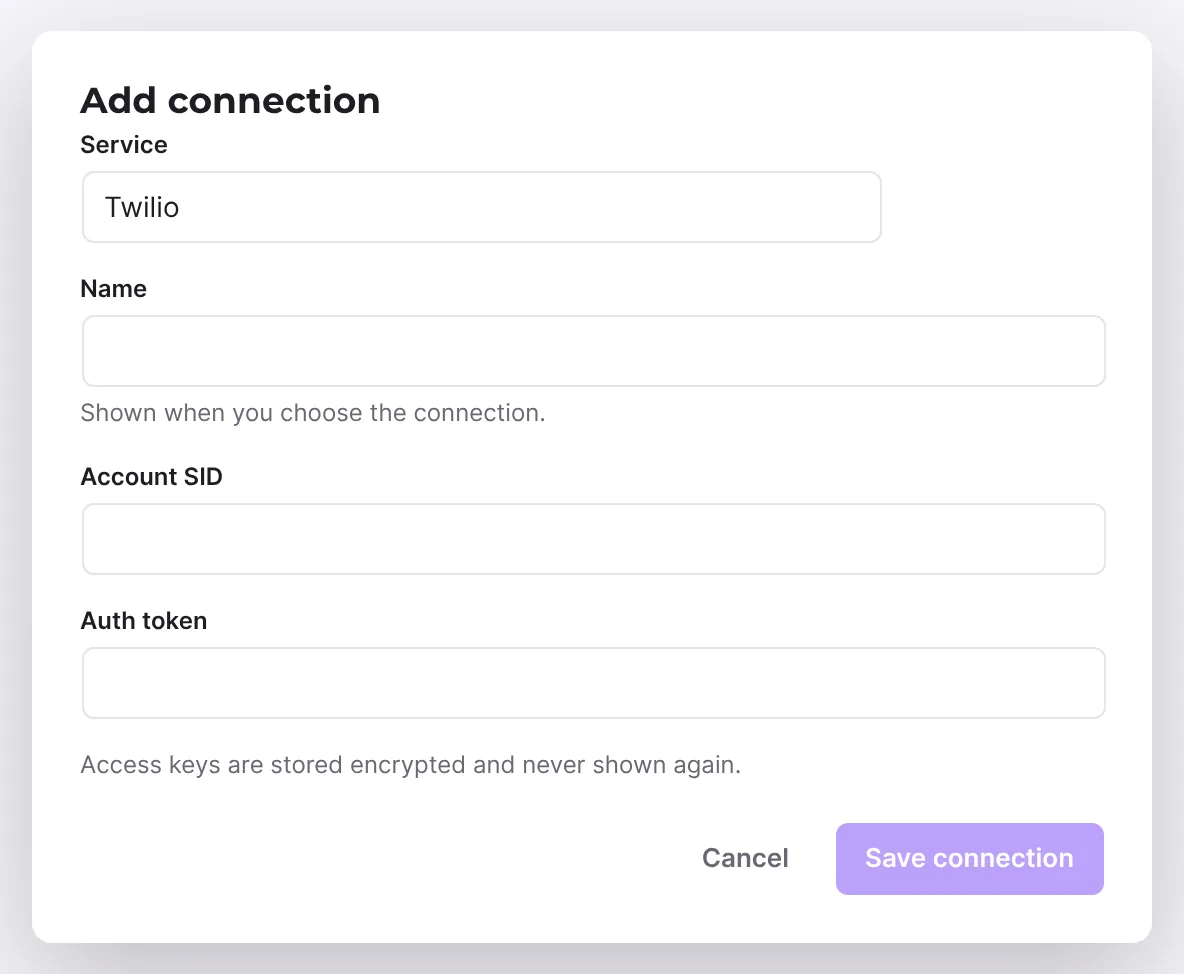
- Next to Connection, click Add connection, choose Twilio or Bird under Service, give it a Name and enter the credentials. For Twilio these are Account SID and Auth token, for Bird Workspace ID, Channel ID and Access key. Click Save connection.
- Under To, enter one or more numbers separated by commas. With the placeholder of a phone field you send to the visitor.
- Under Sender, enter up to 11 letters or a number, as your provider allows.
- Write the Message. You insert placeholders with Placeholders.
- Under Country code for numbers without one, enter for example
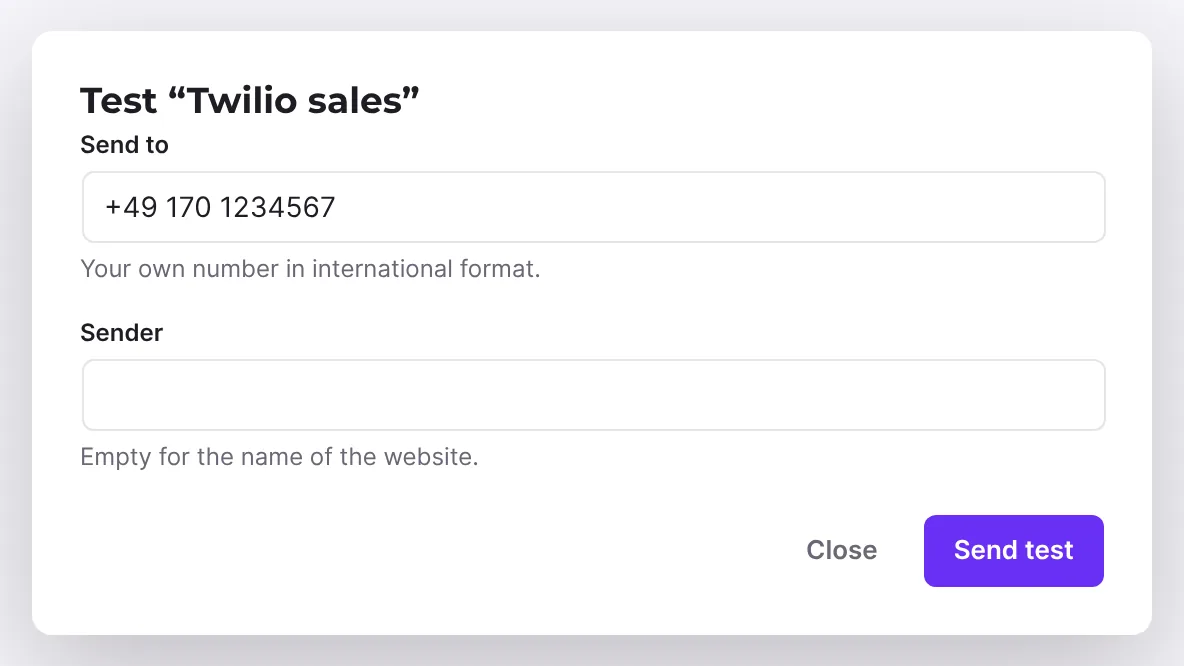
49, so numbers like 0170 … work. - Below the connection, click Test, enter your own number in international format under Send to and click Send test. If you leave Sender empty, the test uses the name of the website.
- Publish the form with Publish and test it with an entry.
- Under Add an action, choose WhatsApp message.
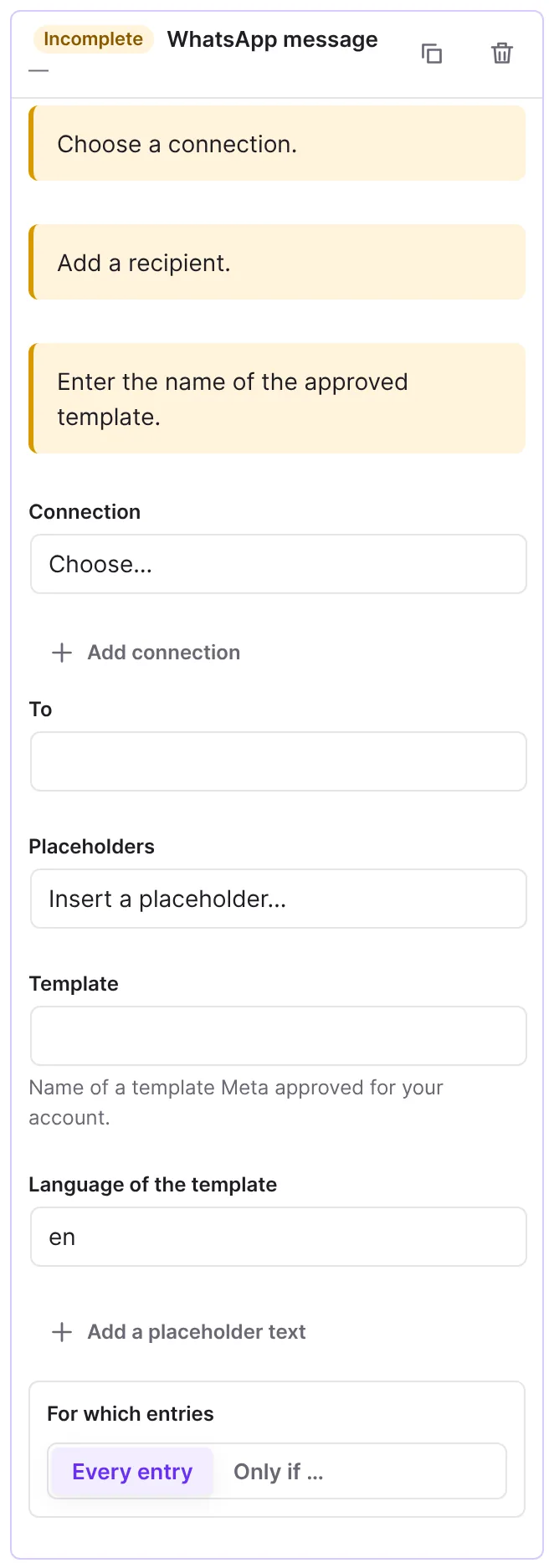
- Next to Connection, click Add connection and enter Phone number ID and Access token. The WhatsApp Business account ID (for templates) is optional, but needed if you want to choose or submit templates in the editor. Click Save connection.
- Under To, enter the recipient number with country code, or a phone placeholder.
- Under Template, choose a template of your account. Below the list you see a preview.
- Give every placeholder of the template a text in the fields "Placeholder
{{1}}of the template", "Placeholder{{2}}of the template" and so on. You can use placeholders such as{{field:name}}in them. Add a placeholder text adds another field. - Below the connection, click Test. Enter your own number under Send to. Approved template holds the template of the action or
hello_world, which exists in every account, and Language of the template its language oren_US. Click Send test. - Publish the form and test it with an entry.
Submit a new WhatsApp template
- Below the template list, click New template.
- Give it a Name (lowercase letters, digits and underscores) and choose the Language.
- Under Kind, choose Service message (e.g. confirmation of the request) or Marketing (offers, news).
- Write the Message (up to 1024 characters). With Add a placeholder you insert placeholders 1, 2 and so on. Put text before the first and after the last placeholder.
- Give an Example for every placeholder, which Meta reviews the message with.
- If needed, enter a Footer (optional) of at most 60 characters.
- Click Submit to Meta.
How it works
How does Funnelforms handle phone numbers?
Funnelforms sends numbers in international format. It removes spaces, dashes, brackets and slashes and turns a leading 00 into +. For SMS it also puts the country code from the field Country code for numbers without one in front of numbers that start with 0. Numbers that still do not fit are left out. If none is left, the action counts as "Skipped". SMS allow up to 1600 characters.
How do WhatsApp templates work?
WhatsApp only lets a business start a conversation with a template that Meta approved. The action therefore names the template, the language and the texts for the placeholders. Each text fills {{1}}, {{2}} and so on in the template text. Line breaks and tabs become spaces, and empty texts become a dash, because WhatsApp refuses them otherwise.
In the list, each template shows its status: approved, in review, rejected or paused or disabled.
- A template in review is usually decided within a few minutes. Messages are sent once it is approved.
- For a rejected template, change it in the WhatsApp Manager or write a new one.
- Forms do not support templates with a picture, a document or variables in the header or buttons; choose another one.
What happens without the account ID?
Without the account ID, the editor cannot load the templates. It then shows the field WhatsApp Business account ID with a note on where to find it (WhatsApp Manager → Account tools → Business account ID), and Save. Whoever may not change the settings sees a note that someone with that right adds the ID to the connection. Until then, you enter Template and Language of the template by hand: the name of a template that Meta approved for your account, and the language code, such as de.
What does the test send?
Test opens the window "Test “name of the connection”". A text message reads "Test message from Funnelforms on …" with the name of your website. For WhatsApp the chosen approved template goes out, because WhatsApp sends first messages only as a template. If it works, it says "The test message was sent. Check that it arrived.", otherwise "The message was not delivered (…)." with an error code. A number not in international format is refused with "Enter the number in international format, e.g. +49 170 1234567."
With Edit you change the name and credentials of a connection; empty fields keep the stored values. With Delete you remove it for the whole site. More in Add, test and delete connections for actions.
What happens on errors?
The message runs in the background. On server or rate-limit errors, Funnelforms tries up to three times. When the provider refuses the request (answer 4xx, for example because of wrong credentials), it does not retry.
Best Practices
- Test with your own number before you write to visitors.
- For templates, choose the kind Service message if it only confirms a request. Meta charges marketing messages higher and may change the kind on review.
- Keep WhatsApp templates short and give descriptive examples.
Troubleshooting
| Problem | Cause | Solution |
|---|---|---|
| "Enter the name of the approved template." | No template chosen. | Choose a template or enter its name. |
| "The templates could not be loaded" | Access to Meta is missing or wrong. | Check token and account ID of the connection and click Try again. |
| "The account has no templates yet." | The WhatsApp Business account has none. | Submit one with New template. |
| "The template has 2 placeholders. Give each one a text below." | Texts for placeholders are missing. | Enter the texts in the fields "Placeholder {{1}} of the template" and the following ones. |
| Status "Skipped" | No valid number. | Enter the number in international format. For SMS you can enter the Country code for numbers without one instead. |
"Failed" with code permanent:connection_incomplete | The connection is incomplete, for example the sender is missing for Twilio. | Enter the Sender and the credentials. |
"Failed" with code permanent:provider_retired | The action uses a provider that Funnelforms no longer supports. | Choose or add a Twilio or Bird connection under Connection and publish. |
"Failed" with code permanent:http_401 or similar | Credentials or permissions are wrong. | Enter valid credentials with Edit and check with Test. |
| Send test stays greyed out | Send to is empty, for WhatsApp also template or language. | Fill in the fields. |
Tips
- For Twilio, the sender is a Twilio number or a messaging service ID starting with MG.
- For Bird, the sender is the sender of the chosen SMS channel.
FAQ
Can I send an SMS to the visitor? Yes. Put the placeholder of a phone field under To, for example {{field:phone}}.
Can I send free text through WhatsApp? No. WhatsApp only lets businesses start with an approved template.
Who pays for SMS and WhatsApp? You do, through your account with the provider. Funnelforms sends through your connection.
Can I send a message again? Yes. Open the entry and choose the action under Send again ….