You do not have to keep entries forever. With the retention period, Funnelforms deletes entries older than the number of days you choose every day, together with their uploaded files. This helps you keep no more data than you need. On new sites a period of one year applies from the start, and the setup assistant asks you how long entries should stay.
Requirements
- Funnelforms Free 5.0 or Funnelforms Pro 5.0. Retention is included in both editions.
- You may change settings (the right "Change settings").
- WordPress runs its scheduled tasks (WP-Cron). Funnelforms checks the period once a day.
Where to find it
- Funnelforms → Settings → Entries and spam, card Deleting entries
- In the setup assistant: the question How long should entries be kept?
Features at a glance
- One period for all forms: the field Delete entries after (days).
- 0 means entries are not deleted automatically.
- New sites start with 365 days.
- The setup assistant offers 6 months, 12 months, 24 months and Never.
- With the entries, their uploaded files, their delivery log and their notes (Pro only) are deleted.
- Uploaded files that never became a submitted entry are cleaned up after one day (Pro only, as file uploads exist only in Pro).
Step by step
Choose the period in the setup assistant
- The setup assistant opens for administrators after installing or updating. Until it is finished, the Funnelforms pages lead to it.
- Under How long should entries be kept?, choose a period. On a new site 12 months is preselected. After an update from Funnelforms 3, your current setting is preselected.
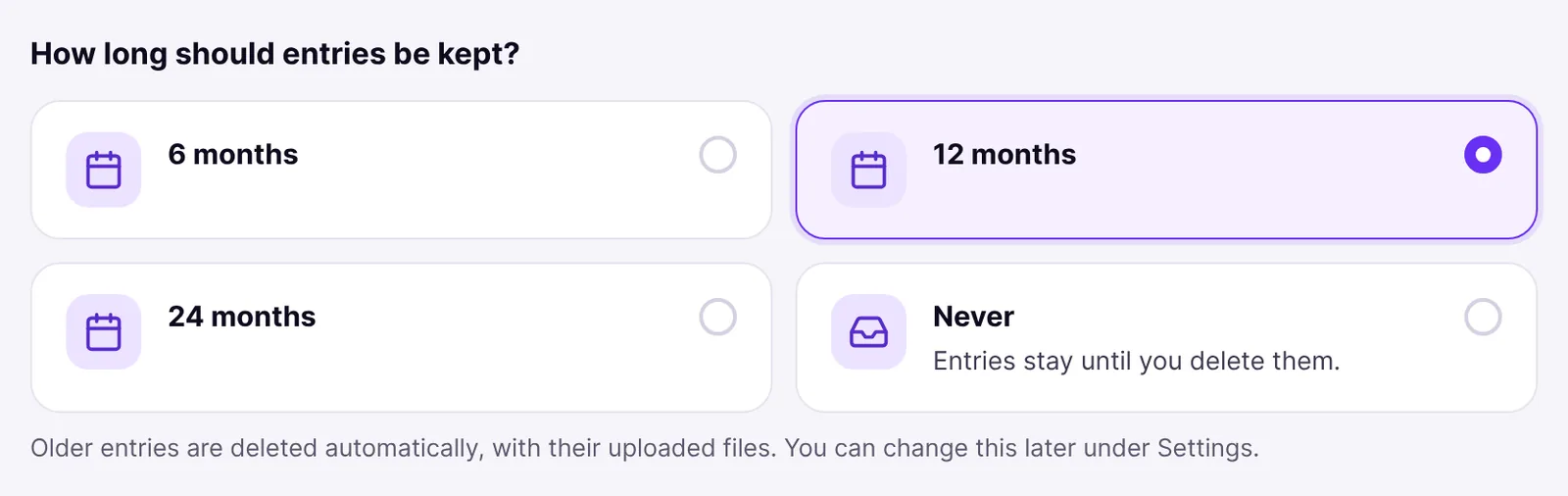
- Below the choice, one sentence says what applies, for example "Entries are kept for 12 months, then deleted automatically" or "Entries are never deleted automatically".

- Finish the assistant. The period is saved only then, and only if it differs from the current one.
Change the period in the settings
- Open Funnelforms → Settings → Entries and spam.
- Go to the card Deleting entries.
- In the field Delete entries after (days), enter the number of days, for example
365. Values from 0 to 36500 are allowed. - Click Save.
From the next daily run on, entries that arrived more than this number of days ago are deleted.
How it works
Which period applies on my site?
| Situation | Period |
|---|---|
| New site without forms or entries when the plugin is activated | 365 days, until you save something else |
| Site with forms or leads from Funnelforms 3 or 5, nothing saved yet | the setting "Automatically delete leads" of Funnelforms 3; if it is off, nothing is deleted |
| A value is saved (settings or setup assistant) | only that value |
This way nobody loses leads by updating from Funnelforms 3. In the setup assistant, the old rule appears converted to days (a week = 7, a month = 30, a year = 365 days). If that is none of the usual periods, it is offered as a choice of its own.
What is deleted?
Entries whose arrival is longer ago than the period are deleted, archived ones too. With every entry, its uploaded files, its delivery log and its notes disappear. Appointments that are over are deleted along with it; appointments that are still ahead are kept. Deleting cannot be undone. Every run is recorded in the log of administrator actions with the number of deleted entries, not with their content.
What does the field show while I have saved nothing?
As long as you have not saved a value, the rule of Funnelforms 3 applies. The field shows it converted to days (a week = 7, a month = 30, a year = 365 days); if the rule is off, it shows 0. The card points this out. Once you save a value, only it applies, exactly in days. If nothing should be deleted automatically, save 0.
Can a form have a period of its own?
A form can hold a period of its own in days. It takes precedence over the website's period. The setting for it in the builder: This feature is currently in progress.
What happens to entries from Funnelforms 3?
Entries taken over are deleted after the period too. Their copy in the old lead list of Funnelforms 3 is marked so that it is not taken over again; files of leads from Funnelforms 3 stay in the upload folder (uploads/af2). To delete the data of one person completely, including the old lead list, use the privacy tools of WordPress (see "Privacy and personal data").
What happens to uploads that were never sent? (Pro only)
When visitors upload a file and leave the page without sending the form, the file first stays on the server. Funnelforms deletes such files after one day; the check runs every hour.
What happens to saved progress? (Pro only)
With forms that use Continue later, visitors save their answers and get a link to carry on. These answers are removed after 30 days, and as soon as the entry is submitted.
And the statistics?
The measurement data of the statistics is deleted after 400 days, independent of the period for entries.
Best practices
- Set the period on purpose. You decide which period fits your purpose; it should match your privacy policy. The suggested text for the privacy policy names the saved period.
- Export entries you need for longer before the period runs out (see "Viewing, filtering, exporting and deleting entries").
- After an update from Funnelforms 3, check in the setup assistant whether the preselected period still fits.
Troubleshooting
| Problem | Cause | Solution |
|---|---|---|
| Old entries are still there. | The period is 0, or the daily run has not happened yet. | Check the period and wait for the next daily run. |
| Entries disappear although I set nothing. | On a new site a period of 365 days applies, or "Automatically delete leads" of Funnelforms 3 still applies. | Save the period you want in Deleting entries, 0 if needed. |
| The field shows a period although I never saved one. | The rule of Funnelforms 3 still applies; the field shows it in days. | Save the value you want. From then on only it applies. |
| Every Funnelforms page leads to the setup assistant. | The assistant is not finished yet. | Answer the questions and finish it. |
| The tasks do not run. | WP-Cron is not run on the site. | Check Tools → Site Health for notes on waiting tasks. |
Tips
- Archive takes entries out of the list without deleting them. The period still deletes them once it has passed.
- You delete a single entry right in the entry's side panel.
- If you change the value, the new period applies to all existing entries from the next run on.
FAQ
Why are entries deleted after one year on my new site? New sites start with 365 days so that no more data is kept than needed. You change it in the setup assistant or under Settings → Entries and spam.
Does an update from Funnelforms 3 change my period? No. The old rule keeps applying and is preselected in the setup assistant. Only what you change there is saved.
When does the deletion run? Once a day through the scheduled tasks of WordPress.
Can I exclude single entries from deletion? There is no setting for that. Export the entries beforehand.