With long forms, visitors sometimes stop because a detail is missing. With Continue later, they can save their answers and pick up exactly where they left off, using a link. This reduces the number of abandoned forms.
Requirements
- Funnelforms Pro. This feature is not included in Funnelforms Free.
- Changes reach visitors only after you publish the form.
In Funnelforms Free, the Continue later switch is missing from the General section. It appears there only when a form already has it turned on, so that you can turn it off.
Where to find it
Funnelforms → Forms → open a form → workspace Settings → section General → switch Continue later.
Features at a glance
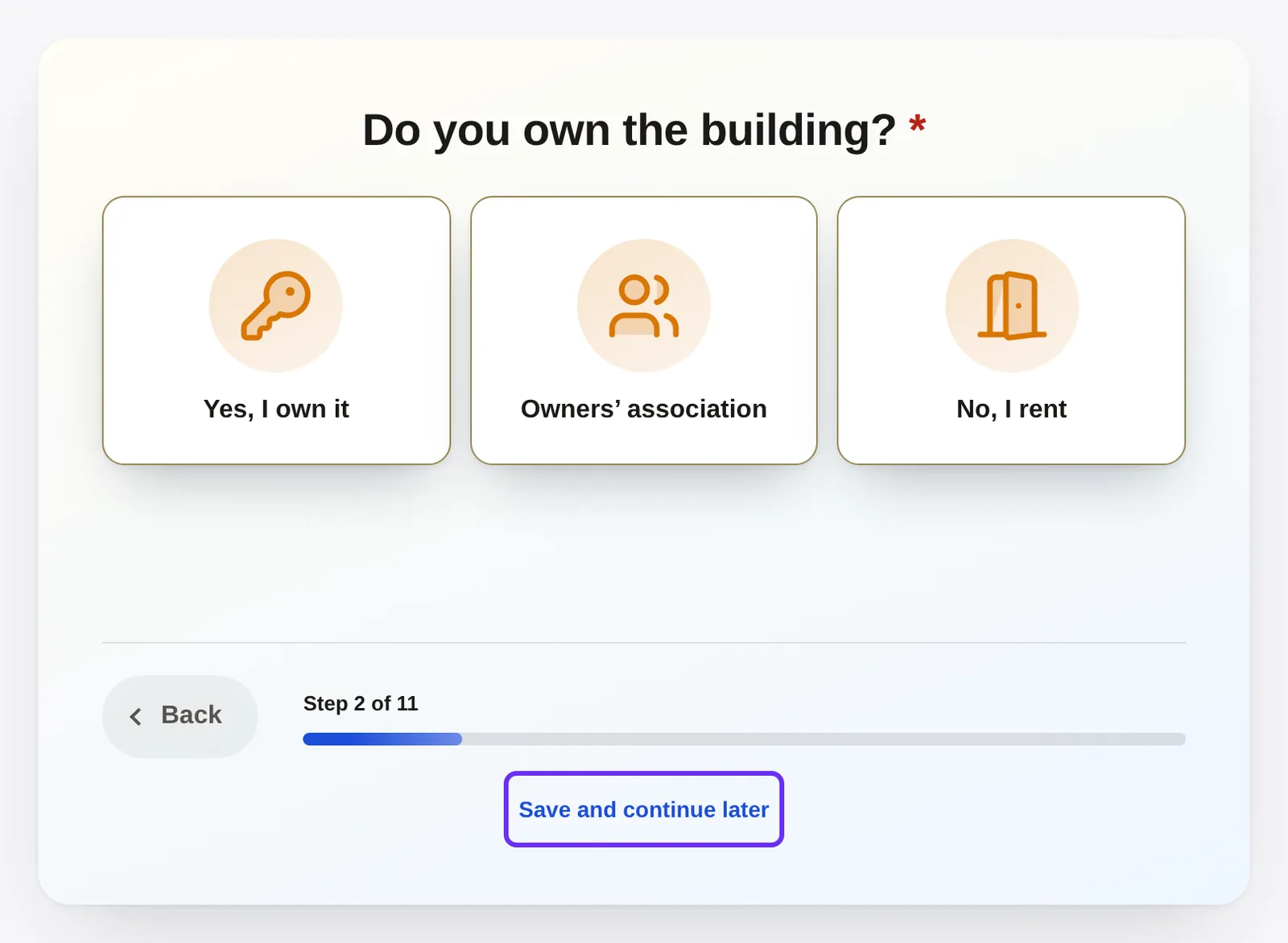
- On every step, the button Save and continue later appears in the bar at the bottom next to Next.
- Visitors get a link that they can copy or bookmark.
- The link takes them to the first step that still needs answers.
- Saved answers expire after 30 days and disappear as soon as the entry is sent.
Step by step
- Open the Settings workspace and go to the section General.
- Turn on Continue later. The hint reads: "Visitors can save their answers and get a link to continue."

- Publish the form with Publish.
- Test it on your page: answer a question and click Save and continue later.
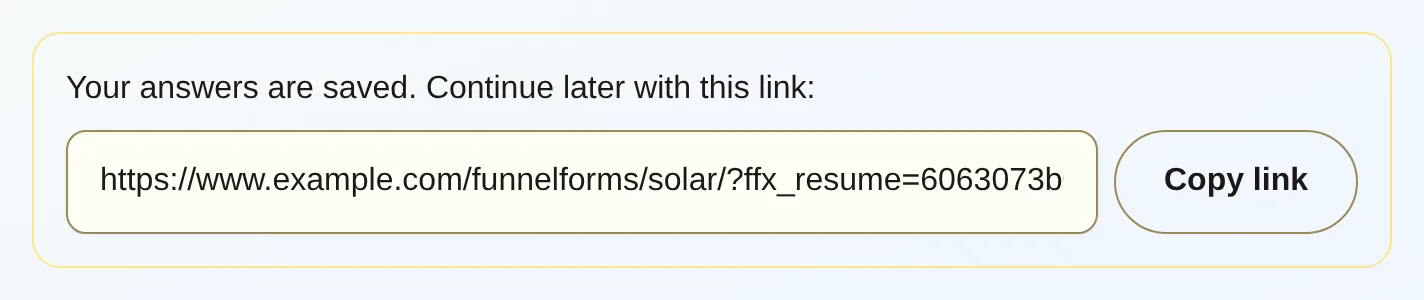
- Copy the link with Copy link and open it in a new browser window. The form loads your answers.
How it works
What do visitors experience?
- The visitor clicks Save and continue later.
- They see "Your answers are saved. Continue later with this link:", below it a field Link to continue and the button Copy link. After copying, it says "Copied".
- Later they open the link. The form loads the saved answers and jumps to the first step that still needs answers. It shows steps of type Text and media again, so that results, for example, appear again.
If they save again later, the link stays the same.
Note: Funnelforms does not send the link by e-mail. Visitors have to copy it or bookmark the page themselves.
Where does the button appear?
Next to Next on all steps. It does not appear on the contact step or on the end.
What is saved and what is not?
The valid answers of the steps are saved. Uploads and the details in the contact step are not saved. Visitors upload files again after resuming and enter their contact details again. With an A/B test, the variant the answers were saved with is kept.
How long do saved answers last?
30 days. After that, the link has expired and the visitor sees "This link has expired or is not valid. Please start again." As soon as the visitor sends the form, Funnelforms deletes the saved answers. The plugin cleans up expired answers every hour. Whoever develops the website can change the duration with the filter funnelforms_save_progress_days.
Are saved answers entries?
No. Saved answers appear neither in the entry list nor in exports or statistics. Only the sent contact step creates an entry.
What happens if I change the form?
When resuming, Funnelforms checks the answers against the form as it looks then. It leaves out answers that no longer fit.
What happens at steps whose way on depends on a calculation?
If the way leads past a step whose paths compare a calculation result (for example in a quiz), the form stops there. The visitor continues with Next themselves.
What does Funnelforms Free do with "Continue later"?
Free cannot publish a form with Continue later turned on, for example after switching from Pro to Free ("The form uses "Save and continue later", which is part of Funnelforms Pro …"). If it is already published, Free does not show it on the website. Turn Continue later off in the General section and publish the form again; then it appears again. Saved states cannot be resumed in Free.
How is this different from "Save incomplete entries"?
These are two separate settings in the section General.
| Continue later | Save incomplete entries | |
|---|---|---|
| For whom? | For visitors who want to pick up later. | For you: answers are kept step by step, even if visitors leave. |
| Trigger | The visitor clicks Save and continue later. | Automatically after each step. |
| Result | A link to continue. | An incomplete entry. |
Best practices
- Turn on Continue later for long forms, or for forms where visitors need documents at hand.
- For forms with uploads, point out that files have to be uploaded again after resuming.
- Ask for contact details in the contact step at the end if possible, because they are not saved.
- Test the flow yourself once after bigger changes to the form.
Troubleshooting
| Problem | Cause | Solution |
|---|---|---|
| The button Save and continue later is missing. | Continue later is off, the form is not published, or the visitor is on the contact step. | Turn the setting on and publish the form. |
| In Funnelforms Free the form has disappeared from the website. | Continue later is still turned on. | Turn it off in the General section and publish again. |
| "Please answer at least one question first." | There is no valid answer to save yet. | Answer at least one question and save again. |
| "This link has expired or is not valid. Please start again." | The link is older than 30 days, was deleted after sending, or was copied incorrectly. | Fill in the form from the start and save again. |
| An answer is missing after resuming. | It no longer fits the form, or it was an upload or a contact field. | Enter the answer again. |
| The form stops at a step after resuming. | The step leads on depending on a calculation result. | Continue with Next. |
Tips
- The link contains the address of the page with the form. The form therefore has to stay embedded on the page where the visitor saved.
- Visitors can e-mail the link to themselves. The plugin does not do this, so the service cannot be abused for spam.
FAQ
Can visitors continue on another device with the link? Yes, the link contains everything needed. Anyone who has the link can open the saved answers. Please ask visitors not to share the link.
Where are the saved answers stored? In the database of your WordPress website. The key from the link is stored there only as a check value.
Does a saved interim state count as an entry? No. Only sending the contact step creates an entry.