Conditions decide which step comes after a step and which fields a visitor sees. Visitors who choose "Private customer" can get different questions than visitors who choose "Company". This way one form suits several audiences, and every visitor only sees the questions that make sense for them.
In Funnelforms Free you branch by the chosen answer of a choice or dropdown question. Rules with AND/OR, numbers, text, dates and calculations come with Funnelforms Pro. The section Conditions in Funnelforms Free explains the difference.
Requirements
- Funnelforms Free 5.0 or Funnelforms Pro 5.0.
- A form with at least two steps, or one step and one end.
- To branch by answer: a Choice or Dropdown question in this step or an earlier one.
- For rules on other fields (Pro only): fields such as Number, Slider, Rating, text fields, Date, Address, File upload or Repeat group.
- Changes reach visitors only after you publish the form.
Where to find it
Funnelforms → Forms → open a form → workspace Structure. Select a step on the canvas and open the Logic tab on the right. It holds the Next step section. For a contact step the tab is called After sending and the section Then visitors see.
A number on the Logic tab shows how many Hints about the logic this step has. When you click a connection on the canvas, the Path section opens. Whether a single field appears only on certain answers is set in the field's properties under Show this field.
Features at a glance
- By answer: every answer of a choice or dropdown question gets its own next step.
- Rules: "If … → target". A rule checks one or more conditions (Pro for everything except "answer is selected").
- Otherwise go to: the path for every visitor for whom no rule applies.
- Groups with AND/OR (Pro only): for example "A and (B or C)".
- Rules on calculations (Pro only): comparisons with the result of a calculation.
- Show fields only on certain answers: a field appears only when an answer above it or from an earlier step fits.
- Logic check: Funnelforms shows dead ends, steps nobody reaches, rules that never apply, and loops.
Step by step
Send visitors to another step by answer
- Open the form in the Structure workspace and select the step with the question.
- Open the Logic tab. Under By answer every answer of the question appears with an arrow and a select.
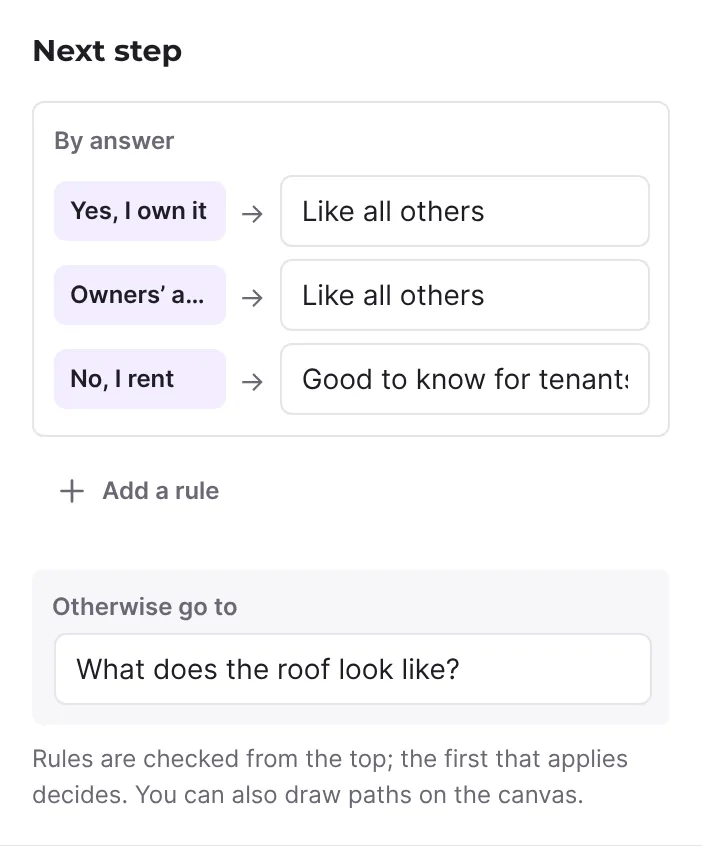
- Choose where each answer leads. The groups Steps, Contact steps and Ends list every target. + New end creates a new end right away.
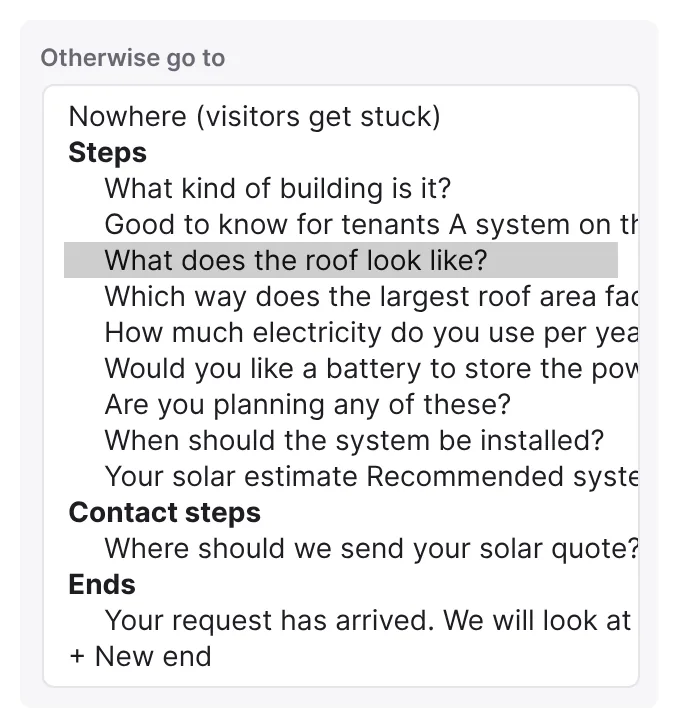
- Leave answers that need no step of their own on Like all others.
- Under Otherwise go to, choose where all other visitors go.
- Check every branch in the Preview and click Publish.
If the step has several choice questions, pick the one that decides under By the answer to.
Add a rule (if … then …)
- Select the step and open the Logic tab.
- Click Add a rule (without a choice question the button reads Add a rule (if … then …)). The new rule opens.
- Choose the rule's target under Go to.
- After when, choose the field, the Comparison and the value, for example "Budget is at least 5000".
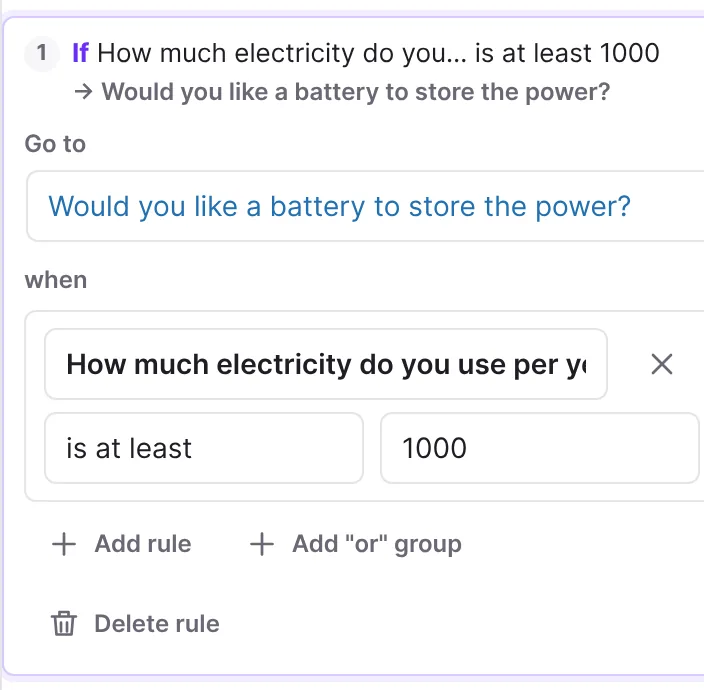
- For another condition click Add rule. With all of these apply or one of these applies you decide whether all conditions must hold (AND) or one is enough (OR).
- For a mixed condition click Add "or" group or Add "and" group. The group appears with Group: and has rules of its own.
- Remove rule and Remove group take parts out again. Delete rule removes the whole rule.
- Click the line If … → target to close the rule.
If you remove every condition from a rule, Funnelforms deletes the rule. Otherwise it would always apply.
Draw paths on the canvas
- Drag from the dot on the right of a step to the next step. The first path is the path without condition.
- Drag a second connection to another step. Funnelforms adds a rule: for a choice question, the first answer without a path of its own; otherwise the first field of the step (Pro only). Without a free answer of a choice or dropdown question, Funnelforms Free adds no rule but moves the path without condition to the new target.
- Click the connection. Adjust the rule in the Path section.
- Make it the path without condition turns it into the path for all other visitors. Add a condition gives a path without condition a rule. Delete path removes it.
- All paths of this step takes you back to the Logic tab.
Show a field only on certain answers
- Select a step with at least two fields and click the field.
- Under Show this field, switch from Always to Only if ….
- Set the rules after Show when, as for a path (Pro only). In Free, as for a path, choose a choice or dropdown question after when and the answer after is answered with.
- On the canvas the field now carries a small if (Shown only on certain answers).
A field can depend on answers higher up in the same step or on earlier steps. While hidden, the field is not required and its answer is not sent.
How it works
How does Funnelforms check the paths?
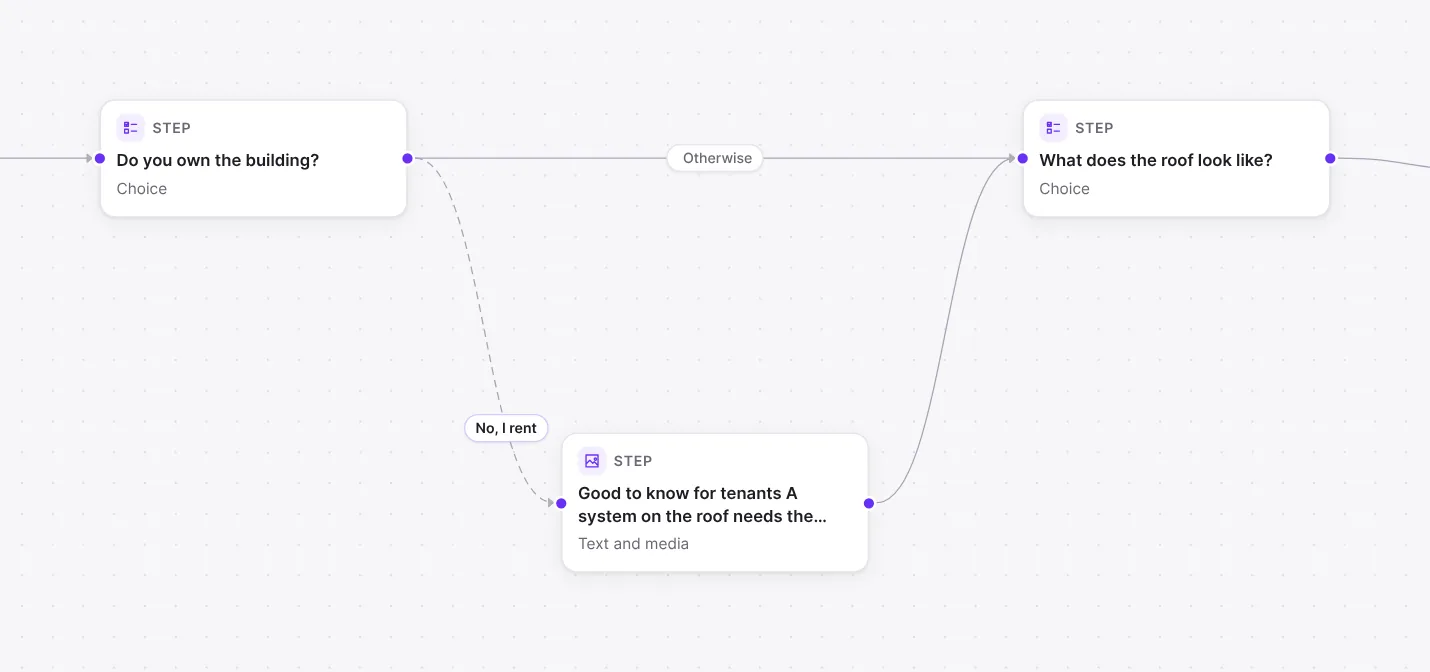
When a visitor clicks Next, Funnelforms checks the rules of the step from the top. The first rule that applies decides. If none applies, Otherwise go to is used. Change the order in an open rule with Check earlier and Check later. On the canvas, paths with a rule carry a number in this order, and the path for all other visitors is labelled Otherwise.
With a multiple choice, the first answer in the By answer list that has its own step decides. If every answer has its own target, Funnelforms shows Every answer has its own next step. and Otherwise go to reads Not needed.
The plugin follows the path again from the answers when the form is sent. An entry always follows the rules of the published form.
What happens when no path leads on?
If Otherwise go to is set to Nowhere (visitors get stuck), visitors without a matching rule cannot go on. They see "The form could not be sent (dead_end). Please try again." For a contact step the option is called Nowhere (empty form): after sending, visitors see an empty form.
Which comparisons are there?
| Field type | Comparisons |
|---|---|
| Choice with one answer | is selected, is answered, is not answered |
| Choice with several answers, Dropdown | also is the only answer, has at least this many answers, has at most this many answers, has exactly this many answers |
| Number, Slider, Rating | is at least, is more than, is at most, is less than, equals, does not equal, is answered, is not answered |
| Short text, Long text, E-mail address, Phone number, Web address, Time | is exactly, is not exactly, contains, does not contain, starts with, ends with, is answered, is not answered |
| Address | like text fields, plus Part of the address: whole address, Street, House number, Postcode, City, Country |
| Date | is before, is after, is on, is answered, is not answered |
| File upload, Repeat group | has at least this many answers, has at most this many answers, has exactly this many answers, is answered, is not answered |
| Calculation (Pro only) | is at least, is more than, is at most, is less than, equals, does not equal and a number |
Details:
- is exactly compares character by character, including upper and lower case. contains, starts with and ends with ignore case and spaces at the edges.
- For a Date, pick today or a date under Day and shift it with Plus days (minus for earlier). "Today" follows the time zone of your WordPress site.
- The field list only shows fields of steps before this step, grouped by step. Fields of the contact step are not offered. A field visitors answer only later appears in the rule as "(answered later)".
- Deleted fields, answers and calculations appear as Deleted field, deleted answer or Deleted calculation.
What happens when I delete a question that rules ask for?
Funnelforms adjusts the logic and reports, for example, "Deleted. Rules asked for it, so the logic changed: paths removed: 1." Undo brings back the question and its rules.
What does the logic check show?
With nothing selected, the Logic check section lists every hint of the form. Without problems it reads Every step leads on and every end can be reached. Show takes you to the place. On the canvas, steps carry the flags Start, Not reachable, Stuck or Check.
| Hint | Meaning |
|---|---|
| No path leads on from this step: visitors get stuck here. | No path at all, not even Otherwise go to. |
| Visitors for whom no rule applies get stuck. | Otherwise go to is missing. |
| No path leads here, so visitors never see this. | The step cannot be reached. |
| A rule asks for "…", which visitors answer only later. | The question comes after this step. |
| A path without a condition is checked before this one … Move it up. | The rule is never checked. |
| A path checked earlier asks the same … | Two identical rules. |
| The rules of this path contradict each other … | The rule can never apply. |
| This path leads round in a circle … Entries would be refused. | A loop without a way out. |
| Every field of this step can be hidden … | Visitors could see an empty step. |
Dead ends and loops are errors, the other hints are warnings.
Conditions in Funnelforms Free
Funnelforms Free branches by the chosen answer. That covers:
- By answer with one target per answer, and Otherwise go to.
- Rules of the form when [Choose a question] is answered with [answer]. Choice and dropdown questions of this step and earlier steps are offered.
- Paths without condition, the order of rules and the Logic check.
- Show this field for fields in a step with several fields, with the same rule as for paths: when [question] is answered with [answer].
If there is no fitting question before the step, Free shows "A path can ask for the answer to a choice or dropdown question before it.", for a field "A field can depend on the answer to a choice or dropdown question before it." If a path has a Pro condition, for example after switching from Pro to Free, it shows "This path has a condition of Funnelforms Pro. Choose a question and an answer to replace it." A field shows "This field has a condition of Funnelforms Pro. Choose a question and an answer to replace it, or show the field always."
As long as a form contains a Pro condition, on a path or under Show this field, Free cannot publish it. The message reads "The form uses "Conditions with AND/OR, numbers, text and dates", which is part of Funnelforms Pro, so Funnelforms Free cannot publish it." A form that is already published with a Pro condition is not shown on the website by Free, and entries are not accepted. Replace the condition with an answer rule or delete the rule, then publish again.
Best practices
- Set Otherwise go to first and add exceptions afterwards. That way every visitor ends up somewhere.
- Put more specific rules at the top and more general ones below.
- Branch on fixed answers (Choice, Dropdown) where you can. Text comparisons are sensitive to spelling.
- Hide fields within the same step instead of creating a step of its own for one extra question.
- Look at the Logic check before publishing and test every branch in the Preview.
Troubleshooting
| Problem | Cause | Solution |
|---|---|---|
| After Next, visitors see "The form could not be sent (dead_end) …". | No rule applies and Otherwise go to is set to Nowhere. | Choose a target under Otherwise go to. |
| Visitors end up in the wrong branch. | A rule checked earlier also applies. | Change the order with Check earlier and Check later. |
| A rule never applies. | The Logic check reports a contradiction, a duplicate rule or a later question. | Follow the hint with Show and adjust the rule. |
| Free does not publish the form. | A rule on a path or under Show this field uses a Pro condition, such as a number, a text or several rules. | Open the path or the field, choose a question and an answer, or delete the rule. |
| In Free a second line replaces the previous path. | The step has no choice or dropdown question with an answer without a path of its own; Free then moves the path without condition. | Branch on the Logic tab under By answer. |
| A field never appears. | The question it depends on is below it or in a later step. | Move the question up or into an earlier step. |
| A step is Not reachable. | No path leads there. | Choose it as the target of an answer or a rule. |
Tips
- With a Date you compare relative to today, for example "is after today + 6 days" for appointments at least 7 days ahead.
- With a multiple choice, is selected checks whether the answer is among the chosen ones. is the only answer applies only if nothing else was chosen.
- On a contact step, Another end on certain answers sends visitors to different thank-you pages depending on their answers.
FAQ
Can I hide single fields depending on an answer? Yes. Set Show this field to Only if … in the field. This works in steps with at least two fields, not in the contact step.
Can I mix AND and OR? In Pro, yes: Add "or" group or Add "and" group builds conditions such as "A and (B or C)". Free knows one answer per rule.
Can I branch on the result of a calculation? In Pro, yes. In a rule's field list, all calculations of the form appear under Calculations. After a quiz, the quiz sets the paths itself (Paths to the quiz results).
What happens to my conditions when I switch from Pro to Free? They stay saved in the form. Free does not show forms with Pro conditions, though, until you replace them with answer rules and publish again.