An A/B test shows visitors different versions of a step or of the design and tells you which one brings more entries. This way you improve questions, headings, answers or colours with real figures instead of guessing. A new test runs ten days and then shows everyone the winner.
Requirements
- Funnelforms Pro. This feature is not included in Funnelforms Free.
- For a test of a step: a regular step. Contact steps and ends cannot be tested.
- Changes to a test reach visitors only after you publish the form.
- You see the figures when the published form has views and you may see entries.
- For the main goal More lead value per view: a calculation with the switch This is the order value of the lead.
In Funnelforms Free, the Settings workspace shows More settings with "These settings come with Funnelforms Pro:" and A/B tests in the list. If a form already has A/B tests, for example after switching from Pro to Free, Free also shows the A/B tests card so you can remove them; the form can be published only without them.
Where to find it
- At the step: click the step on the canvas → at the top of its properties, Add a variation
- All tests of a form: Funnelforms → Forms → open a form → workspace Settings → section A/B tests
- Results, tests that ended and comparison: Funnelforms → Statistics → click the form → tab A/B tests
Features at a glance
- Add a variation right at the step, then the tabs A, B and + for each variant.
- Test a step in two versions in the A/B tests section: Funnelforms copies the step as variant B.
- Test the design with New design test: variant B gets its own colours, corners and shadow.
- Add variant …: up to four variants (A to D).
- A Share per variant and Split evenly.
- Run time: Runs for 7, 10, 14 or 30 days or Until I stop it, and what happens At the end.
- Main goal: More sent forms or More lead value per view.
- Test later against the winner: a test plan in several rounds.
- Pause test and Go on with the test.
- Figures per variant: Views, Entries, Conversion, Uplift against the comparison and Chance to win.
- Winner found: Funnelforms suggests a winner as soon as the figures suffice.
- Stop test, Run again, End test and keep this variant or End test and keep this design.
- Tab A/B tests in the form analytics: conversion with a 95 % range, a day-by-day chart, Tests that ended, a comparison of two tests and What the tests brought.
- Up to 20 tests per form.
Step by step
Test a step
- In the Structure workspace, click the step you want to test.
- At the top of its properties, click Add a variation. Or, in the Settings workspace → section A/B tests, pick the step under Test a step in two versions (Choose a step…).
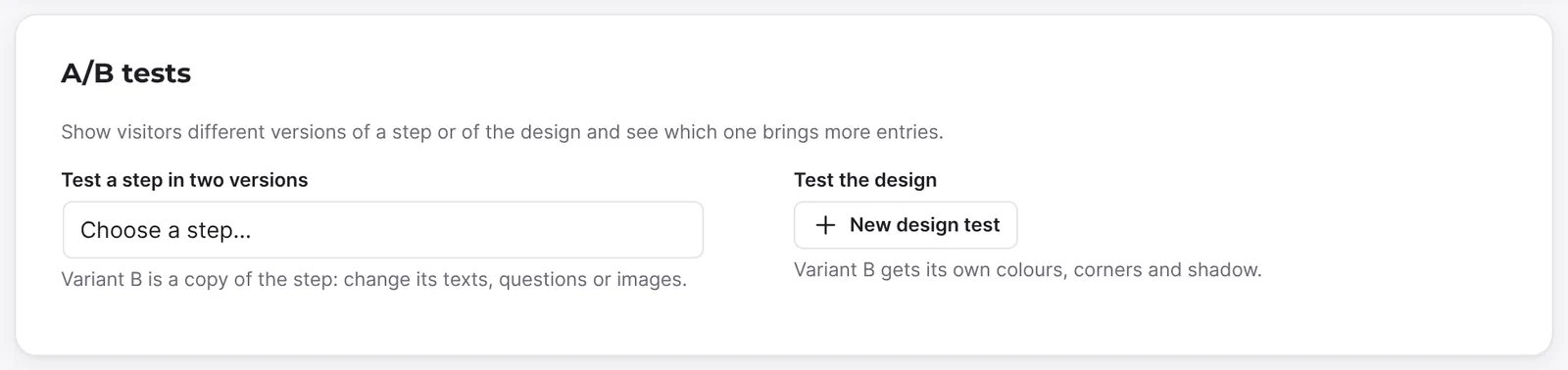
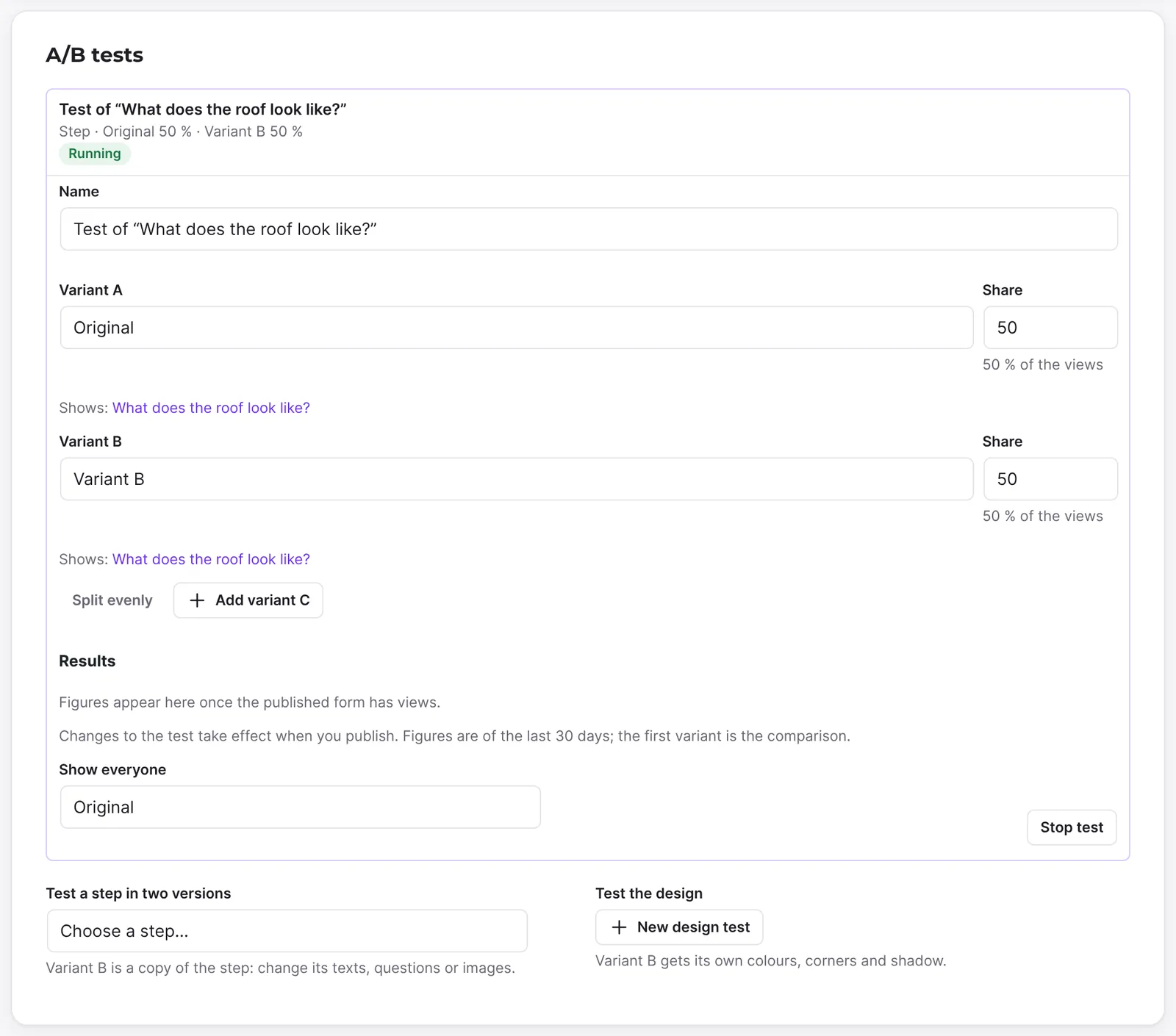
- Funnelforms adds the test "Test of "…"" with Variant A ("Original") and Variant B ("Variant B"), 50 percent each. The test has the status Running and runs for 10 days.
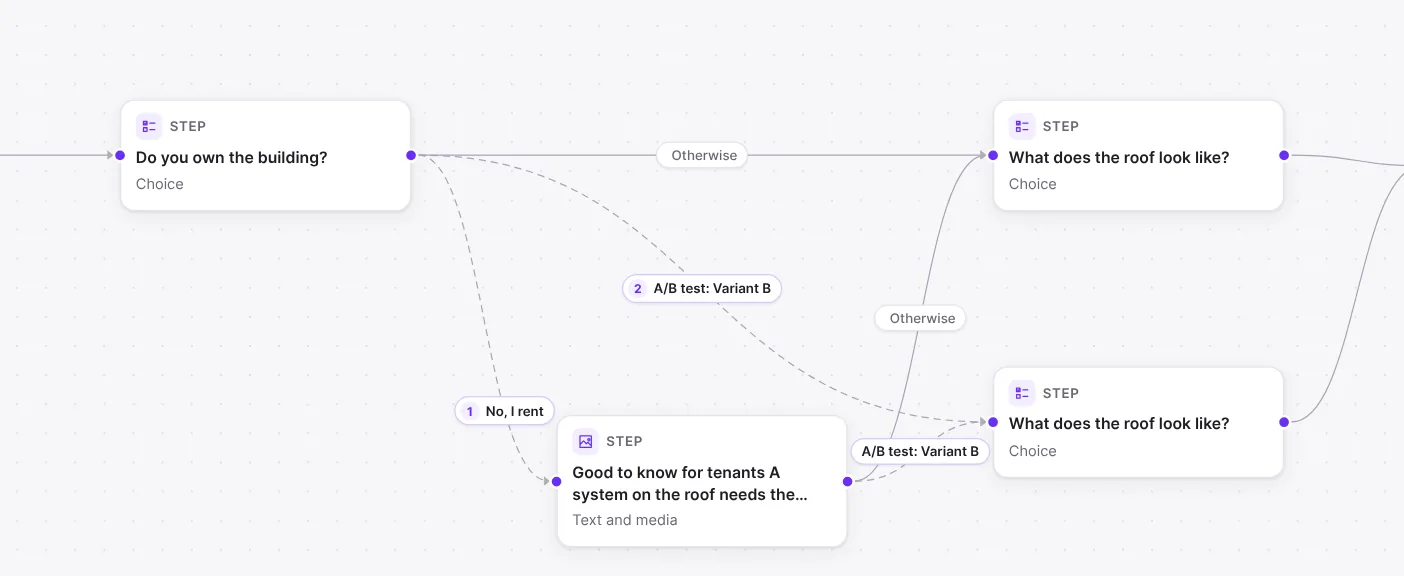
- The copy sits below the original on the canvas. If you started at the step, the copy is selected right away. Change the texts, answers or images of variant B. Use the tabs A and B in the properties to switch between the versions.
- For a third or fourth version, click the tab +, or click Add variant C or Add variant D in the test. Funnelforms copies the last variant and splits the shares evenly.
- Set the run time if needed (see below).
- Click Publish. The days of the test count from this day.
Test a design
- In the A/B tests section, click New design test under Test the design.
- Funnelforms adds the test "Test of the design" with Current design and Variant B. The first variant shows the form's design.
- Set the values you want to change for variant B: Main colour, Button, Button text, Background, Text, Corners of the form (px), Corners of buttons (px), Corners of fields (px), Shadow (Like the form, None, Soft, Medium, Strong) and Inner spacing (px). Reset … returns a value to the form's.
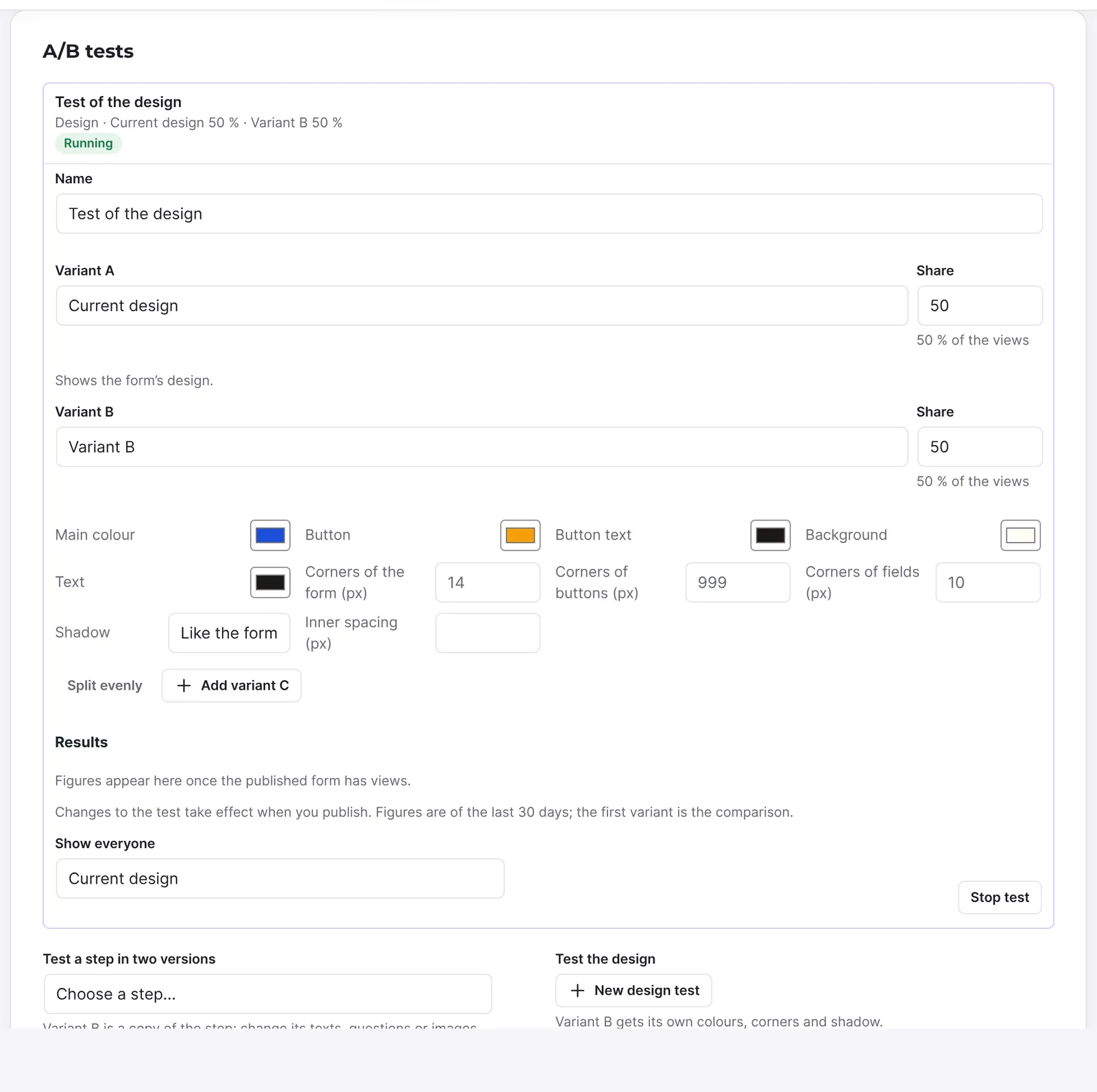
- Add variant C tests another design.
- Click Publish.
Set run time and main goal
- Expand the test in the A/B tests section. At the step, the link Shares, results and end of the test takes you there.
- Under Run time, choose 7, 10, 14 or 30 days or Until I stop it under Runs for.
- Under At the end, choose Show everyone the winner or Pause and ask me.
- If the form has a lead value, choose More sent forms or More lead value per view under Main goal.
- Publish the form.
Take over the winner
- Expand the test and read the figures under Results.
- Once every variant has enough views, Funnelforms shows Winner found with a sentence such as "Variant B brings 12 % more entries than the comparison, with 97 % certainty."
- Click Show everyone …. The test stops, and every visitor sees the winner.
- Click End test and keep this variant (for designs End test and keep this design) to tidy up.
- Publish the form again.
Without a suggestion, choose the variant yourself under Show everyone and click Stop test.
Decide a test that waits
With Pause and ask me, the test carries the badge Waits for you after its run time. The test says "The test has ended and waits for you".
- Expand the test.
- Choose an action: Show everyone …, Run 2 more days or Keep … for the original. With a test plan there is also Next round: … against ….
- Publish the form. Below the buttons it says "Takes effect when you publish."
Compare tests that ended
- Open Funnelforms → Statistics and click the form.
- Click the tab A/B tests.
- Under Tests that ended, tick two tests.
- Click Compare the two chosen. Two tests compared appears above.
How it works
What does Funnelforms do when it creates a step test?
Funnelforms copies the step. The copy keeps the fields' Variable names, so entries, mails and calculations treat all versions as the same question. Every path to the step gets a twin to the copy that applies only to visitors of that variant. The copy goes on like the original. If the step is the form's first step, the form starts with the copy for variant B. Below each variant, "Shows:" links to its step.
When you edit the original, it says "You are editing the original. Paths, answers to the questions and calculations apply to every variant." In a variant you change texts, answers or images; paths and calculations stay those of the original.
What can a design test change?
The colours, corners, shadow and inner spacing listed above. A design test does not test fonts or the background image. Ending the test makes the kept design the form's design.
How are visitors split?
On every view, Funnelforms draws a variant, weighted by its Share (0 to 100). Below the share it says what part of the views the variant gets ("… of the views"). In the list of tests, the name is followed by "Step" or "Design" and the shares of the variants.
Nothing is stored in the browser. If someone reloads the page, they can see another variant. Visitors who continue with "Save and continue later" see their variant again.
Why can't I add another variant?
A test has at most four variants. More variants exist only for tests of one step or of a design. If the last variant tests several steps, the button says "Only tests of one step get more variants."
How long does a test run?
A new test runs 10 days. The days count from the day you publish ("Runs 10 days from the day you publish it."). After that the test shows "Day … of …, the last day is …". With Until I stop it it runs without an end.
Once a day, Funnelforms checks whether a test has reached its days. Then the figures since the first day decide:
- Show everyone the winner (the default): everyone sees the variant that brought the most entries, or the original when none was clearly better. Funnelforms publishes this by itself.
- Pause and ask me: the test pauses, everyone sees the original, and you decide in the editor.
Either way, the admin address of the website gets a mail. If the test had too few views for a clear result, it runs half its days longer, once. A stopped test then shows, for example, "The test ended on its own on …: Variant B brought the most entries."
What happens when I pause a test?
Pause test sets the test to Paused. Everyone then sees the original ("Paused: everyone sees …. The days paused do not count."). Go on with the test continues it, and the last day moves by the days of the pause.
What does the main goal mean?
The Main goal decides which variant wins at the end:
- More sent forms (the default): the share of views with an entry counts.
- More lead value per view: the lead value that the entries of a variant bring per view on average counts.
The choice shows only when a calculation of the form gives the lead value with This is the order value of the lead.
How does a test plan work?
From three variants on, you can turn on Test later against the winner for variant B, C or D. This variant gets no views in the current round ("Gets no views in this round. When it ends, the variant kept meets this one."). Two variants always stay in the round.
When a round ends, the variant kept meets the next variant of the plan, half the views each, and the days start anew. The other variants of the round then show "Lost an earlier round and gets no views." You get a mail for this too.
What do the figures in the editor mean?
The figures in the editor cover the last 30 days of the published version. The first variant is the comparison.
| Column | Meaning |
|---|---|
| Views | How often the variant was shown. |
| Entries | How many of these views ended with an entry. |
| Conversion | Share of views with an entry. |
| Uplift | By how many percent the conversion is above or below the comparison. |
| Chance to win | How likely the variant is better than the comparison. |
For the comparison, uplift and chance to win show "–".
When does Funnelforms suggest a winner?
Only once every variant has at least 100 views. Before that it says "Too early for a winner: every variant needs about … more views." After that:
- If a variant beats the comparison with at least 95 percent chance, it is the winner. Of several, the one with the best conversion wins.
- If no variant has more than 5 percent chance, the comparison stays ahead ("No variant beats …").
- In between there is no suggestion; the test keeps running.
A running test with a suggestion carries the badge Winner found in the list.
What do "Stop test" and "End test …" do?
Stop test marks the test as Stopped ("Stopped: everyone sees …"). Run again starts it again from the first day. End test … removes the test and the paths to the other variants. Their steps stay on the canvas, flagged Not reachable, until you delete them.
What does the tab "A/B tests" in the analytics show?
You see the tab A/B tests next to Overview once the form has tests or tests that ended. It counts each running test from its first day, not by the period of the page.
- For each running or paused test, a card "A/B test: …" with the day of its run time, "Main goal: …" and "Views for a clear result: … of 100 per variant".
- Per variant, views, entries and conversion with a range below it: "With 95 % certainty the true conversion lies in this range." If the form has a lead value, Lead value per view is added, plus Uplift and Chance to beat the original. Variants without a share carry the badge No share.
- The chart Conversion since the start, day by day.
- Tests that ended: the figures of each test as they were on its last day, with period, main goal, the variant kept and the result (Winner applied, Original won, No clear winner or Cancelled). Tests you end or remove in the editor stay here too.
- What the tests brought: the conversion before the first test and that of the variant each test kept, with the Difference.
If no test is running, it says "No test is running" at the top.
What is in the export?
The export of the statistics of a form has the section "A/B tests that ended" with one row per variant: test, first and last day, main goal, result, variant kept, views, entries, conversion, uplift, chance and lead value per view.
What does Funnelforms Free do with an A/B test?
Free cannot publish a form with an A/B test and does not show a form with a test that is already published, for example after switching from Pro to Free. The test stays saved.
Best practices
- Test one change at a time, such as only the heading or only the main colour.
- Let the test run its days instead of deciding after a few views.
- More variants need more views. With little traffic, stay with two or use a test plan.
- Use More lead value per view if the value of requests matters more to you than their number.
- End a decided test so the form stays clear. Its figures stay under Tests that ended.
Troubleshooting
| Problem | Cause | Solution |
|---|---|---|
| "Figures appear here once the published form has views." | Not published, no views yet, or you may not see entries. | Publish the form and check your rights. |
| Everybody sees only variant A. | The other variants have Share 0, the test is paused, stopped or not published. | Check shares and status, then publish. |
| "Give at least one variant a share above 0." | All shares are 0. | Click Split evenly. |
| Add a variation is greyed out. | There are already 20 tests ("This form has the most tests it can have.") or another test already replaces the first step. | End old tests or pick another step. |
| A step is missing under Choose a step…. | It is not a regular step, there are already 20 tests, or another test already replaces the first step. | End old tests or pick another step. |
| New design test is greyed out. | There are already 20 tests. | End a test. |
| Main goal is missing. | No calculation gives the lead value. | Turn on This is the order value of the lead for a calculation. |
| At the end is greyed out. | Runs for is set to Until I stop it. | Choose a number of days. |
| The test carries Waits for you. | It ended with Pause and ask me. | Decide in the test and publish. |
| The tab A/B tests is missing in the analytics. | The form has no tests and no tests that ended. | Add a test in the editor and publish. |
| After ending, steps are Not reachable. | The other variants' steps stay. | Delete them. |
Tips
- Funnelforms reports the drawn variants of running tests to your page's
dataLayer(eventffxExperiment), for example for Google Tag Manager. - On the canvas, a path with a test reads "A/B test: …" with the variant's name.
- Name variants after the change, such as "Green button".
- The mail at the end of a test goes to the administration e-mail address under Settings → General in WordPress.
FAQ
How many variants can a test have? Up to four: A, B, C and D.
How long does a test run? By default 10 days from publishing. You choose 7, 10, 14 or 30 days or Until I stop it.
Can I test colours and shapes? Yes, with New design test. Fonts and the background image are not part of it.
What happens to entries, mails and calculations? All versions of a step use the same variable names and count as the same question.
Do I have to take over the suggestion? No. The suggestion is a hint. You can choose any variant under Show everyone. With Pause and ask me you also decide yourself at the end.
Where do I see old tests? In the form analytics, tab A/B tests, under Tests that ended.