The analytics show you, for a single form, how visitors find it, move through it and answer. You see every step with its drop-off and time, which answers lead to entries, which sources and campaigns visitors come from and when entries come in. All figures are compared with the period of the same length before.
Requirements
- Funnelforms Pro. This feature is not included in Funnelforms Free.
- The sections Quiz and Calculations show only when the form uses those features.
- The tab A/B tests shows only when the form has A/B tests or results of ended tests.
- You have the right "See entries".
- The form is published. Views, steps and sources are measured only for forms on Funnelforms 5.
Where to find it
- Funnelforms → Statistics, in Forms compared click the form's name or the arrow at the end of the row.
- Under Funnelforms → All forms, click the Statistics icon in the form's row. In the window "Statistics: name", click Open analytics.
- Under Funnelforms → Statistics → Where visitors leave, click a step. The analytics open at the table Steps.
At the top left, All forms takes you back to the overview; at the top right, Open in editor opens the form in the editor.
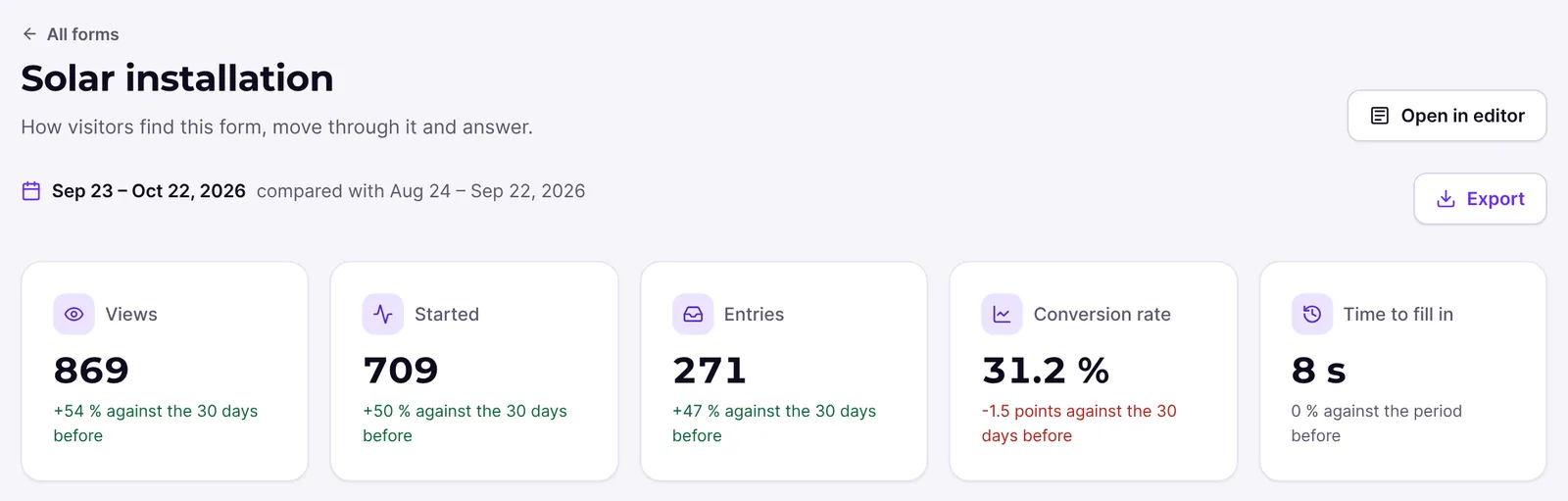
Features at a glance
- Period 7 days, 30 days, 90 days or Custom (up to 400 days), compared with the same number of days before.
- Key figures Views, Started, Entries, Conversion rate and Time to fill in (median).
- Views and entries per day and From view to entry as a funnel.
- Steps: Reached, Left here, Drop-off and Time on step.
- Answers: how often each answer was given and how many of those visitors sent the form, plus average, median and range of numbers, sliders and ratings.
- Time to fill in: median, average, middle half and spread.
- Entries by device.
- Where visitors come from and Campaigns.
- When entries come in as a heatmap.
- Views by device and returning visitors, only from views with consent to statistics.
- Quiz and Calculations.
- Tab A/B tests next to Overview when the form has A/B tests.
- Export as CSV.
Step by step
Find and improve a drop-off point
- Open the form's analytics.
- At the top, choose the period, for example 30 days.
- In Steps, read the line above the table, such as "Most visitors leave on “Contact”: 40% of those who reach it." That step is highlighted in the table.
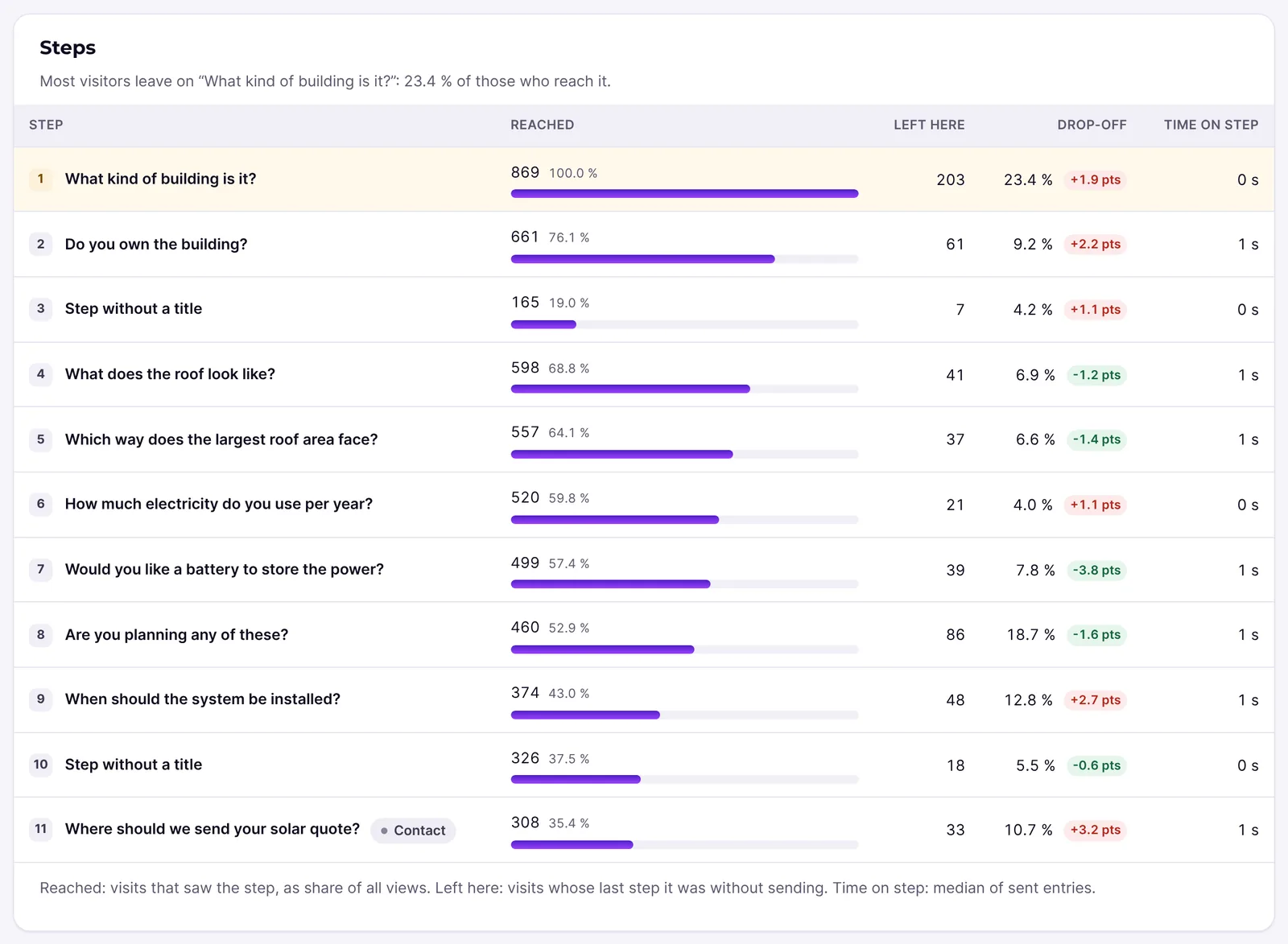
- Check the Time on step. A long time hints at a hard question.
- Click Open in editor and change the step.
- After a few days, compare the Drop-off with the period before. The arrow next to it shows the change in points.
Compare campaigns
- Add
utm_campaignto the links of your ads or newsletters, for example?utm_campaign=<your-campaign>. - Open the analytics and scroll to Campaigns.
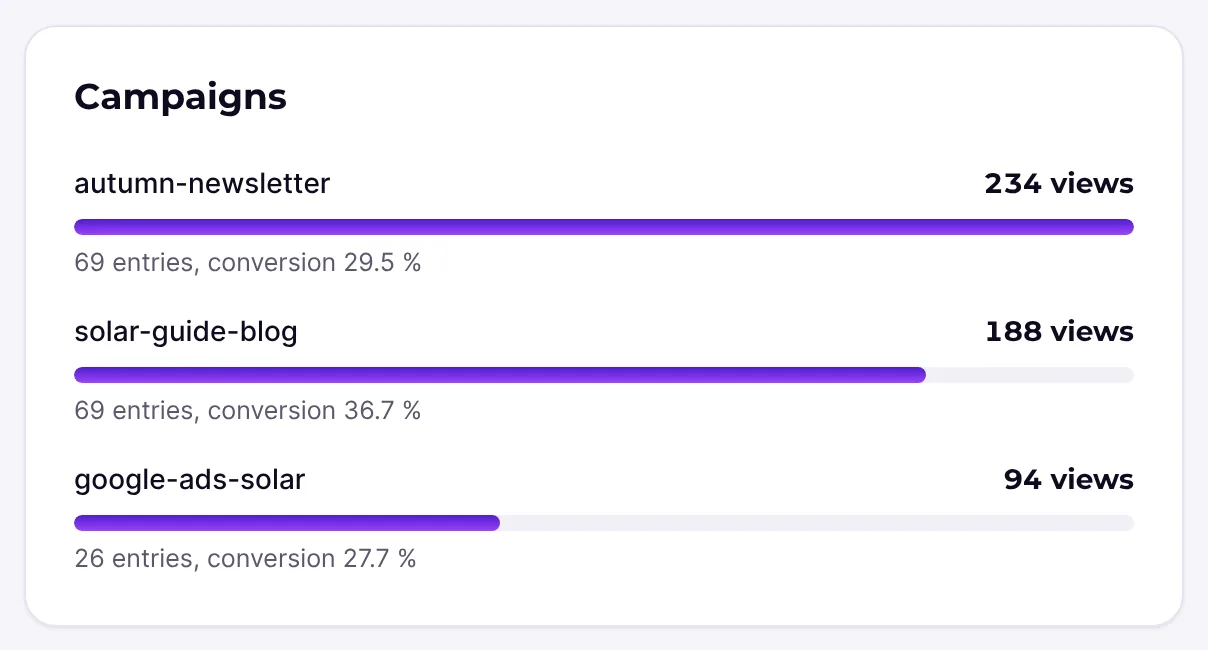
- Each campaign shows its views and, for example, "12 entries, conversion 8%". Up to 10 campaigns are shown.
Export the figures
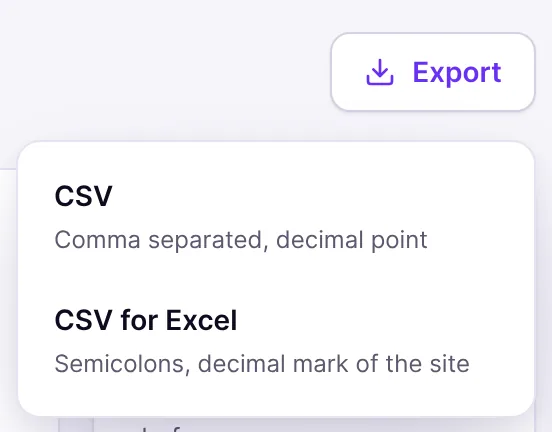
- In the period bar, click Export.
- Choose CSV or CSV for Excel.
- The file holds all sections of the analytics for the chosen period and the period before.
How it works
The table "Steps"
- Reached: visits that saw the step, as a share of all views.
- Left here: visits whose last step it was without sending.
- Drop-off: Left here divided by Reached, with the change against the period before.
- Time on step: the median of sent entries.
- The contact step carries the badge Contact.
Answers
For choice and dropdown questions you see, per answer, how often it was chosen and, for example, "40% of them sent the form". For numbers, sliders and ratings you see Average, Median, Range and the spread. Questions without an answer in the period are collected under "Not answered in this period".
Time to fill in
The time from the first answer to sending is measured. The Median is the time that half of the visitors beat; outliers hardly distort it. Middle half names the range in which the middle 50% of the entries lie. For the key figure at the top, a shorter time than in the period before shows in green.
How much data does a figure need?
Averages, times and points show only from three values on. Before that you read, for example, "The times show from 3 sent entries on." This way the answer of a single person can never be read off. Times, numbers, points and calculation results are computed from the latest 5000 sent entries of the period.
Sources and campaigns
Funnelforms finds the channels and sources the same way as on the Statistics page. A campaign counts when the page address carries utm_campaign. The analytics show up to 8 sources.
Views by device and returning visitors
This section uses the extended statistics and counts only views in which the visitor allowed statistics. For each device (Desktop, Tablet, Mobile) it shows the views and, for example, "12 entries, conversion 8.0 %". Below follow Visitors, Came back (the share of visitors who had opened the form before) and Conversion of return visits, with for example "From 412 views with consent to statistics." Shares appear from three visitors or views on, otherwise a dash is shown. If there were no such views in the period, it says "Counted only for views with consent to statistics. There were none in this period." The export holds this section too.
The tab "A/B tests"
If the form has A/B tests, the tabs Overview and A/B tests show at the top. The overview holds all sections of this article. The tab A/B tests shows a card "A/B test: name" for each test with Running, Paused or Waits for you. The table shows per variant Views, Entries, Conversion, Uplift and Chance to beat the original. Below follow Tests that ended, where you can compare two tests, and What the tests brought. This tab has no period bar. More in A/B tests.
Quiz and calculations
For a quiz, Quiz: points or Quiz: right answers shows the average, median, range and spread, plus the Results with the least points of each result. A personality quiz has types, not points: Quiz: types shows only how often each result was reached. Calculations shows the average, median and range of each calculation over the sent entries.
Forms on Funnelforms 3
If the form still runs on Funnelforms 3, the top reads "This form still runs on Funnelforms 3. Views, steps and sources are measured once it runs on Funnelforms 5." The entries count anyway.
Best practices
- Change only one step at a time. Then you can compare the effect in Steps cleanly.
- Use Custom to keep the periods before and after a change the same length.
- Check answers with a low "of them sent the form". A clearer wording often helps.
- Plan campaigns with distinct
utm_campaignvalues so they show separately in Campaigns.
Troubleshooting
| Problem | Cause | Solution |
|---|---|---|
| "No figures yet" and "Statistics start when the form is published." | The form is not published. | Publish the form. |
| "Form not found" | The form was deleted or is in the trash. | Choose another form under All forms. |
| No time to fill in, only "The times show from 3 sent entries on." | The period has fewer than three sent entries. | Choose a longer period. |
| Campaigns is empty. | No page address carried utm_campaign. | Add utm_campaign to your campaign links. |
| Under Views by device and returning visitors it says "Counted only for views with consent to statistics. There were none in this period." | No visitor allowed statistics in the period, for example because the cookie banner reports no yes in the EU mode. | Check your cookie banner and the privacy mode. |
| The tab A/B tests is missing. | The form has no A/B test and no results of ended tests. | You set up A/B tests in the editor. |
| Instead of the analytics you see "More in the analytics" with the badge Pro. | You use Funnelforms Free. | In Free, a click on a form under Funnelforms → Statistics shows its figures on the same page. The analytics come with Funnelforms Pro. |
Tips
- The period stays when you switch from the overview to the analytics and back.
- The heatmap shows you when to be ready to answer new entries fastest.
- In the editor, the switch Analytics or the key A turns on the analytics mode: paths, drop-offs and fields right on the canvas (see Analytics mode in the builder).
FAQ
Can you see in the analytics what single visitors typed? No. The analytics show only counts, shares and averages of at least three values. Typed text is not recorded.
Why is a step missing from the table? Steps that no longer exist in the published version are not listed.
Are the analytics included in Funnelforms Free? No. The analytics of a form are part of Funnelforms Pro. Free shows the statistics of all forms and, after a click on a form, its figures on the Statistics page. Free already stores the source of every view, so Pro shows the sources at once after the switch.