Understand Form Performance: Analyze Views, Leads and Conversions in One Place
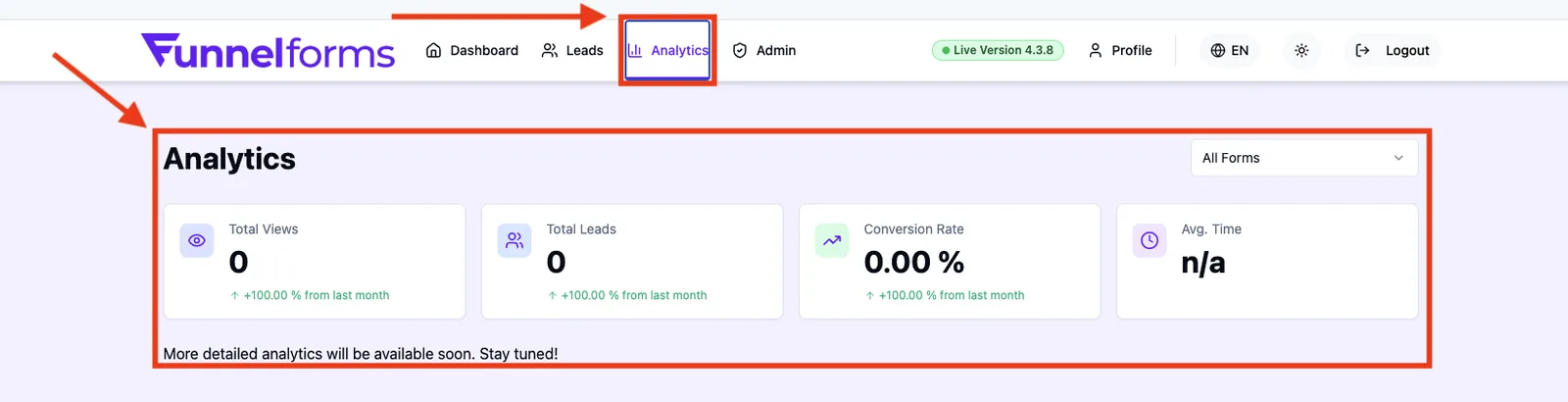
The Analytics area is your central place to evaluate the performance of your funnelforms forms: views, generated leads, conversion rate and average completion time. This overview article shows you where to find Analytics inside funnelforms, which evaluation tools are available today, and how the building blocks work together.
Prerequisites
- An active funnelforms account with at least one published form.
- Incoming form views or submissions — without traffic there is nothing to evaluate.
- A correct domain assignment (see the setup area) so that views are attributed cleanly to the form.
Where to find it
Main menu → Analytics
Lead lists live under Main menu → Leads, and the form-specific flow analysis is opened directly in the form editor under Form → Logic.
What can you evaluate in the Analytics area?
- Core metrics: total views, total leads, conversion rate and average completion time.
- Form filter: evaluate across all forms or focus on a single form.
- Month-over-month comparison: each metric shows the change in percent.
- Lead management: detail view, filtering and export for every submission.
- Flow Analytics (inside the logic editor): visual evaluation of user paths per node.
Step-by-step
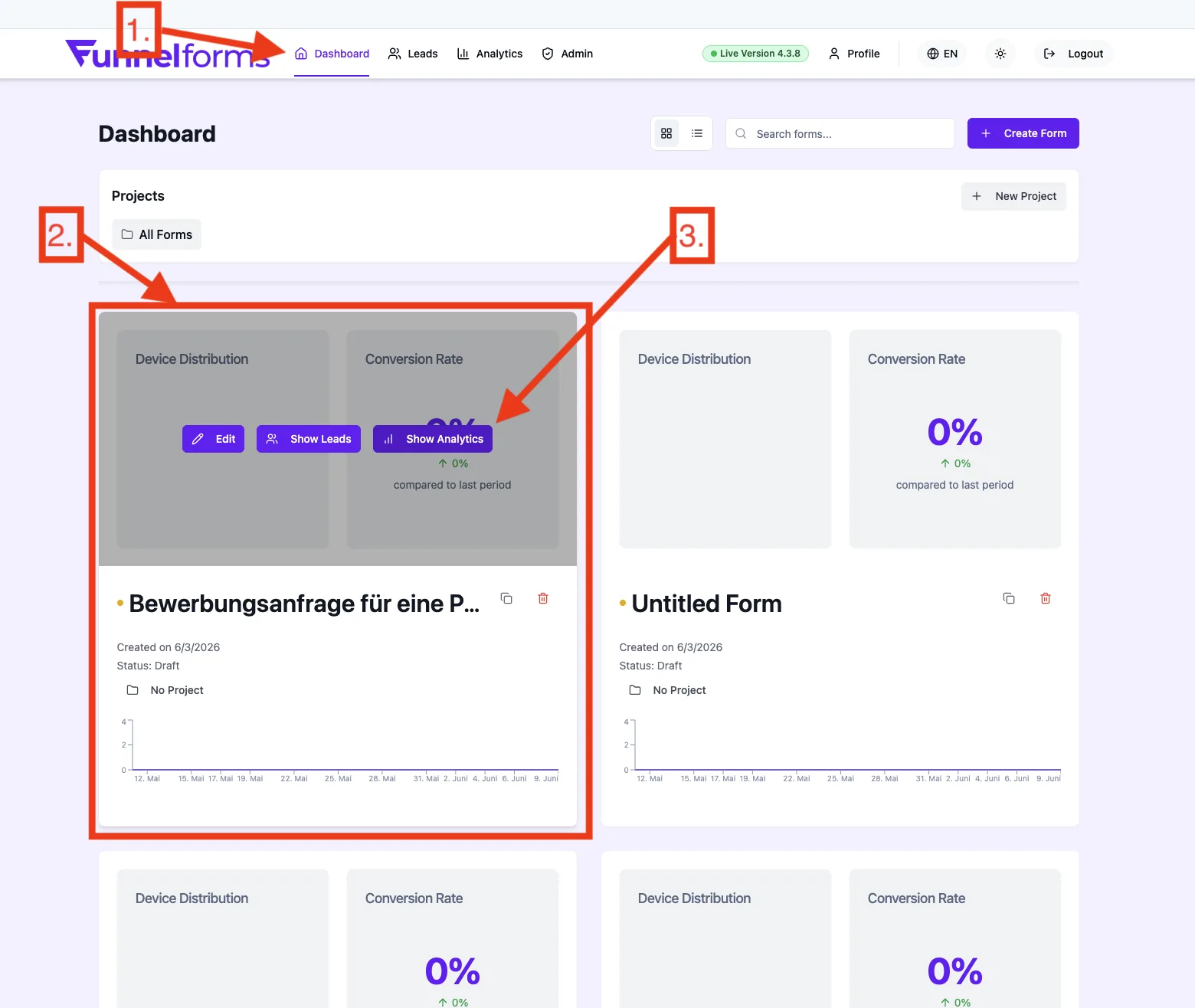
- Open Main menu → Analytics.
- In the form dropdown on the top right, pick the form you want to inspect or keep All Forms active to aggregate across every form.
- Review the four metric cards (views, leads, conversion rate, average time).
- For lead-level detail switch to Main menu → Leads, then filter and export entries as needed.
- For visual funnel analysis open the form and switch to Form → Logic.
How do the areas work together?
Analytics dashboard
The dashboard aggregates the top-level metrics across all forms or a single form and shows them as compact tiles. It is the entry point for a quick read on how your funnels are doing.
Lead management
This is where each individual submission is visible with its detailed structure — filter, sort and export. The dashboard is about volumes; lead management is about the content behind those numbers.
Flow Analytics
Flow Analytics is a form-internal evaluation inside the logic editor. It visualises how users move through your flow, which nodes they drop off on and which answer options are picked most often.
Best practices
- Watch conversion rate and average completion time together — a falling conversion with rising time usually points to long or unclear questions.
- Compare forms by switching the dropdown between them rather than always keeping All Forms active.
- Use the month-over-month change as an early warning indicator; sharp drops should be investigated quickly.
- Keep domain assignment clean so that views are not skewed by foreign hosts.
Common pitfalls & troubleshooting
- No data visible: check that the selected form is published and that it has already received views.
- Views without leads: often a sign of a high drop-off rate — Flow Analytics helps locate where users leave the flow.
- Skewed numbers after testing: your own test calls flow into the statistics. Plan tests deliberately and communicate them inside the team.
Tips & notes
Note: Detailed evaluations such as the conversion funnel, geographic distribution, device statistics, question performance and the activity heatmap are currently in progress and will be released step by step inside the Analytics area.
Tip: For an in-depth lead analysis (individual answers, timestamps, sources) the Lead management area is the right place.
Frequently asked questions
How is Analytics different from Lead management?
The Analytics dashboard shows aggregated metrics (volumes, rates, averages). Lead management shows the individual submissions with every answered field.
Can I evaluate Analytics across multiple forms at once?
Yes. Pick All Forms in the form dropdown to aggregate the metrics across your entire portfolio.
Are test or preview views counted?
Views of the published form page are counted — including your own test calls once they happen on the live URL. Plan tests accordingly.
Where can I see at which question users drop off?
Inside the logic editor of the form via Flow Analytics. Dwell time, exits and chosen options are evaluated per node there.
Is there an export for the dashboard metrics?
Lead data can be exported in the Leads area. An export for the aggregated dashboard metrics is currently in progress.