Build multi-step forms the right way
Multi-step forms guide your visitors through a longer survey one question at a time, instead of overwhelming them with a single long form. In Funnelforms, every field is rendered as its own step by default – you do not have to create "pages". The flow is shaped by the order of your fields and, optionally, by the step logic in the Logic tab. Content fields (HTML, image/video, loading animation) count as in-between pages that do not capture answers.
Prerequisites
- An existing form in the Form Editor
- At least two fields (otherwise there is no multi-step flow)
- Optional: a plan that unlocks the Logic editor (depending on plan tier)
Where to find it
Form Editor → left sidebar "Fields" for ordering and left sidebar "Logic" for branched step paths.
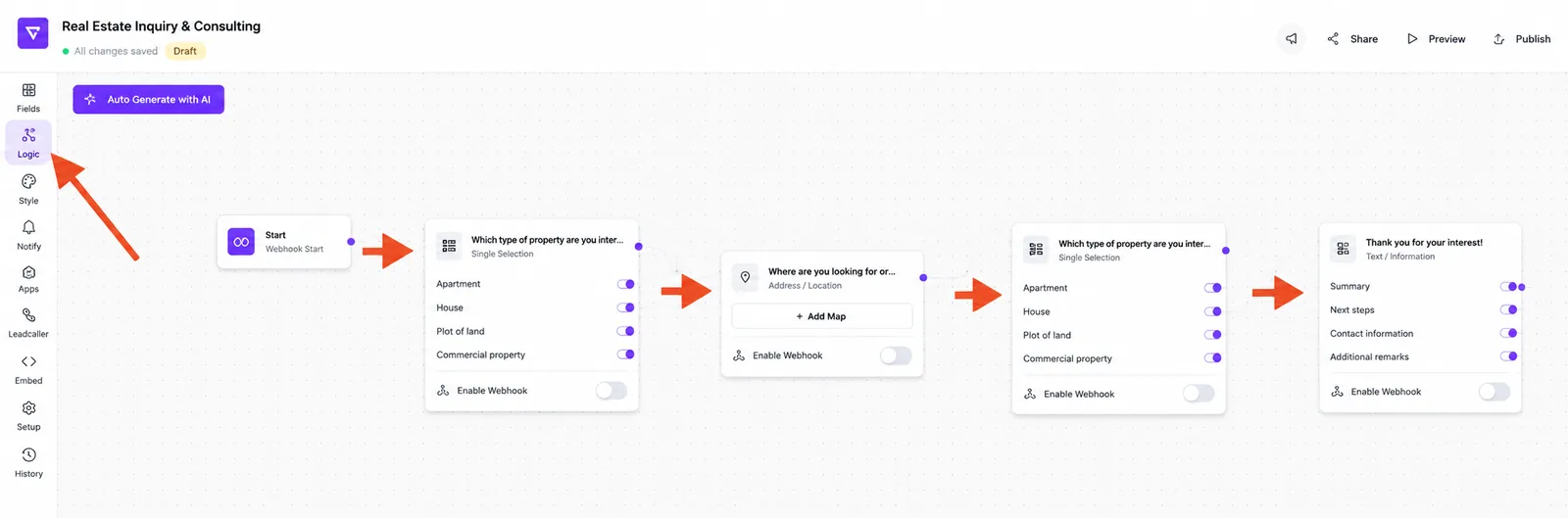
Features at a glance
- Every field = one step – no manual page splitting required
- Drag-and-drop to reorder steps in the field list
- Progress indicator with a bar and a text line (percentage plus current/total step); the bar and the text line can be hidden independently
- Content fields (HTML, image/video, loading animation) can be used as in-between steps
- Branching via the Logic editor so not every visitor sees the same steps
- Submit field as the mandatory closing step that turns a visitor into a lead
Step-by-step: build a multi-step flow
- Open your form in the Form Editor.
- Switch to the Fields tab in the left sidebar.
- Add the question fields in the order in which visitors should answer them.
- Reorder the steps via drag-and-drop until the sequence is correct.
- Make sure every active path ends with a Submit field – without at least one reachable Submit field no leads are recorded. Branched flows may use multiple Submit nodes.
- The progress indicator is enabled by default. In Style Editor → Spacing you can disable the bar ("Hide progress bar") and/or the text line ("Hide percentage & steps") independently.
- Test the flow in the preview (see article "Response preview and live test in the editor").
How does step logic work internally?
Funnelforms treats every field as a node in the form flow. By default, the next question is always the next node in the list. As soon as you draw a connection with a condition in the Logic editor, the visitor's answer decides which next node is targeted. If no condition matches, the form uses the default edge (a connection without a condition) from the Logic editor. If there is no default edge either, the flow ends at this node.
Content fields as in-between steps
You can insert HTML blocks, image/video fields or a loading animation. These fields do not capture answers, but they are great for intros, section breaks or short explanations between two question steps.
Best practices
- Start with the easiest question – it lowers the entry barrier.
- Group thematically related questions back-to-back.
- Keep each step to one question – that is the strength of the funnel approach.
- Place a short content field before sensitive questions (e.g. contact details) to add context.
- Plan the closing step deliberately: the Submit field is the single point that turns a visitor into a lead.
Common pitfalls
- No Submit field at the end: without it, answers are not stored.
- Too many steps in a row: completion rates tend to drop in very long funnels – plan length and payoff deliberately.
- Logic without fallback: if no conditional connection matches and there is no default edge (without condition), the flow ends at the current node. Always add a default edge for branched paths.
- Forgotten required field: if a field is marked as required, Funnelforms checks for an answer on step change – without one, the visitor stays on the step.
Tips & notes
Note: the order in the field list is the default step order. Branches from the Logic editor only override it when their condition is met.
Tip: keep the progress indicator visible – visitors stay engaged noticeably longer when they can see how close they are to the end. The bar and the text line can be hidden independently in the Style Editor under Spacing.
Frequently asked questions (FAQ)
Do I have to create steps or pages manually? No. Every field is a step automatically – you control the order in the field list.
How many steps make sense? There is no technical limit. As a rule of thumb, short, focused funnels tend to convert best for lead magnets and qualification forms.
Can I let visitors skip steps? Yes, via the Logic editor with an appropriate condition (see article "Conditional Logic & Branching").
Does every visitor see the same steps? Without logic: yes. As soon as you add branches, each visitor only sees the steps relevant to them.
Where is the actual lead created? Only when the Submit field is triggered are the answers stored persistently and integrations fired.