Set up actions in the logic editor
Action nodes are what happens at the end of a path in the logic editor. Funnelforms currently offers two action types: URL Redirect and AI Leadcaller. Webhooks are not action nodes — they are configured as integrations under Setup → Integrations and run independently of action nodes.
Requirements
- A form with a connected logic flow (default or branched path).
- For URL Redirect: the target URL.
- For AI Leadcaller: an active AI Leadcaller configuration and a phone-number field in the form. May require a specific plan.
Where to find it
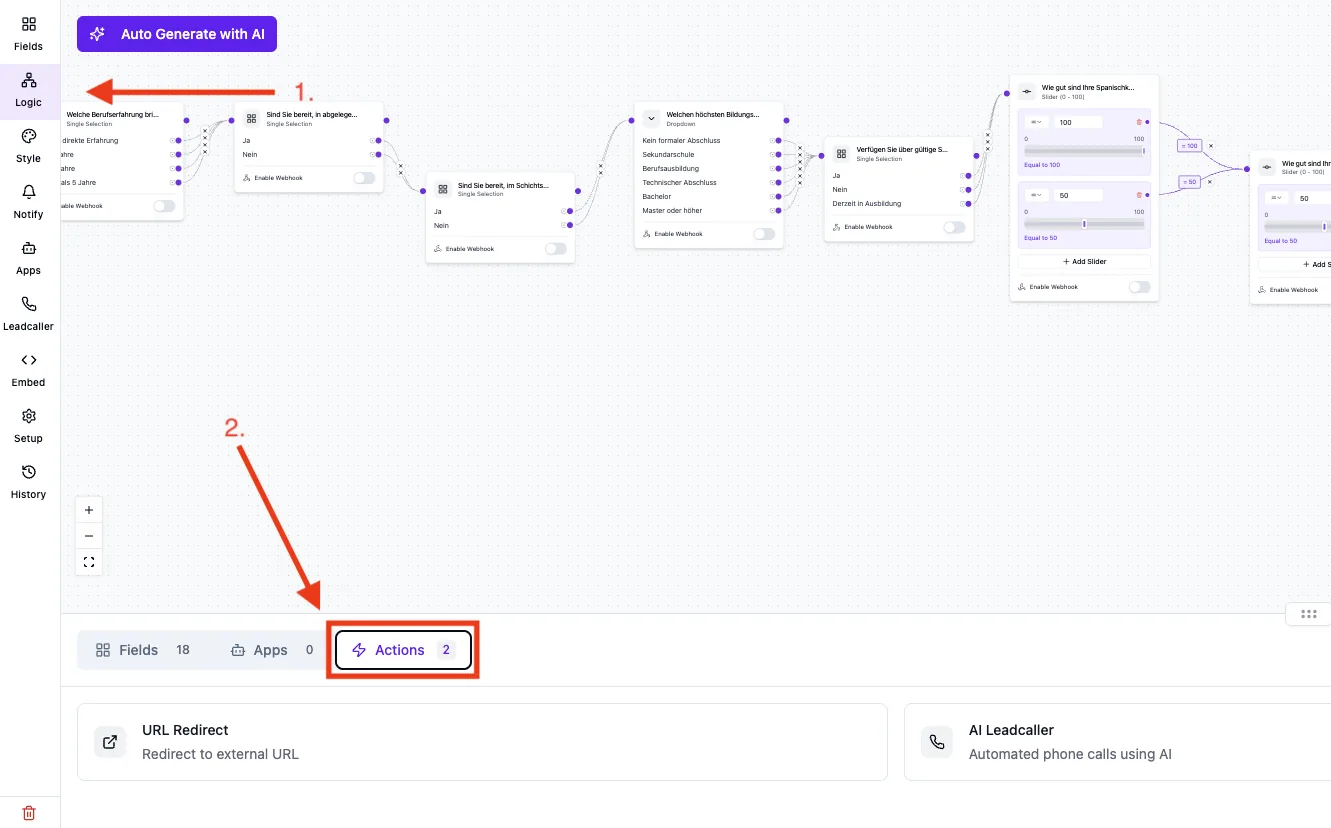
Forms → [Form] → Logic → "Actions" tab. Drag an action node into the flow and connect it to the last step of your path.
Available actions
URL Redirect
- Redirects the lead to a target URL after completing the funnel.
- Optionally opens in a new tab.
- Optional redirect timer and CTA button depending on the configuration.
AI Leadcaller
- Triggers an automated call to the submitted phone number after the funnel completes.
- Requires a phone-number field in the form, mapped on the action node via phoneNumberField.
- The call and AI configuration is managed separately under AI Leadcaller in the editor.
Step-by-step
- Switch to the Logic tab and open the Actions tab.
- Drag the desired action (Redirect or AI Leadcaller) into the flow.
- Connect the last node of your path to the action node.
- Configure the action: target URL for Redirect, phone-number field mapping for AI Leadcaller.
- Save the form and test with a real submission — the editor preview does not trigger actions.
Best practices
- Use at most one redirect per path — multiple redirects can cancel each other out.
- To push data to external systems (CRM, Zapier, Make), use the webhook integration under Setup → Integrations, not an action node.
- Test AI Leadcaller with a real, reachable phone number before going live.
Common pitfalls
- Redirect does not fire: The target URL must start with https:// and be publicly reachable.
- AI Leadcaller does not place a call: Verify that the mapped phone-number field exists in the form and is filled in.
- Data is not arriving in the CRM: This is the webhook integration, not an action node. Configure it under Setup → Integrations.
Tips
Note: Webhooks are separate from action nodes. They fire on funnel completion depending on the configuration (see the webhook integration article).
Tip: Redirect and the webhook integration combine well: the webhook pushes data to your CRM, the redirect sends the lead to a matching follow-up page.
FAQ
Are actions fired immediately on submit?
Yes. As soon as the lead reaches submit and the path is connected to the action node, the action is triggered.
Why don't I see a webhook action node?
Webhooks are not action nodes in Funnelforms — they are a separate integration. Configure them under Setup → Integrations.
Can I run multiple actions in parallel?
You can attach multiple action nodes at the end of a path. Execution happens after the funnel completes — the order depends on internal processing and should not be relied on as strictly parallel.