Using the Partner Program: Referral Links, Commissions, and Payouts
The Funnelforms Partner Program rewards you for recommending Funnelforms. For every customer who signs up through your personal referral link you earn a 30 % lifetime commission on every payment they make – month after month, for as long as they keep paying.
This article explains how to become a partner, how tracking works, when and how payouts happen, and what to watch out for.
Prerequisites
- An active Funnelforms account (any plan – Free included).
- A valid PayPal email address for receiving payouts.
- Acceptance of the partner terms during sign-up.
How to get there
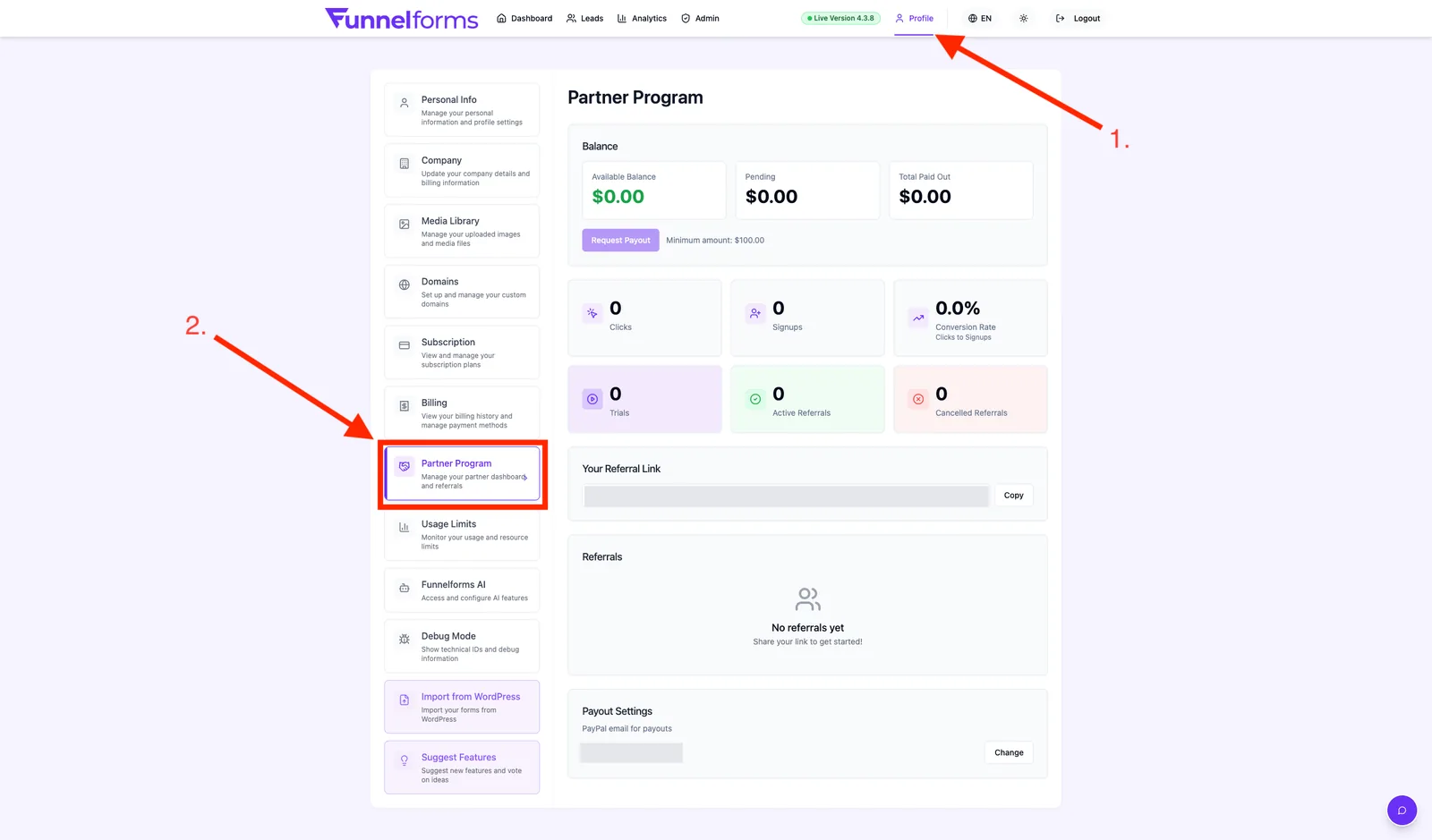
Where to find: profile menu (top right) → Partner Program. Also accessible directly at /partner-program.
Once registered, your partner dashboard lives under Profile → Partner tab.
Terms at a glance
How it works in 3 steps
- Sign up: register on the partner program page, add your PayPal address, accept the terms.
- Share your link: distribute your personal referral link (
https://www.funnelforms.io/ref/YOUR-CODE) on your website, blog, social media or via email. - Earn commission: whenever someone signs up for a paid plan through your link, you earn 30 % of every payment they ever make.
Step by step: become a partner
- Open profile menu → Partner Program.
- Click Become a partner.
- Enter your PayPal email address – all future payouts will go there.
- Check the box for the partner terms.
- Click Register. You are activated automatically and see your personal dashboard right away.
Note: you can change your PayPal address later in the partner dashboard at any time.
Your referral link and tracking
Your link has the format https://www.funnelforms.io/ref/YOUR-CODE. Clicking it sets a 30-day cookie in the visitor's browser. If they register within that window and buy a plan, they are attributed to you for life.
- First-click attribution: whoever brought the visitor first wins the referral – even if the visitor later returns via another partner's link.
- Self-referrals are blocked: you cannot refer yourself.
- Safari/ITP: in Safari cookies may expire earlier. See the related article on affiliate tracking.
Commission stages
Every commission goes through three states:
- Pending: the referral's payment has been received but is still in the 60-day hold period (refund protection).
- Approved: hold period passed, commission is ready for payout.
- Paid: payout has been transferred to your PayPal address.
Payouts
- As soon as your approved commissions exceed 100 USD, the next monthly payout is triggered.
- The transfer is made via PayPal to the email address you registered.
- You automatically receive a credit note (PDF) with number (prefix "GS"), date and amount via email.
- If you stay below 100 USD, the balance rolls over to the next month.
Tip: make sure your PayPal email is correct and verified – otherwise the payout will fail.
Best practices
- Show real use cases: sharing your own Funnelforms forms as examples converts far better than plain advertising.
- Use multiple channels: blog, YouTube, newsletter, LinkedIn – mix organic and targeted distribution.
- Add UTM parameters: append
?utm_source=…&utm_campaign=…to your link to track sources in your own analytics. - Focus your audience: agencies, coaches and online marketers with lead-generation needs convert best.
- Be patient: lifetime commissions grow over months and years – the first month is rarely the biggest.
Troubleshooting
- "Referral does not appear": the cookie may have been blocked (ad blocker, incognito mode, Safari ITP) or the customer signed up after the 30-day window.
- "Commission stays Pending": the 60-day hold period has not yet ended. After that the status switches to Approved automatically.
- "Payout not received": check the PayPal email in your dashboard and look in your spam folder for the credit-note email.
- "My own sign-up via my link": self-referrals are blocked by the system and never earn commission.
- "Partner status missing": after registration log out and back in or reload the page to make the dashboard appear.
FAQ
Do I need a paid plan to become a partner? No, the program is open to every account – Free included.
How long do I earn commission per customer? For life, as long as the referred customer keeps paying for Funnelforms.
Are upgrades and annual plans also commissioned? Yes. Every payment your referral makes – including upgrades or annual switches – counts at 30 %.
What happens if my referral gets a refund? The matching commission is reversed. That is exactly what the 60-day hold period is for.
Can I shorten or customise my referral link? The partner code is fixed, but you may shorten the link with a URL shortener (e.g. Bitly) and append UTM parameters.