Detect Downtime Before Losing Leads: Monitor Your Forms With FormWatch
FormWatch monitors your form's availability automatically and alerts you by email or SMS when it stops responding. You learn about outages before your leads do.
Prerequisites
- FormWatch is a plan-dependent feature — on unsupported plans an upgrade hint is shown instead.
- For SMS alerts: a valid phone number in E.164 format (e.g. +491701234567).
Where to find
Form Editor → Setup → FormWatch
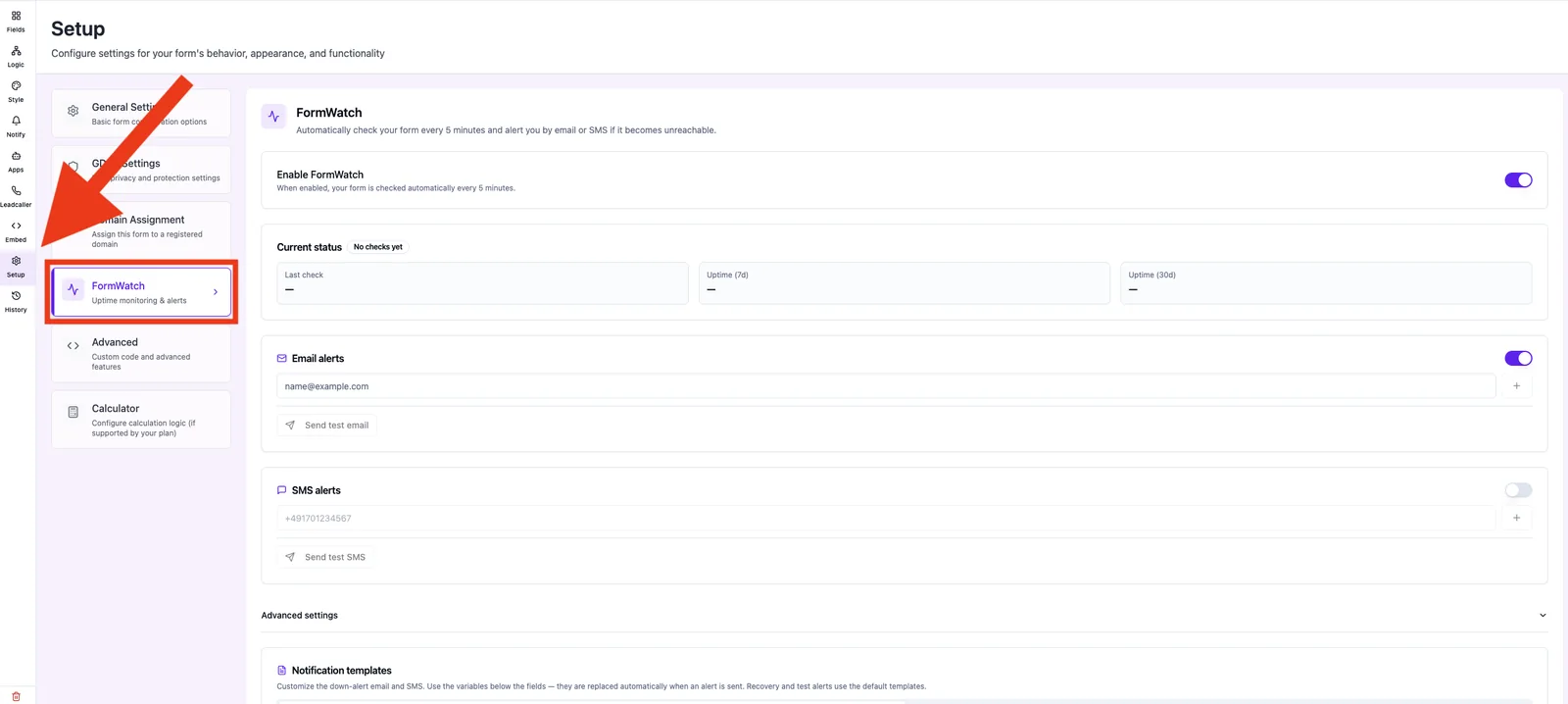
Capabilities
- Automatic check every 5 minutes.
- Email and/or SMS alerts to multiple recipients.
- Threshold Failed checks before alert.
- Cooldown Cooldown between alerts.
- Status overview: Up, Degraded, Down, Resolved.
- Uptime stats (7 days / 30 days) and incident history.
- Test alert via Send test email or Send test SMS.
Step by step
- Open Setup → FormWatch.
- Toggle Enable FormWatch.
- Add at least one recipient under Email alerts.
- Optionally add a phone number under SMS alerts.
- Open Advanced settings and set threshold and cooldown.
- Send a test alert to verify recipients and delivery.
How alerting works
FormWatch counts consecutive failed checks. Once the counter hits the threshold, an incident is opened (open) and an alert is sent. During the cooldown phase, no further alerts are sent for the same incident. When the form becomes reachable again, the incident is auto-marked resolved and a recovery message is sent.
What does the incident history show?
A list of recent incidents with start time, duration, cause and status. Open incidents can be closed manually if needed.
Best practices
- Add at least two email recipients, ideally including a group address.
- Do not pick a threshold that is too low, otherwise transient network glitches trigger alerts.
- Set a generous cooldown to avoid alert spam.
Common pitfalls
- Test SMS does not arrive: the phone number must use E.164 format.
- No recovery email: only sent when an incident was actually open before.
- Status "Unknown": no check has run yet — please wait a few minutes.
Tips & notes
Note: FormWatch down-alert templates can be customized; recovery and test alerts use the default templates.
Frequently asked questions
How often does FormWatch check?
Every 5 minutes, automatically.
Does SMS sending cost extra?
SMS alerts are plan-dependent — see your plan overview for details.
Can I close an incident manually?
Yes, via Close manually in the status panel.