Control Privacy With Confidence: Configure GDPR, Cookies and Tracking Per Form
GDPR settings control how your form handles personal data: retention period, auto-save, pre-fill, cookie duration and IP storage. You decide per form whether the strict GDPR defaults apply or whether you deliberately allow more tracking.
Prerequisites
- A form created in the Form Editor.
- When compliance is enabled, you need a consent checkbox inside the form.
Where to find
Form Editor → Setup → GDPR Settings
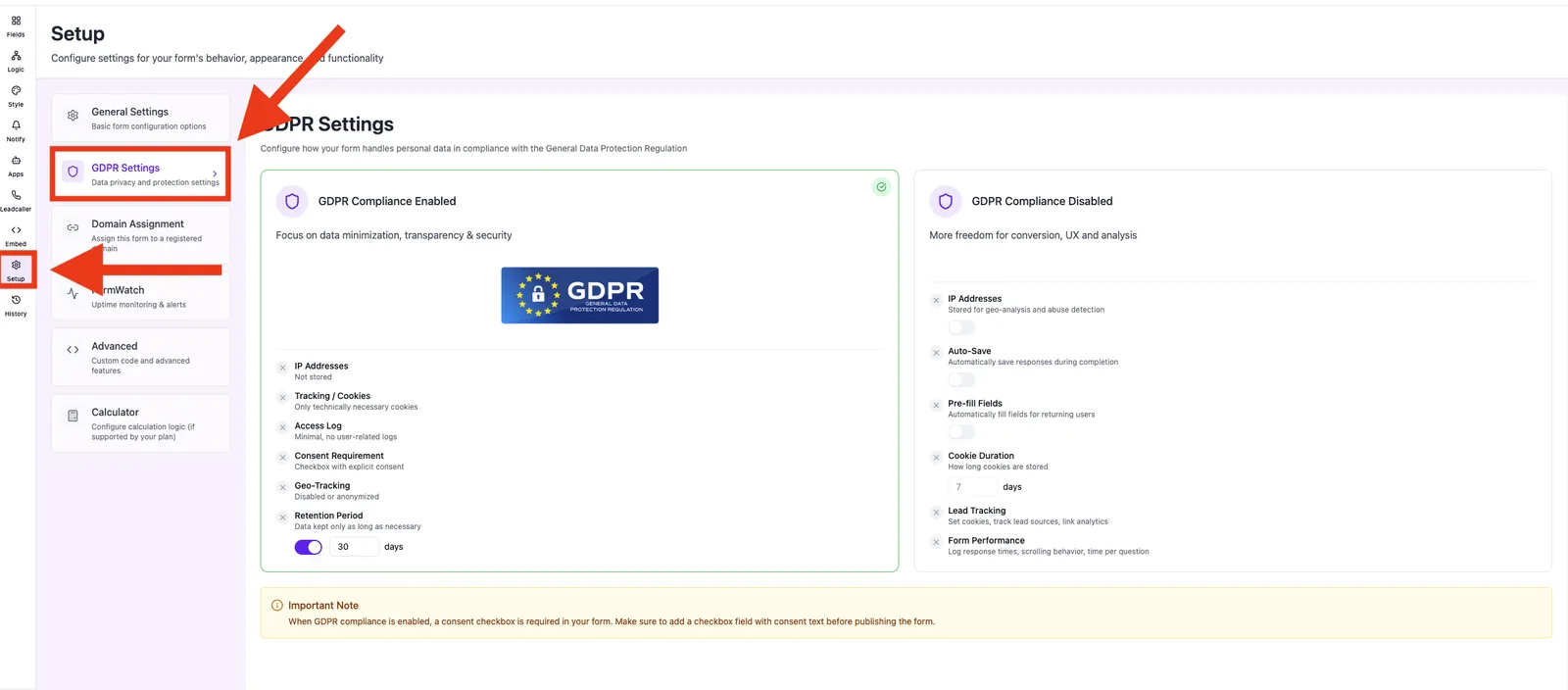
Capabilities
- GDPR Compliance Enabled / Disabled — global switch.
- Retention Period in days.
- Auto-Save during completion.
- Pre-fill Fields for returning users.
- Cookie Duration in days.
- IP Storage on/off.
Step by step
- Open Setup → GDPR Settings.
- Choose GDPR Compliance Enabled or Disabled.
- Set the Retention Period (default: 30 days).
- Optionally enable Auto-Save, Pre-fill Fields and IP Storage.
- Adjust the Cookie Duration (default: 7 days).
- Add a consent checkbox field to your form.
What does "Compliance Enabled" mean?
- IP addresses are not stored by default.
- Only technically necessary cookies are set.
- Access logs stay minimal.
- Explicit consent via a checkbox is required.
- Geo-tracking is disabled or anonymized.
What happens when "Disabled"?
You collect more data (lead tracking, form performance, geo analysis), but you take responsibility for informing visitors transparently and having a valid legal basis.
Best practices
- Keep the retention period as short as your use case requires.
- Use a short cookie duration when long-term recognition is not needed.
- When compliance is enabled, place the consent checkbox prominently as the first field.
Common pitfalls
- Form rejects submissions: when compliance is enabled and no consent checkbox exists, validation blocks the submit — add the checkbox.
- Auto-save does nothing: requires GDPR compliance to be enabled.
Tips & notes
Caution: Funnelforms provides the controls but does not replace legal advice. Review your privacy notice and data processing agreements yourself.
Frequently asked questions
Are existing leads deleted when I shorten the retention period?
Shortening only affects future data; existing leads remain until you actively delete them.
Can I enable IP storage later?
Yes. From the moment you enable it, IPs of new submissions are stored.
Does the cookie duration apply to embeds as well?
Yes. The setting applies across all delivery channels.