Forms you carried over from Funnelforms 3 keep sending entries to your CRM or newsletter tool if they did so before. The integrations from Funnelforms 3 keep running in Funnelforms 5.0 with the same credentials: nine CRM and newsletter providers, Zapier and Make. New in 5.0 are Brevo, CleverReach and Google Sheets, see Connect Brevo, CleverReach and Google Sheets. This article explains what keeps running, where you see it and what to do on errors.
Requirements
- Funnelforms Pro. This feature is not included in Funnelforms Free. Free does not run carried-over CRM actions, does not offer CRM, newsletter or spreadsheet under Add an action and names CRM and newsletter tools in the note with the Pro badge.
- The form comes from Funnelforms 3 and was carried over by the move, see Migration assistant.
- To change or delete actions you need the right to see entries. Without this right you can prepare changes; someone with the right publishes them.
Where to find it
Open the form in the editor in the Structure workspace, click the contact step and then the After sending tab on the right. The carried-over connections appear under Actions as CRM, newsletter or spreadsheet, with the name of the provider and the connection behind it.
Features at a glance
Funnelforms 5.0 supports these nine providers from Funnelforms 3:
| Provider | What Funnelforms creates |
|---|---|
| ActiveCampaign | Contact in a list |
| Deals & Projects | Customer and deal |
| finCRM | Customer and a note with the answers |
| GetResponse | Contact in a list (campaign) |
| HelloHQ | Company, contact person, lead and the answers as a custom field |
| HubSpot | Contact and deal with the answers as description |
| KlickTipp | Subscriber with tag and double opt-in process |
| Mailchimp | Member of an audience |
| Pipedrive | Person and a note with the answers |
Other things from Funnelforms 3 that keep running:
- Webhooks in the format "Funnelforms 3 (Pro)", see Webhooks.
- SMTP connections for mails (shown in the editor as "SMTP from Funnelforms 3" under Send through).
- Zapier and Make from Funnelforms 3, through the lead list of Funnelforms 3 (see below).
Step by step
- Open the carried-over form in the editor, click the contact step and then the After sending tab on the right.
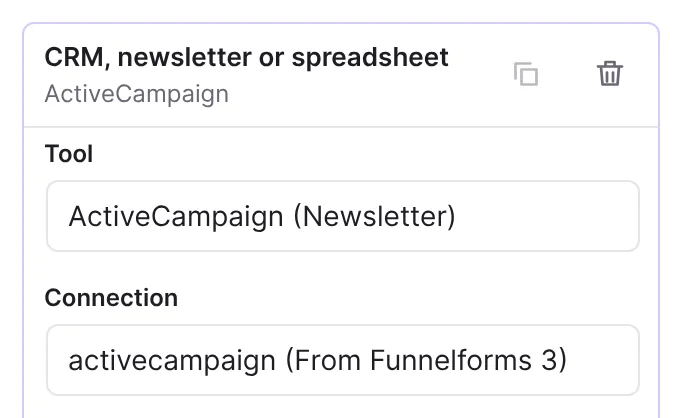
- Find the action CRM, newsletter or spreadsheet. The provider, such as HubSpot, and the connection stand behind it.
- Open the action. Tool shows the provider, Connection the carried-over connection with "(From Funnelforms 3)".
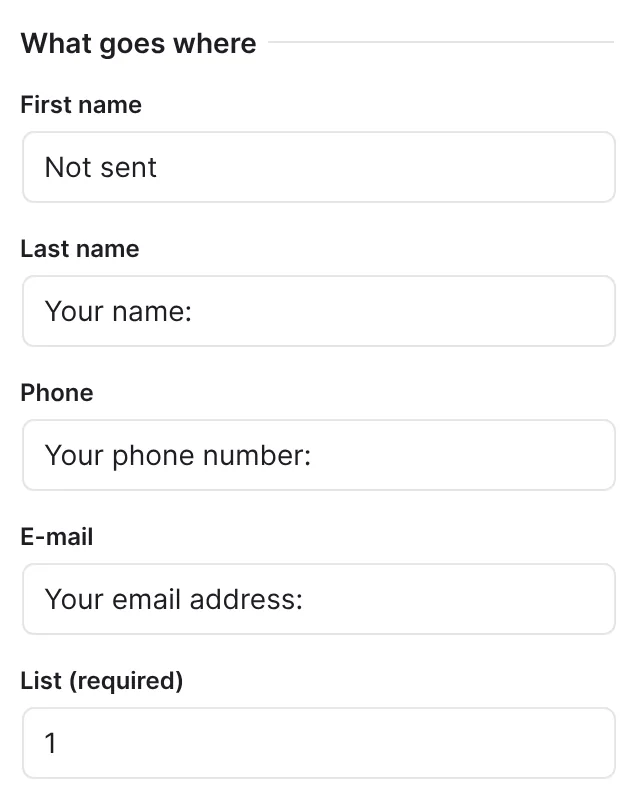
- Check under What goes where which field of the contact step goes where. The mapping from Funnelforms 3 is carried over; Funnelforms reads lists, tags and pipelines from your account.
- If needed, set under When and For entries from when the action runs.
- Publish the form if you changed something, and send a test entry.
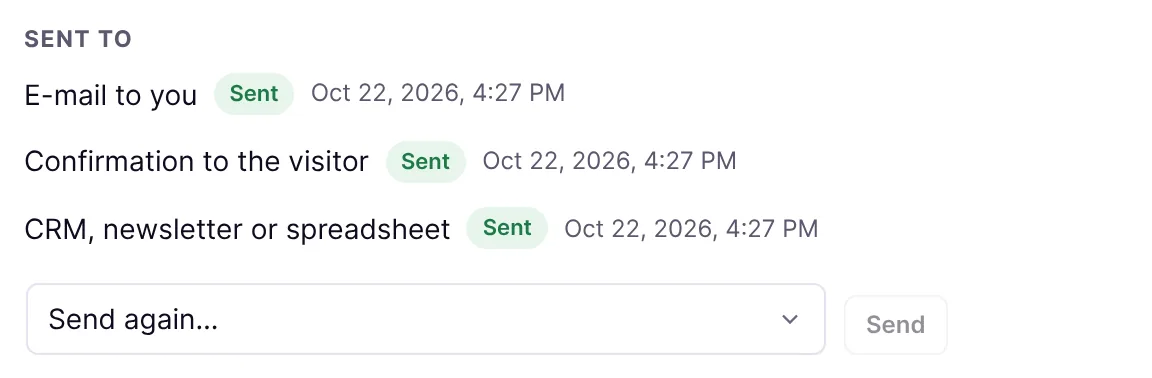
- Open the entry under Funnelforms → Entries and check under Sent to that the CRM transfer shows Sent.
- Check in the CRM that the contact arrived.
How it works
Can I change carried-over connections in the editor?
Yes. You edit carried-over connections in the editor like new ones: Tool, Connection and the mapping under What goes where. If a required value is still missing, it says "Still to fill in: …". You limit the action with When and For entries from and delete it with the trash icon. The action cannot be duplicated. You create new CRM actions under Add an action with CRM, newsletter or spreadsheet.
How does the transfer work?
Like mails and webhooks, it runs in the background. It sends the same requests to the provider as Funnelforms 3, with the carried-over credentials and the field mapping from Funnelforms 3. Funnelforms stops at the first failed step. It does not retry errors where a retry changes nothing (wrong credentials, a refused request), nor errors after a record was already created, so nothing is created twice. It tries all others up to three times. The error code appears in the entry under Sent to, for example permanent:contact:http_401. It names the step and the status, never visitor data.
Funnelforms 3 ignored CRM errors. In Funnelforms 5.0 you see them.
What changed for individual providers?
Some providers have retired their old interfaces. Funnelforms 5.0 therefore uses their current interfaces. Nothing changes for you, and your credentials stay valid.
| Provider | What changes |
|---|---|
| Pipedrive | Persons go to the new interface (v2), because Pipedrive no longer supports the old one since 1 August 2026. If a person has no name, Funnelforms uses the e-mail address, otherwise the phone number. An address with http:// is sent over https://. |
| HubSpot | Contacts and deals go to the CRM interface v3. If the contact already exists, Funnelforms attaches the deal to the existing contact. Funnelforms 3 created the deal without a contact in that case. |
| Deals & Projects (formerly julitec) | Funnelforms uses the new address of Deals & Projects. Requests and credentials stay the same. |
| KlickTipp | The connection runs encrypted over HTTPS. |
You create new HubSpot access differently than before, see Connect HubSpot.
Where do I manage my connections?
Funnelforms 5.0 can create, change, check and delete CRM connections and read lists, tags and pipelines straight from your account. You do this under Funnelforms → Integrations. Connections from Funnelforms 3 are listed there too. If you change them, Funnelforms also writes the change back to Funnelforms 3. A connection that a form uses or that came from Funnelforms 3 cannot be deleted.
How do entries reach Zapier, Make and the Funnelforms 3 app?
Funnelforms 5.0 also stores every complete entry of a carried-over form as a lead in the Funnelforms 3 format. The lead list of Funnelforms 3, the app, and Zapier and Make from Funnelforms 3 keep reading them from there. If you delete the entry (for example through automatic deletion), Funnelforms deletes the mirrored lead as well. With double opt-in the lead is only created after the confirmation.
For new connections, use webhooks or the interface with access tokens, see Automation with access tokens.
Best Practices
- After the move, check every CRM connection with a test entry.
- After larger changes to the form, look under Sent to to see whether the transfer still works.
- After the move, check the test "Funnelforms deliveries" under Tools → Site Health. It reports mails, webhooks and CRM transfers of the last seven days that did not arrive.
Troubleshooting
| Problem | Cause | Solution |
|---|---|---|
Transfer "Failed", code ends in http_401 | Credentials expired or wrong, for HelloHQ for example an expired token. | Store the credentials again under Funnelforms → Integrations. |
Mailchimp: code permanent:member:http_404 | The list ID from Funnelforms 3 does not match your audience. | In the action, choose the right audience under List in What goes where and publish the form. |
Pipedrive: code permanent:person:name_missing | The entry has no name, e-mail address or phone number. | Map at least one of these fields in the connection or make it required in the form. |
ActiveCampaign: code permanent:contact:rejected | ActiveCampaign refuses existing contacts. | Check in ActiveCampaign whether the contact already exists. |
| The action cannot be duplicated | Duplicating is switched off for CRM actions. | This is intended. |
| Connection shows "Deleted connection" | The connection was deleted. | Choose another connection or add a new one under Funnelforms → Integrations. |
| The contact is missing in the CRM, the entry shows "Waiting" | The transfer runs in the background. | See Mails do not arrive, section on WP-Cron. |
Tips
- After fixing the cause, repeat a transfer in the entry with Send again ….
- With double opt-in, CRM transfers wait for the confirmation of the address.
- If a provider was set up several times for a form, Funnelforms 3 only ran the last connection. Funnelforms 5.0 keeps this behaviour.
FAQ
Which CRMs does Funnelforms 5.0 support? The nine from Funnelforms 3: ActiveCampaign, Deals & Projects, finCRM, GetResponse, HelloHQ, HubSpot, KlickTipp, Mailchimp and Pipedrive. Brevo, CleverReach and Google Sheets are new.
Can I connect other CRMs? Use webhooks or the interface with access tokens to send entries to other systems.
Do I lose my credentials? No. Funnelforms carries them over during the move and stores them encrypted.