With diagnostic data you help improve Funnelforms. While it is on, the plugin sends a report to Funnelforms once a week: versions, server environment, which features and question types are in use, and counts. Content, answers and data about your visitors are never part of it. It stays off until an administrator turns it on, and you can turn it off again at any time.
Requirements
- Funnelforms Free 5.0 or Funnelforms Pro 5.0. Both editions behave the same. You need no Funnelforms account and no license.
- You are an administrator of the website. Only users who may manage the WordPress settings see the card and change the choice.
- The scheduled tasks of WordPress (WP-Cron) run. The weekly report goes out through them.
Where to find it
- In the setup assistant, in the block Help improve Funnelforms: for new customers in the step Go live, for users of Funnelforms 3 in the step What to keep, each below the question about retention.
- Later under Funnelforms → Settings → General, card Diagnostic data.
- Tools → Site Health → Info → Funnelforms also shows in the row "Diagnostic data for Funnelforms" whether it is on.
Features at a glance
- Switch Send diagnostic data to Funnelforms (no content and no data about your visitors), off by default.
- Industry (optional), for example Craft and trades, Real estate or Online shop, or No answer.
- Include this website's address, off by default.
- View report: the report your website would send now, exactly as it goes out.
- Last sent and Send now while it is on.
- One report per week at a random time, the first about a minute after turning it on.
- When you turn it off, the plugin asks Funnelforms to delete the reports of the current installation ID.
Step by step
Turn it on in the settings
- Open Funnelforms → Settings → General.
- Scroll to the card Diagnostic data.
- Tick Send diagnostic data to Funnelforms (no content and no data about your visitors).
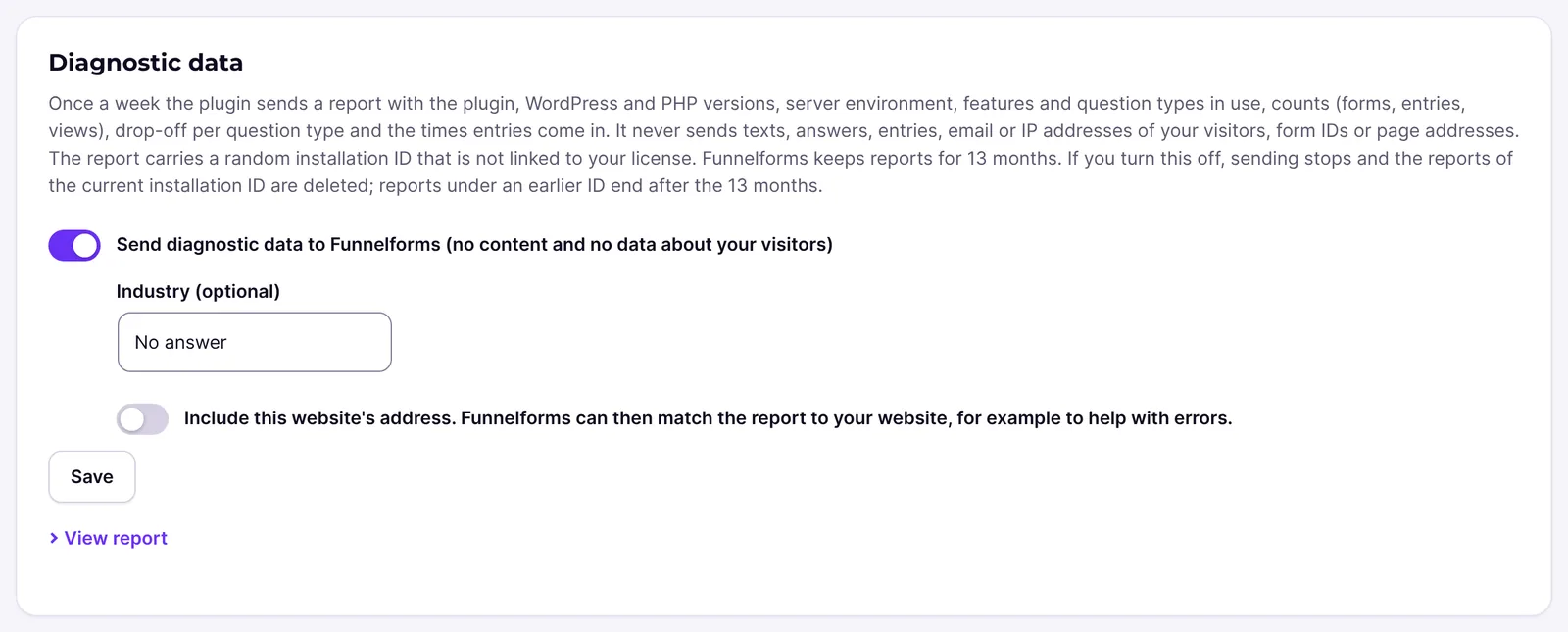
- If you like, choose an Industry (optional).
- Tick Include this website's address only if Funnelforms should match the report to your website, for example to help with errors.
- Click Save.
Turn it on in the setup assistant
- In the assistant, go to the step Go live (new customers) or What to keep (users of Funnelforms 3).
- In the block Help improve Funnelforms, tick the switch and choose industry and address if you like.
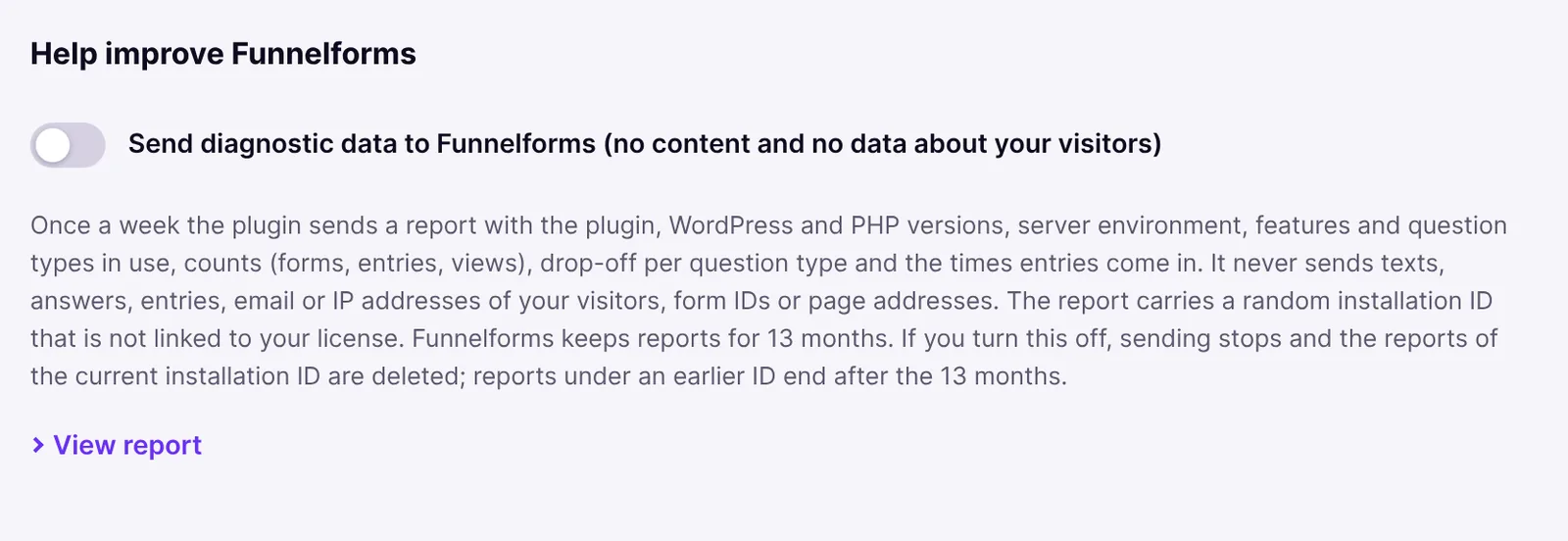
- Finish the step. New customers save the choice with Publish, users of Funnelforms 3 with Go live now. The summary for users of Funnelforms 3 then reads "Diagnostic data go to Funnelforms once a week".
View the report
- In the card Diagnostic data or the block of the assistant, open View report.
- Read the report. It is built by the same code as the real report.
- Before you turn it on for the first time, it reads "The installation ID is created when you turn this on."
Send at once
- In the card Diagnostic data, click Send now.
- Read the message, for example "The report was sent."
Take the address out again
- Untick Include this website's address and click Save.
- The plugin sends a report without the address at once. Funnelforms then removes the address from the stored reports of this installation.
Turn it off
- Untick Send diagnostic data to Funnelforms and click Save.
- Sending stops. The plugin asks Funnelforms at once to delete the reports of the current installation ID and forgets the ID. The card says so too: "If you turn this off, sending stops and the reports of the current installation ID are deleted; reports under an earlier ID end after the 13 months."
How it works
What is in the report?
- Website: edition (Free or Pro), plugin version, major and minor version of WordPress, PHP and the database, language, time zone, multisite, privacy mode, whether the site came from Funnelforms 3, for how many days Funnelforms 5 has been installed, whether an object cache is used and whether WP-Cron or a system cron runs. Theme, page builder, consent tool and plugins only if they are on fixed lists (for example Elementor, Complianz or WooCommerce), otherwise only "other". Plus the industry if you chose one, and the website's address only when ticked.
- Migration: counts from the move from Funnelforms 3, for example checked and failed forms.
- Forms: counts of forms, question types, contact fields, features in use (for example conditions, calculations, quiz, A/B tests), actions, templates used and ways of embedding.
- Usage of the last 7 days: views, started, sent entries, the share of views with extended statistics, the shares of devices and the times entries come in. For forms with at least 20 views, without an ID and in random order: the question types of the steps in their order and, per step, reached, left and check failed.
- Admin: how often each Funnelforms admin page was opened and how often the analytics mode of the builder. This is counted only while it is on, and never who opened a page.
- Health: failed mails and webhooks of the last 7 days and whether scheduled tasks are more than an hour late.
What is never in the report?
Texts, labels, answers, entries, e-mail and IP addresses, form, field and step IDs, titles, page addresses, user names and the full list of your plugins. The only address is the website's, and only if you ticked Include this website's address.
The installation ID
Every report carries a random installation ID. It is not linked to your license, your account or your domain. The website signs in with its own random secret, which is stored encrypted. When you turn it off, the plugin forgets the ID and the secret. When you turn it on again, a new ID is made.
When is a report sent?
- Once a week at a random time through WP-Cron, never while a visitor waits.
- The first report about a minute after turning it on.
- At once with Send now.
- Funnelforms can ask for a pause of at most a week. During it the weekly run sends nothing.
How long does Funnelforms keep the reports?
13 months. When you turn it off or delete the plugin, the plugin asks Funnelforms to delete the reports of the current installation ID. If the website got a new installation ID in between, for example after the message "Funnelforms did not recognise this installation.", the reports under the earlier ID end after the 13 months. If Funnelforms does not answer when you turn it off, or answers with a server error, the plugin asks a second time an hour later.
What happens when the plugin is deleted?
While it is on, the plugin asks Funnelforms to delete the reports when it is deleted, without waiting for the answer. Then it deletes the choice, the installation ID and the counters from your website, even if you keep the other Funnelforms data. If Funnelforms Free is still installed when you delete Funnelforms Pro, everything stays as it is: Free keeps using the same choice.
Diagnostic data and the diagnostics for support
Diagnostic data are a weekly report without identifiers of your forms. The Diagnostics on the Support page (Pro only) are something else: a file you download yourself and attach to a ticket. It holds, for example, form titles and your website's address (see Diagnostics and Site Health).
Best practices
- Before turning it on, look at what is sent with View report.
- Tick the address only if you want help with your website. Without the address Funnelforms cannot match the report to a website.
- Choose an industry if you like. It helps to put the figures in context and is voluntary.
Troubleshooting
| Problem | Cause | Solution |
|---|---|---|
| The card Diagnostic data is missing. | You are not an administrator of the website. | Ask an administrator to make the choice. |
| "The report could not be sent. The next weekly report tries again." | Funnelforms could not be reached or did not take the report. | Nothing to do; the next report tries again. If it keeps failing, check whether the website allows outgoing connections. |
| "Funnelforms did not recognise this installation. It gets a new installation ID with the next report." | Funnelforms knows another secret for the ID, or the secret could no longer be read, for example after the WordPress security keys changed. | Nothing to do; the next report goes with a new ID. Reports under the old ID end after 13 months. |
| "Funnelforms takes no more reports from this website, so sending diagnostic data was turned off." | Funnelforms takes no more reports from this installation. | It is off now. You can turn it on again; a new ID is then made. |
| Last sent: not yet does not change. | WP-Cron does not run, for example because DISABLE_WP_CRON is set without a system cron. | Set up a cron job for wp-cron.php or use Send now. |
Tips
- Industry and address show only while the main switch is ticked. While it is off, the plugin ignores both.
- You can change industry and address at any time without turning it off.
- Diagnostic data do not depend on your license. They also work without a connection to Funnelforms.
FAQ
Is it on by itself? No. It stays off until an administrator turns it on in the assistant or the settings.
Does Funnelforms receive data about my visitors? No. The report holds only counts and shares, never entries, answers, e-mail or IP addresses.
Can I withdraw my consent? Yes, at any time. Untick the box and save. Sending stops, and the plugin asks Funnelforms to delete the reports of the current installation ID. Reports under an earlier ID end after 13 months.
Can Funnelforms tell my website from the report? Only if you tick Include this website's address. Otherwise the report carries only the random installation ID.
Are diagnostic data also in Funnelforms Free? Yes. Free and Pro send the same report, Free without a Funnelforms account.