The privacy mode decides how every form on your website handles the visitor's consent: for conversions, tracking code, Google Maps and captchas. In the mode EU (GDPR) all of this runs only once your cookie banner reports consent. In the mode Global (opt-out) it runs as long as the visitor does not refuse; only conversions that require consent wait for a yes there too. In the mode Unrestricted (at your own risk) all of this runs for every visitor without consent, even after a refusal. EU is the default, also after an update.
Requirements
- Funnelforms Free 5.0 or Funnelforms Pro 5.0. The privacy mode is included in both editions. Conversions (Pro only) and address suggestions with Google Maps (Pro only) exist only in Pro.
- You have the right "Change settings".
- Only administrators can turn on the mode Unrestricted.
- For consent you need a cookie banner that reports it through the WP Consent API. Funnelforms reads consent only through this interface.
Where to find it
Funnelforms → Settings → General, card Privacy mode
Features at a glance
- Three modes: EU (GDPR), recommended, Global (opt-out) and Unrestricted (at your own risk).
- One setting for all forms of the website.
- Applies to conversions, the tracking code from Funnelforms 3, Google Maps, captchas and the identifiers stored for conversion tracking.
- Without consent, scripts of other providers load only after a click on a button in the form.
- The mode shows under Tools → Site Health → Info and in the diagnostics.
- The suggested text for the privacy policy follows the mode.
Step by step
- Open Funnelforms → Settings → General.
- Go to the card Privacy mode.
- Choose EU (GDPR), recommended, Global (opt-out) or Unrestricted (at your own risk). For Unrestricted, also tick "I have checked that this setting is lawful for my website and take responsibility for it."
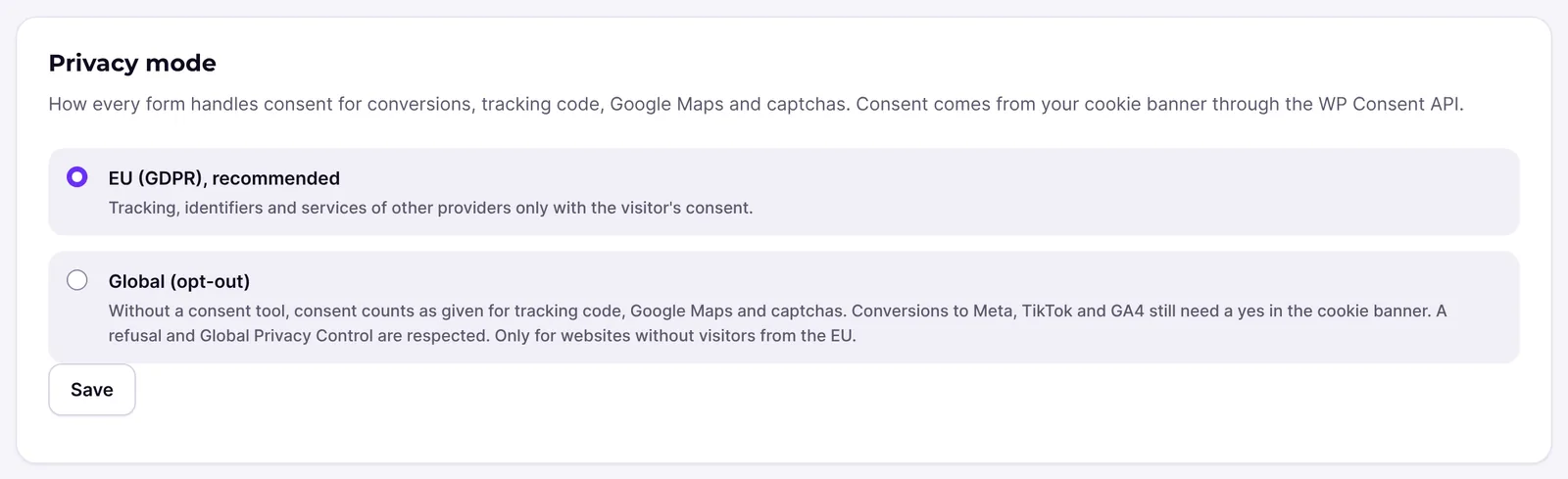
- Click Save.
- Open a form on your website in a private browser window and check that the captcha and Google Maps load the way you expect.
How it works
What applies in which mode?
| EU (GDPR) | Global (opt-out) | Unrestricted | |
|---|---|---|---|
| Cookie banner reports yes | runs | runs | runs |
| Cookie banner reports no | does not run | does not run | runs |
| No cookie banner or no answer | does not run | runs | runs |
| Browser sends Global Privacy Control | as above, by the banner's answer | does not run | runs |
"Runs" means: the form loads Google Maps and the captcha at once, runs the tracking code and sends conversions. Marketing services follow the banner's category "marketing", Google Analytics the category "statistics".
Exception in the global mode (Pro only): conversions that require consent are sent there, too, only once the cookie banner reports a yes. These are Google Ads conversions with the switch Only with the visitor's consent turned on, and the conversions to Meta, Google Analytics 4 and TikTok, which the form builder always creates with consent required.
The unrestricted mode
In this mode Funnelforms loads tracking codes, sends conversions to Meta, TikTok, Google Analytics and Google Ads, loads maps and captchas without consent and stores full IP addresses, for every visitor. It then ignores a no in the cookie banner and Global Privacy Control.
The card warns under Your own liability: in the EU, the EEA, Switzerland and the UK the mode is usually not permitted because consent is required. As the website operator you are responsible for making sure the setting is lawful for your visitors.
- Only administrators can turn the mode on, and only with the tick that confirms it. Without the tick the mode stays as it was.
- Funnelforms stores who confirmed the mode and when. The card then shows "The unrestricted mode is on, confirmed by name on date."
- The suggested text for the privacy policy (Pro only) carries a note that the texts about consent and objection do not match this mode.
What happens without consent?
- Captcha: instead of the captcha, the contact step shows a button, for example "Load spam protection from Cloudflare to send the form". Only after the click does the provider's script load.
- Google Maps (Pro only): the address field shows the button "Load Google Maps to suggest addresses". Without a click, the visitor types the address without suggestions.
- Tracking code from Funnelforms 3: it runs only where marketing is allowed.
- Conversions (Pro only): they are not sent. The entry then stores no identifiers such as ad cookies, IP address or browser details.
Conversions in the editor (Pro only)
In the EU mode, the switch Only with the visitor's consent of Google Ads conversions is always on and locked, with the hint "Always on in the EU privacy mode." In the global mode you can turn it off; then it is sent unless the visitor refused. If it stays on, the conversion waits for a yes in the global mode too. Conversions to Meta, Google Analytics 4 and TikTok have no such switch and are sent only with consent in the EU and global modes. In the unrestricted mode the switch is always off and locked, with the hint "Always off in the unrestricted privacy mode: sent for every visitor."
Why EU after an update?
Existing sites start in the EU mode too. This means: Google Ads actions whose consent setting was off, and the tracking code of forms from Funnelforms 3, now wait for a cookie banner that reports consent through the WP Consent API.
What is Global Privacy Control?
A signal some browsers send to object to the sale or sharing of data. In the global mode, Funnelforms treats it as a no for marketing and statistics, whatever the cookie banner reports. In the unrestricted mode, Funnelforms ignores it.
Best practices
- Stay with EU (GDPR) if your website has visitors from the EU. The card says: "Only for websites without visitors from the EU."
- Use a cookie banner that supports the WP Consent API. Otherwise Funnelforms never gets consent in the EU mode.
- After changing the mode, check the suggested text for your privacy policy.
- Mention the captcha and Google Maps in your privacy policy.
- Choose Unrestricted only after you have checked with your legal advisor that the mode is lawful for your visitors.
Troubleshooting
| Problem | Cause | Solution |
|---|---|---|
| The contact step shows a button "Load spam protection from …" instead of the captcha. | EU mode, and the cookie banner reported no consent for marketing. | This is intended. The visitor loads the captcha with one click, or consents in the cookie banner. |
| Conversions stopped arriving after the update. | In the EU mode every conversion needs consent. | Set up a cookie banner with the WP Consent API. Without EU visitors you can choose Global (opt-out). |
| The tracking code from Funnelforms 3 does not run. | Marketing is not allowed, or the tracking code is not allowed under Tracking code. | Check both settings and the cookie banner. |
| The switch Only with the visitor's consent cannot be turned off. | The EU mode is active. | This is intended. Only in the global mode can it be turned off. |
| In the global mode, conversions do not arrive although the visitor did not refuse. | The conversion requires consent, and the cookie banner reported no yes. This always applies to Meta, Google Analytics 4 and TikTok, and to Google Ads with the switch Only with the visitor's consent turned on. | Set up a cookie banner with the WP Consent API. For Google Ads you can turn the switch off in the global mode. |
| Nothing runs in the global mode either. | The browser sends Global Privacy Control, or the visitor refused. | This is intended. A refusal applies in the EU and global modes. |
| Unrestricted (at your own risk) cannot be chosen. The card shows "Only an administrator can switch on the unrestricted mode." | You are not an administrator. | Ask an administrator to turn the mode on. |
| After saving, you see "Confirm that you have checked the unrestricted privacy mode is lawful for your website." | The confirmation tick is missing. | Tick the box and save again. |
Tips
- The setting applies to all forms at once. Clear your website's cache if needed so that visitors get the new version.
- When you contact support, the mode shows in the diagnostics. You do not have to mention it.
FAQ
Which mode is the default? EU (GDPR), on new sites and after an update.
Do I need a cookie banner in the global mode? Funnelforms then runs without one. It still respects a refusal through a cookie banner and Global Privacy Control. Conversions that require consent, however, are not sent without a yes from a cookie banner. Whether the mode is allowed for your website is for you to check with your legal advisor.
Which cookie banners work? All that fill the WP Consent API, for example Complianz, CookieYes or Real Cookie Banner.
Does the mode apply to the Funnelforms statistics too? No. The statistics work without cookies and without IP addresses and need no consent.