Fix “Form Not Available”: Allow Your Domain and Show Your Form Again
The „Form Not Available" message appears when the Funnelforms server does not recognise the domain that hosts your embed. This article explains the cause and walks you to a fix in three minutes. Relevant whenever you add a new domain, change an existing one, or run the form on a subdomain.
Prerequisites
- Active Funnelforms account
- Access to Settings → Allowed Domains
- The target domain is known (including the www variant)
Where to find
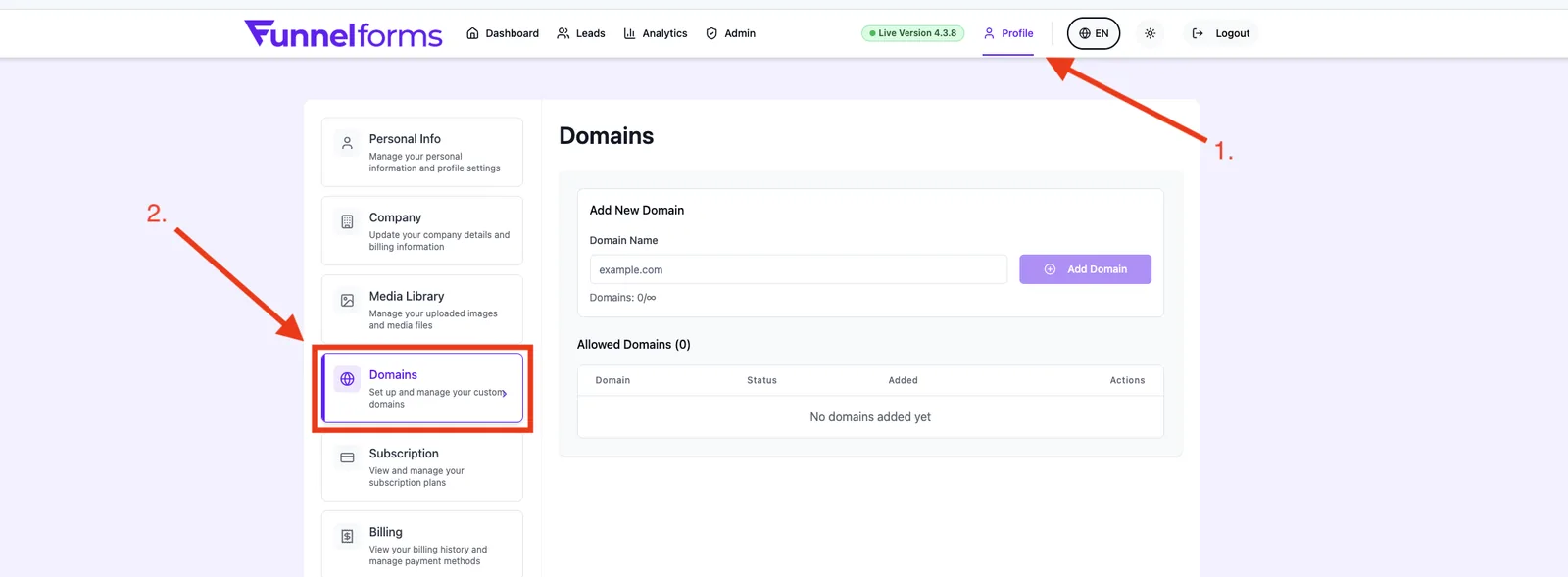
Settings → Allowed Domains → Add domain.
Functions
- Multiple domains per account (depending on plan)
- Server-side validation when the form loads
- Clear error message inside the embed
Step-by-step
- Note the exact domain on which the form is blocked (e.g. app.example.com).
- Open Settings → Allowed Domains.
- Click Add domain and enter the domain without protocol and without path.
- Save and wait 30 seconds for the change to propagate.
- Reload the page with a hard reload (Ctrl+Shift+R).
How does the check work?
When the embed loads, the browser sends the parent URL to the Funnelforms servers. The server compares it against your whitelist. If nothing matches, the form is replaced by „Form Not Available" — for security and licensing reasons.
What happens with multiple subdomains?
Each subdomain must be whitelisted individually. example.com does not cover www.example.com.
Other causes for "Form Not Available"
- Form not published: drafts are never served. Click Publish inside the editor.
- Account owner's license inactive: if the subscription expired or the account was paused, the server blocks every form of that owner — regardless of the domain whitelist. Check the subscription or reactivate the account.
- Domain not assigned to the form (since January 2026): adding the domain account-wide is no longer enough — every form additionally needs an explicit domain assignment. Open Form → Setup → Domains and assign the domain to the form.
- Global admin whitelist: some hosts (previews, maintenance) are globally allowed and override owner restrictions — those entries do not appear in your list.
Special case Wix, Squarespace & builder platforms
Wix embeds custom iframes on a separate subdomain (e.g. *.filesusr.com or *.editorx.io). The Funnelforms embed then sees this builder subdomain as the parent URL, not your own domain. Fix: whitelist both domains — your own domain and the builder subdomain that appears as the iframe host in the browser.
Best practices
- Re-check the whitelist after every site migration.
- Whitelist staging domains too, so tests never fall through.
- Add the new domain before switching domains.
Common pitfalls / Troubleshooting
- **Domain entered with https://:** the entry is ignored. Remove the protocol.
- Domain is whitelisted, error persists: clear browser cache or try incognito.
- Free plan limit reached: only one domain is allowed. Remove the existing one or upgrade.
Tips & notes
Caution: Domains with umlauts (IDN) are currently blocked. Use the ASCII version of your domain (e.g. xn--… is not supported).
Note: Global domains whitelisted internally by our team (e.g. preview hosts) are not shown in your list.
FAQ
How long does it take for a new domain to take effect?
Usually immediately. In rare cases the browser cache adds a one-minute delay.
Does the root domain cover all subdomains?
No. Every subdomain is a separate entry.
Can I add multiple domains at once?
You add them one by one via Add domain.
What happens to old embeds after a domain change?
They show „Form Not Available" until the new domain is whitelisted.