System Variables: Insert Lead Data, UTM Values, and Responses Automatically
In addition to form field variables, Funnelforms ships a fixed set of system variables — covering form metadata, timestamps and UTM parameters. This article lists every variable, explains the date format and shows how the {{all_responses}} summary is rendered for HTML and plain-text messages.
Where system variables are available
In every notification editor (Email Admin, Email User, SMS, WhatsApp, Slack) open the Form field variables panel to the right of the editor and find the full list under System variables. In the SMS editor, {{all_responses}} is hidden in the panel because the summary would exceed the 160-character limit.
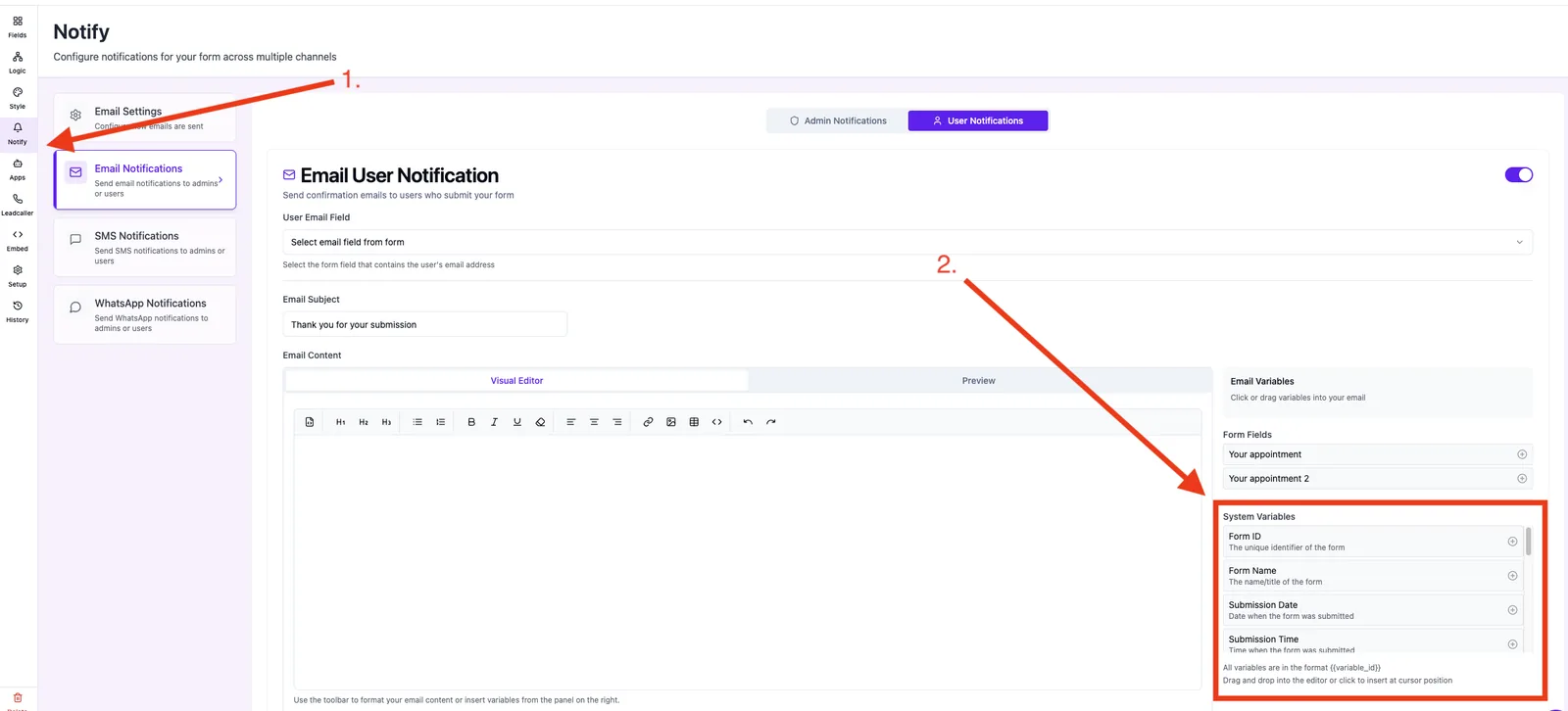
Full list of system variables
Form & submission
{{form_id}}— unique form identifier{{form_name}}— name/title of the form{{submission_date}}— submission date (DD.MM.YYYY){{submission_time}}— submission time in format HH:MM (UTC){{completion_time}}— time the contact took to complete the form{{all_responses}}— full summary of all questions and answers
Context & device
{{user_ip}}— sender IP address{{device_type}}— mobile, tablet or desktop{{entry_url}}— URL where the form was filled
UTM parameters
{{utm_source}}— source (e.g. google, facebook){{utm_medium}}— medium (e.g. cpc, email){{utm_campaign}}— campaign name{{utm_term}}— keyword (paid search){{utm_content}}— content variant{{utm_parameters}}— all UTM parameters as a formatted block
Date format: DD.MM.YYYY
Funnelforms uses the format DD.MM.YYYY (e.g. 05.01.2026) across all channels and languages. This applies to {{submission_date}} and to any date field rendered through a form field variable. ISO strings (2026-01-05T14:30:00Z) are intentionally not used because they are frequently misparsed in lead lists and CRM imports.
How {{completion_time}} is formatted
The completion time is rendered in natural language — currently always in English, regardless of your account language:
- Under one minute: 42 seconds
- Under one hour: 3 minutes and 12 seconds
- Longer periods: 1 hour, 5 minutes and 8 seconds
If no value is available (e.g. for direct test submissions), the placeholder is replaced with Not available.
How {{all_responses}} is formatted
Funnelforms detects automatically whether the notification is HTML or plain text:
- HTML email: a two-column table with header row Question / Answer, subtle borders and zebra striping for readability.
- Plain text (plain email, Slack): question on one line, answer on the next, blank line between blocks.
Multiple selections are joined as a comma list. Missing answers are replaced with the placeholder No answer provided.
Note: Header texts (Question, Answer) and fallback strings (No answer provided, No responses available) are currently hardcoded in English — also for non-English notifications.
Correct syntax
Only the double-brace syntax is replaced:
{{utm_source}}— works ✓{utm_source}— is not replaced and appears as literal text in the message.
Always insert variables via the Form field variables panel to the right of the editor — it sets the correct syntax automatically.
Best practices
- Include
{{utm_source}}or{{utm_parameters}}in every lead email to sales/Slack — you immediately see which campaign produced the lead. - Use
{{entry_url}}for multi-domain funnels to see the exact landing page in the lead record. - Avoid
{{all_responses}}in WhatsApp templates — Meta forbids dynamic lists in marketing templates. - Combine
{{submission_date}} {{submission_time}}in the subject line for a unique lead reference.
Common pitfalls
- UTM variable stays empty: the landing page URL had no UTM parameters — Funnelforms never invents values.
- Date shows in US format: Funnelforms always outputs DD.MM.YYYY; deviating display is caused by the receiving system (e.g. Excel auto-format on CSV imports).
{{completion_time}}is missing: for manual test submissions without tracking the value is unavailable — the variable becomes Not available.{{all_responses}}in SMS: not supported, hidden in the variable panel and would exceed the 160-character limit.
Pro tips
- For CRM integrations: use webhook deliveries instead of email variables — you receive every value structured as JSON.
- For privacy workflows: omit
{{user_ip}}from sales lead emails when the IP is not needed for processing.
FAQ
Can I switch the date format to YYYY-MM-DD? No. Funnelforms uses DD.MM.YYYY project-wide to keep lead data consistent across CRM exports and webhook payloads.
Which time zone does {{submission_time}} use? Server time (UTC). For local time zones use the timestamps in the lead record or the time-zone logic in the Microsoft Calendar integration.
Is there a variable for the account user ID? No — owner data is not exposed through notification variables.